Best Audio Interface Under 50: Top 5 Picks (2026)
- Audio Interface, Buying Guides
- by Bruno Bontempo
Find the best audio interface under 50 for podcasting, streaming, and guitar recording. I compare 5 affordable options to help you choose the right one.
Jump to...
| QUICK OVERVIEW
Introduction
Looking for the best audio interface under 50 that actually delivers? I get it. When I started recording, I thought cheap meant low quality. Turns out, that’s not always true anymore.
The affordable audio interface market has exploded with solid options for podcasters, streamers, and musicians who want to sound better without spending a fortune. The trick is knowing which ones are worth your money and which ones will frustrate you within a week.
I’ve put together this guide focusing on five audio interfaces under 50 dollars that cover different needs: from solo podcasters to guitar players, from mobile streamers to gamers. Each one does something specific really well, so let me help you find the right match for your setup.
If you can stretch to $100-200, check our guide affordable audio interfaces for more options.
Best for Podcast
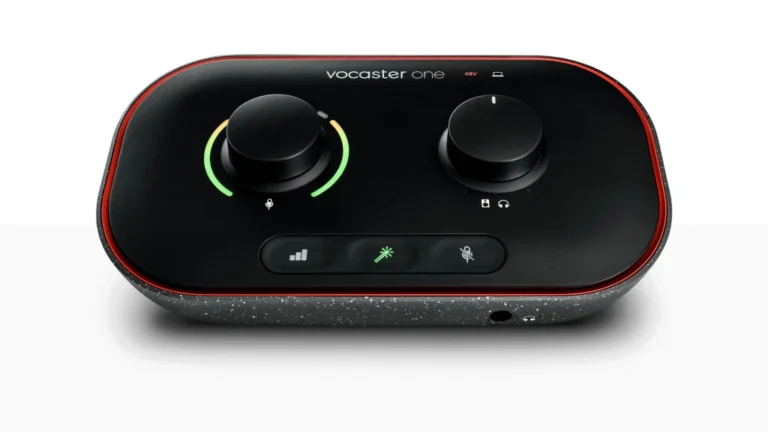
Focusrite Vocaster One
4.5
The Focusrite Vocaster One makes podcasting dead simple. With Auto Gain that sets your levels automatically, 70dB of gain for any XLR mic, and one-click Enhance presets, you’ll sound like a pro in seconds. Perfect for solo creators who want broadcast-quality audio without the learning curve.
| Pros
- Auto Gain sets levels automatically
- 70dB+ gain handles any mic
- Enhance presets improve voice quality
- Phone and camera connectivity
- 3-year warranty
| Cons
- Single XLR input only
- No instrument inputs
- 48kHz max sample rate
| Key Features
- Inputs: 1x XLR + 1x TRRS phone input
- Outputs: 2x balanced TRS + 1x headphone + 1x 3.5mm TRS camera output
- Compatibility: macOS, Windows, iPad (USB-C)
- Connectivity: USB-C (bus-powered)
- Resolution: 24-bit / 48kHz
- Plus: Auto Gain, Enhance voice presets, Mute button, Stereo Loopback, Vocaster Hub software, Hindenburg PRO (6 months), Acast Influencer (6 months)
Buy if...
- You're starting a solo podcast and want professional sound immediately
- You need to record phone interviews or remote guests
- You want to send audio directly to your camera for vlogs
- You use gain-hungry dynamic mics like the Shure SM7B
- You want Focusrite quality and support at an entry-level price
| Not ideal for...
- You need to record guitar, bass, or other instruments
- You host a two-person podcast (check the Vocaster Two instead)
- You need higher sample rates for music production
Overview
Focusrite built its reputation on the Scarlett series, and the Vocaster One brings that expertise to podcasting in the most beginner-friendly way possible. The Auto Gain feature alone is worth considering: press a button, speak for 10 seconds, and the interface sets your optimal level. No more guessing if you’re too loud or too quiet.
The 70dB of gain is a big deal at this price point. Many cheap audio interfaces struggle with gain-hungry dynamic microphones, forcing you to buy a separate preamp booster. The Vocaster One handles even demanding mics without issues.
The Enhance button cycles through three voice presets that add compression and EQ, making your voice cut through without sounding over-processed. I found the “Clean” preset works best for most voices, while “Warm” adds a pleasant low-end boost for deeper voices.
One feature podcasters will love: the TRRS phone input with mix-minus. Connect your phone, call a guest, and they’ll hear you without hearing themselves echoing back. Simple, but many interfaces at this price don’t offer it.
The main limitation is clear: this is designed for voice, not music. If you play guitar or produce tracks, look elsewhere. But for podcasters, streamers, and voice-over artists, the Vocaster One does exactly what it promises with minimal fuss.
Best for Guitar
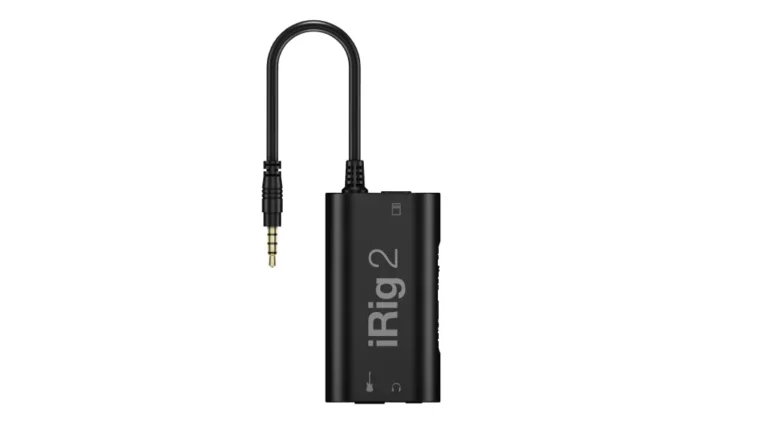
IK Multimedia iRig 2
4.4
The iRig 2 turns your iPhone or iPad into a portable guitar rig. Plug in, open AmpliTube, and access amp simulations, effects, and recording capabilities. Ideal for practice sessions, quick recordings, and musicians who want their tones on the go.
| Pros
- Ultra-portable pocket-sized design
- Works with iOS, Mac, and select Android devices
- 1/4" amp output for using iOS as effects processor
- FX/Thru switch for clean or processed signal
- Includes AmpliTube software bundle
| Cons
- Uses 3.5mm jack (needs adapter for newer iPhones)
- Inconsistent Android compatibility
- Fixed cable can't be replaced if damaged
| Key Features
- Inputs: 1x 1/4" instrument input
- Outputs: 1x 1/8" TRRS (to device), 1x headphone, 1x amp output
- Compatibility: iOS (iPhone, iPad, iPod touch), Mac, select Android
- Connectivity: 3.5mm TRRS (analog)
- Resolution: Analog (device-dependent)
- Plus: Adjustable gain wheel, FX/Thru switch, mic stand mount, Velcro strap, AmpliTube software
Buy if...
- You want to practice guitar with amp sims on your iPhone or iPad
- You need a tiny interface that fits in your gig bag
- You want to use your iOS device as a live effects processor to an amp
- You record quick song ideas on the go
- You want access to AmpliTube's amp modeling ecosystem
| Not ideal for...
- You need studio-quality recordings (consider iRig HD 2 instead)
- You primarily use Android devices
- You need to record vocals with an XLR microphone
Overview
The iRig 2 pioneered mobile guitar recording and remains one of the most popular options for iOS guitarists. It’s essentially a bridge between your guitar and your phone, letting you use apps like AmpliTube as your amp and effects rig.
What makes the iRig 2 useful is the 1/4″ amp output. You can run your processed signal from your iPhone directly to an amp or PA system, effectively using your phone as a pedalboard. The FX/Thru switch lets you choose between sending the processed signal or a clean signal to the amp while still using your phone for tuning or recording.
The adjustable gain wheel helps you dial in the right input level, which was missing from the original iRig. Finding the sweet spot takes some experimenting, but once set, the latency is low enough for comfortable playing.
Be aware that this is an analog interface connecting through the headphone jack. The audio quality won’t match digital interfaces like the iRig HD, but for practice and demos, it gets the job done. The bigger issue is that newer iPhones don’t have headphone jacks, so you’ll need a Lightning or USB-C to 3.5mm adapter.
For guitarists who want to jam anywhere with decent tones, the iRig 2 is the best audio interface under 50. Just don’t expect studio recording quality.
Best for Streaming
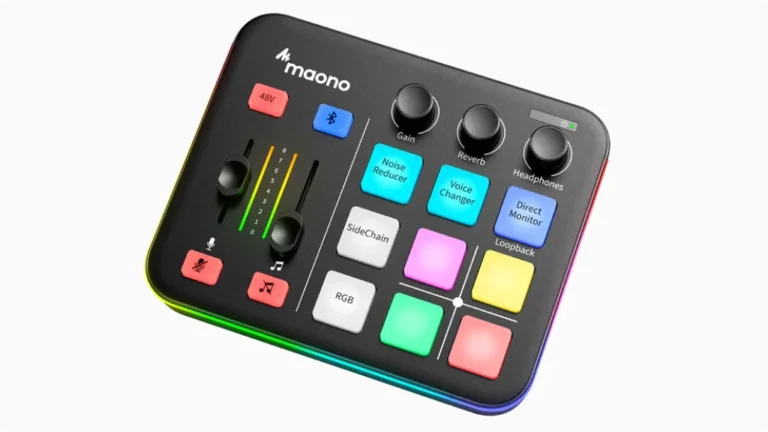
MAONO G1 NEO
4.5
The MAONO G1 NEO is a gaming-focused audio mixer with RGB lighting, customizable sound pads, and everything streamers need in one compact unit. Built-in noise reduction, Bluetooth input, and loopback make streaming setup straightforward for beginners.
| Pros
- All-in-one streaming solution with mixer and effects
- Customizable RGB lighting matches gaming setups
- Built-in noise reduction with two levels
- Bluetooth input for background music
- 48V phantom power supports XLR condenser mics
| Cons
- Not compatible with USB microphones
- Plastic build quality
- Doesn't work with Xbox consoles
| Key Features
- Inputs: 1x XLR (with 48V phantom power), 1x 3.5mm aux, Bluetooth input
- Outputs: 1x headphone (3.5mm), USB audio output
- Compatibility: PC, Mac, phones, tablets, PS4, PS5
- Connectivity: USB-C, Bluetooth
- Resolution: Not specified (streaming-focused)
- Plus: 12 RGB color variations, customizable sound pads (4 recordable), 2-level noise reduction, voice changer effects, reverb, loopback, direct monitor
Buy if...
- You stream on Twitch, YouTube, or TikTok and want an all-in-one solution
- You want RGB lighting that matches your gaming setup
- You need quick access to sound effects and voice changers during streams
- You use Discord for team chat and want clear audio
- You stream on PS4 or PS5
| Not ideal for...
- You need professional audio quality for music production
- You already own a USB microphone
- You stream on Xbox (not compatible)
Overview
The MAONO G1 NEO targets a specific audience: gamers and streamers who want better audio without diving into complex audio routing. It’s essentially a mini broadcast console with gaming aesthetics.
The RGB lighting isn’t just for looks (though it does look cool). The LEDs around the faders and buttons show levels and status at a glance, so you know when your mic is muted or if your gain is too high. The 12 color variations let you match your setup.
For streaming, the built-in features hit the right notes. The loopback function routes computer audio back into your stream, so game sounds and Discord calls go through automatically. The noise reduction has two levels and does a decent job cutting out keyboard clicks and background noise.
The four recordable sound pads let you trigger custom audio clips, intro music, or sound effects during streams. Voice changer effects add entertainment value, though they’re more novelty than professional quality.
Keep in mind: this is not for music production or professional recording. The audio quality is good for streaming and gaming but lacks the precision of dedicated audio interfaces. If you’re purely a music creator, look elsewhere. But for streamers who want a fun, functional setup, the G1 NEO delivers.
Best Value
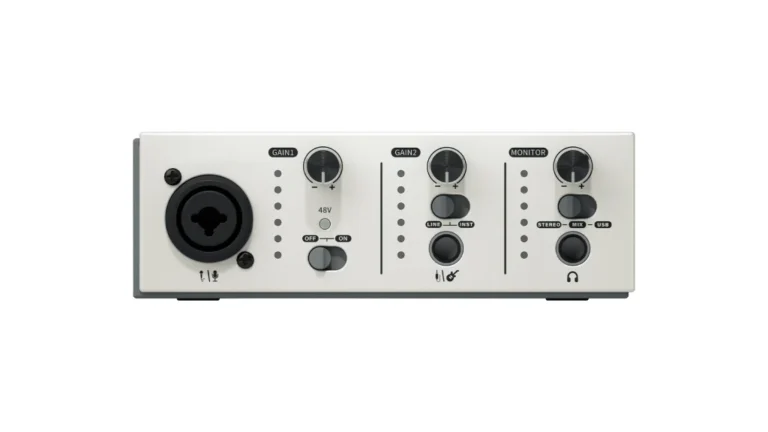
Synido Live Solo MK2
4.5
The Synido Solo delivers traditional audio interface functionality at a fraction of typical prices. With XLR and instrument inputs, 48V phantom power, three monitoring modes, and even a built-in EQ, it’s surprisingly capable for home recording, podcasting, and basic music production
| Pros
- All-in-one streaming solution with mixer and effects
- 48V phantom power for condenser mics
- Three monitoring modes (Stereo, Mix, USB)
- Built-in EQ via software
- Compact and lightweight
| Cons
- Plastic shell may pick up interference from phones
- 48kHz max sample rate limits high-end production
- Lesser-known brand with limited support resources
| Key Features
- Inputs: 1x XLR combo input (with 48V phantom power)
- Outputs: 1x headphone (3.5mm/6.35mm with adapter), stereo outputs
- Compatibility: Windows, macOS, iOS, Android (via OTG)
- Connectivity: USB-C (bus-powered)
- Resolution: 24-bit / 48kHz
- Plus: LED level indicators (green/orange/red), Line/Instrument mode switch, built-in EQ software, included USB-C cable and 3.5mm to 6.35mm adapter
Buy if...
- You need both mic and instrument inputs at a low price
- You're building a home studio on a tight budget
- You want to record on your phone or tablet
- You use a condenser mic and need phantom power
- You want to experiment with EQ without extra software
| Not ideal for...
- You need rock-solid reliability and brand support
- You produce music at high sample rates (96kHz+)
- You need multiple simultaneous inputs
Overview
The Synido Solo proves that you don’t need to spend much to get a real audio interface. It has the fundamentals: a combo XLR/instrument input, 48V phantom power, direct monitoring, and USB-C connectivity. For the price, that’s a solid package.
The three monitoring modes are genuinely useful. Stereo mode sends your input to separate left/right channels for accurate monitoring. Mix mode blends your input with computer audio for live situations. USB mode only monitors computer playback, which is perfect for editing. Most interfaces at this price don’t offer this flexibility.
The built-in EQ through their software is an unexpected bonus. You can shape your sound before it hits your DAW, which helps compensate for less-than-ideal room acoustics or microphone frequency responses. Just note that the EQ applies globally—you can’t treat headphones and monitors differently.
The LED level indicators help prevent clipping. Green means good, orange means getting hot, red means back off the gain. Simple and effective.
The trade-offs are what you’d expect. The plastic housing means you should keep your phone away during recording to avoid interference. The brand is newer, so finding troubleshooting help online is harder than with established names. But for podcasting, voice-over, acoustic guitar recording, and basic production, the Synido Solo performs above its price point.
Most Portable
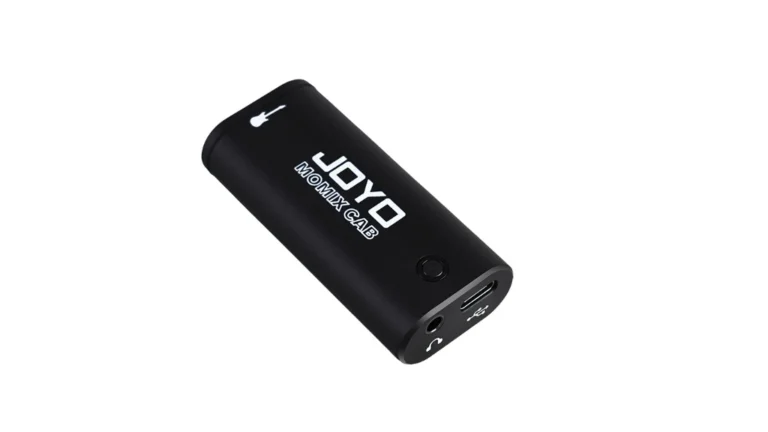
JOYO Momix Cab
4.4
he JOYO Momix Cab is a pocket-sized guitar interface that clips to your belt and connects directly to your phone. It’s the simplest way to record guitar ideas on the go, powered by your smartphone. No batteries, no chargers—just plug in and play.
| Pros
- Extremely compact (fits in your pocket)
- Phone-powered via USB-C (no batteries needed)
- Works with iPhone (Lightning adapter included) and Android
- Clip-on design for hands-free use
- Very affordable entry point
| Cons
- 16-bit/48kHz only (lower resolution)
- Mono recording only
- Headphone jack is monitor-only (can't adjust volume)
| Key Features
- Inputs: 1x 6.35mm (1/4") instrument input
- Outputs: 1x 3.5mm headphone monitor, USB-C audio out to phone
- Compatibility: iPhone (with Lightning adapter), Android (USB-C), PC/Mac
- Connectivity: USB-C (phone-powered)
- Resolution: 16-bit / 48kHz
- Plus: Belt clip, LED indicator (green/red for level), includes USB-C cable and Lightning adapter
Buy if...
- You want to capture guitar ideas instantly on your phone
- You need something to keep in your gig bag at all times
- You practice with apps like Yousician or GarageBand
- You want a backup interface for emergencies
- You prefer minimal gear and maximum portability
| Not ideal for...
- You need quality recordings for release
- You record vocals or podcasts (no mic input)
- You need adjustable headphone volume
Overview
The JOYO Momix Cab is about one thing: getting your guitar into your phone with the least possible friction. It’s not trying to be a studio interface. It’s an always-ready tool for capturing ideas when inspiration strikes.
The form factor is the main selling point. At just 64mm x 29mm x 20mm and weighing only 20 grams, you can clip it to your belt or toss it in your pocket. The USB-C connection powers it from your phone, so there are no batteries to worry about.
For practice, it works well with guitar learning apps. Plug in, open Yousician or GarageBand, and you’re playing along. The latency is acceptable for practice, and the direct audio-to-video sync makes recording quick social media clips easy.
The limitations are significant. The 16-bit resolution is lower than standard, and mono recording means no stereo effects. The headphone output is for monitoring only—you can’t adjust its volume separately. At high gain, you’ll hear noise and crackling. It’s also not compatible with every app, so test before relying on it for anything important.
Think of the Momix Cab as a sketchpad for musical ideas, not a canvas for finished work. For that purpose, it’s remarkably convenient.
Audio Interface Under 50: Full Comparison Table
Feature | Vocaster One | iRig 2 | MAONO | Synido Solo | JOYO Momix |
|---|---|---|---|---|---|
Category | 🎤 Best for Podcast | 🎸 Best Guitar | 🎮 Best Streaming | 💰 Best Valu | 📱 Most Portable |
Inputs | 1 XLR, TRRS | 1 Instrument | 1 XLR, Aux, BT | 1 XLR/Inst Combo | 1 Instrument |
Outputs | 2 TRS, HP, Camera | HP, Amp Out | HP, USB | HP, Stereo | HP Monitor |
Resolution | 24-bit/48kHz | Analog | N/A | 24-bit/48kHz | 16-bit/48kHz |
Connectivity | USB-C | 3.5mm TRRS | USB-C, BT | USB-C | USB-C |
Phantom Power | Yes | No | Yes | Yes | No |
Plus | Auto Gain, Enhance voice presets, Mute button, Stereo Loopback, Vocaster Hub software, Hindenburg PRO (6 months), Acast Influencer (6 months) | Adjustable gain wheel, FX/Thru switch, mic stand mount, Velcro strap, AmpliTube software | 12 RGB color variations, customizable sound pads (4 recordable), 2-level noise reduction, voice changer effects, reverb, loopback, direct monitor | LED level indicators (green/orange/red), Line/Instrument mode switch, built-in EQ software, included USB-C cable and 3.5mm to 6.35mm adapter | Belt clip, LED indicator (green/red for level), includes USB-C cable and Lightning adapter |
Choosing the Best Audio Interface Under 50: Final Thoughts
Finding the best audio interface under 50 comes down to matching the device to your specific use case. Each of these five options excels at something different.
For podcasters, the Focusrite Vocaster One is the clear choice. The Auto Gain and Enhance features remove the guesswork from getting good sound. Focusrite’s reputation and support are bonuses that justify any small premium.
For guitarists who practice on mobile, the iRig 2 remains relevant despite its age. The amp output feature and AmpliTube integration create a legitimate mobile practice rig. Just be prepared for adapter cables on newer devices.
For streamers and gamers, the MAONO G1 NEO offers an all-in-one solution with the aesthetics to match gaming setups. The sound pads and voice effects add entertainment value that pure audio interfaces lack.
For home studios on a tight budget, the Synido Solo delivers the most traditional audio interface experience. It handles both mics and instruments, includes phantom power, and offers features like EQ that you wouldn’t expect at this price.
For ultimate portability, the JOYO Momix Cab is in a class of its own. It’s not for serious recording, but as a pocket-sized idea capture tool, nothing else is this convenient.
Remember: a cheap audio interface that fits your needs beats an expensive one that doesn’t. Start with what works for you now, and upgrade when your skills and requirements grow. For home studio options across all budgets, see our guide to the best audio interfaces for home studios.
FAQ
Is an audio interface under 50 dollars good enough for recording?
For podcasting, streaming, and demo recordings, yes. Modern cheap audio interfaces deliver 24-bit audio quality that was professional-grade a decade ago. For final music production, you may want to upgrade eventually, but affordable interfaces are more than capable for learning and content creation.
Can I use an audio interface under 50 for music production?
You can start learning music production with any interface on this list. The Synido Solo is the most suitable for traditional recording since it accepts both microphones and instruments. Just know that you may eventually want higher sample rates and lower latency for serious production work.
What's the difference between USB-C and analog audio interfaces?
USB-C interfaces (like the Vocaster One and Synido Solo) convert your audio to digital inside the interface, providing consistent quality. Analog interfaces (like the iRig 2) use your device’s built-in converters, which varies by device. Digital USB connections generally provide cleaner, more reliable audio.
Is an audio interface under 50 good enough for beginners?
Yes, an audio interface under 50 can be a solid starting point for beginners. Modern affordable interfaces deliver 24-bit audio quality that handles podcasting, streaming, and demo recordings well. You won’t get all the features of higher-end units, but for learning and content creation, an audio interface under 50 does the job.
Which audio interface under 50 is best for podcasting?
For podcasting, the Focusrite Vocaster One is the best audio interface under 50. It offers Auto Gain, Enhance voice presets, phone connectivity for remote guests, and 70dB of gain for dynamic mics. Read also our complete guide Best Audio Interface for Podcasting: Expert Tested
| Why Can You Trust Us

Bruno Bontempo
I've been recording, producing, and playing bass for over 20 years—from touring with my first band at 15 to playing progressive metal across Europe today. Through multiple albums, projects (Madness of Light, Rising Course, Roots of Ascendant, Human|Archive), and production work, I've tested audio interfaces in every scenario imaginable. At Best Audio Hub, I combine my historian background with years of hands-on music and audio experience. No marketing fluff—just honest insights from someone who's been in the trenches.
| ALSO REVIEWED