Fender Quantum LT 2 Review (2026): Fender Tone on a Budget
- Audio Interface, Reviews
- by Bruno Bontempo
Our articles may include affiliate links and we may earn a commission. Here how it works.
OUR VERDICT
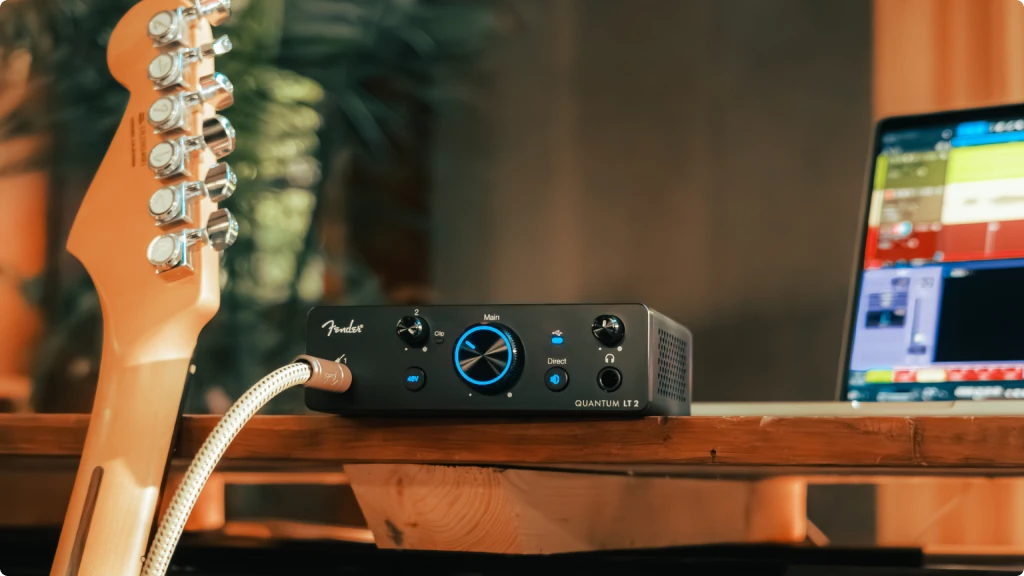
The Fender Quantum LT 2 brings something genuinely different to the entry-level interface market. Rather than just putting the Fender logo on rebranded hardware, this interface reflects decades of instrument expertise applied to the recording signal chain.
The 75dB MAX-HD preamp handles everything from ribbon mics to dynamic workhorses without needing external boost. However, the real story is the Fender-designed instrument input—it captures the dynamics and character of guitars and basses the way other budget interfaces simply don’t.
At a compelling price for solo artists, students, and content creators who need one great channel done right. If you record one source at a time and want your guitar to sound like your guitar, the Quantum LT 2 deserves serious consideration.
Release Date
Jan 2026
14x9x4,5 cm
5.5x3.5x1.7 in
510 g
1.12 lb
| Pros
- 75dB preamp gain handles ribbon mics without boosters
- Fender-designed instrument input preserves guitar dynamics
- Bus-powered portability for mobile recording
- Standalone Mixer Mode works without computer
- Class-leading low-latency drivers
| Cons
- Single preamp limits simultaneous recording
- No MIDI I/O
- Only 6-month software trial (not perpetual license)
| Key Features
- Inputs: 1x Hi-Z instrument + 1x XLR/TRS combo
- Outputs: 2x balanced TRS + 1x headphone
- Compatibility: macOS, Windows, iOS, iPadOS, Android
- Connectivity: USB-C (USB 2.0), bus-powered
- Resolution: 24-bit/192kHz
- Plus: Loopback audio routing, standalone mixer mode, Universal Control software integration, Fender Studio Pro 6-month trial, built-in My Fender access
| Best for...
- Solo guitarists recording demos and ideas
- Content creators needing quality vocals and guitar
- Podcasters seeking reliable loopback functionality
- Students building their first home studio
- Mobile musicians who need portability
| Not ideal for...
- Bands or duos who need to record multiple sources simultaneously
- Producers requiring MIDI hardware integration for synths and controllers
- Multi-mic setups like stereo recording or drum overheads
Fender's Entry Into Audio Interfaces: What the Quantum LT 2 Offers Guitarists
When Fender announced their entry into the audio interface market earlier this month, it raised eyebrows across the music production community. A guitar company making recording gear? It turns out, the story is more nuanced—and more interesting.
The Quantum LT series emerged from Fender’s unification with PreSonus, combining PreSonus’s proven interface engineering with Fender’s seven decades of instrument expertise. This isn’t simply a rebrand. The instrument inputs were specifically voiced by Fender’s amp and guitar engineers to preserve what makes your instrument sound like your instrument.
I’ve plugged my Jazz Bass and Telecaster into dozens of interfaces over the years. Most treat the instrument input as an afterthought—a high-impedance jack that technically accepts your signal but strips away the character of your playing. You end up compensating with EQ, compression, and amp sims to get back what the interface took away.
Fender Quantum LT 2 Features: Breaking Down What Matters
Before diving into each feature, here’s what you need to know: the Quantum LT 2 packs more capability than its compact size suggests. Fender focused on quality over quantity, giving you one excellent channel rather than two mediocre ones.
MAX-HD Preamp with 75dB Gain
This is the headline specification, and it deserves the attention. Most interfaces in this price range offer 50-60dB of preamp gain. The Quantum LT 2 pushes that to 75dB—the highest in its class.
- What It Means for You: Think of preamp gain like headroom in a car. Driving a car with weak acceleration, you’re always flooring it, which introduces noise and strain. With plenty of headroom, you cruise comfortably and stay in control. The 75dB gain means you can use quiet ribbon microphones or gain-hungry dynamics like the SM7B without needing external preamp boosters like a Cloudlifter. You’ll get clean, transparent recordings with headroom to spare.
Fender-Designed Instrument Input
This is where the Fender collaboration with PreSonus shows its value. The front-panel 1/4″ input was specifically tuned by Fender engineers to capture the frequency response and dynamics of guitars and basses.
- What It Means for You: When you plug directly into a standard interface, the signal often sounds thin or lifeless—the low-end growl disappears, and the pick attack gets smoothed out. The Fender-designed input works like a quality DI box built into the interface. Plug in your Precision Bass, and the low-end growl comes through intact. Strum your acoustic-electric, and the transients stay punchy. You’re not fighting the interface to get your tone back.
Custom Low-Latency Drivers
Fender developed proprietary drivers that deliver what they call “class-leading converter latency performance.” In practice, this means the interface responds quickly enough that monitoring through your DAW feels natural.
- What It Means for You: Latency is the delay between playing a note and hearing it back. Too much delay throws off your timing and makes recording frustrating. Low latency lets you monitor through amp sims and effects in real-time without that disorienting lag. You can track with your favorite plugin tones and stay in the creative zone.
Loopback Audio
Built-in loopback lets you combine your microphone or instrument signal with system audio—music, video calls, or other applications—into a single stream.
- What It Means for You: Streamers and podcasters will appreciate this feature. You can bring a remote guest into your stream, add background music, or record tutorials without needing additional software or routing. It simplifies workflows that previously required virtual audio cables or separate hardware.
Standalone Mixer Mode
The Quantum LT 2 can function as a basic analog-style mixer without connecting to a computer or opening any software.
- What It Means for You: Heading to a rehearsal space without your laptop? The interface still works as a simple mixer. You can blend your microphone and playback audio, monitor through headphones, and output to a PA or powered speakers. It’s a versatile backup that makes the interface useful beyond the studio.
Universal Control Integration
Fender Studio Pro and Universal Control software let you control the interface remotely from your computer, tablet, or phone.
- What It Means for You: When you’re tracking in another room or the interface is out of arm’s reach, you can still adjust gain, enable phantom power, and tweak your monitor mix. The software also provides visual metering and lets you manage preamp settings without touching the hardware.
Fender Quantum LT 2 Specs: Full Technical Breakdown
Here’s everything you need to make an informed decision. I verified these specifications against multiple sources, so you can trust the numbers.
| Feature | Specification | Practical Benefit |
|---|---|---|
| Simultaneous I/O | 2-in / 2-out | Record one source while hearing stereo playback |
| Inputs | 1x XLR/TRS combo (rear), 1x ¼" Hi-Z (front) | Mic/line plus dedicated guitar input |
| Outputs | 2x balanced ¼" TRS, 1x stereo headphone | Connect monitors and headphones simultaneously |
| Compatibility | macOS, Windows, iOS, iPadOS, Android | Works with virtually any modern device |
| Connectivity | USB-C (USB 2.0), bus-powered | Single cable for power and audio |
| Resolution | 24-bit / 192kHz | Professional-quality recording |
| Preamp Gain | +75dB MAX-HD | Handles quiet mics without external boosters |
| Phantom Power | 48V switchable | Powers condenser microphones |
| Frequency Response | 20Hz – 20kHz | Full audible range |
| Loopback | Yes | Stream and podcast with system audio |
| Standalone Mode | Mixer Mode (no computer required) | Use as basic mixer for rehearsals |
| Software Included | Fender Studio Pro (6-month trial), Universal Control | Complete recording and control package |
| Dimensions | 139 x 88 x 44 mm (5.5 x 3.5 x 1.7 in) | Compact desktop footprint |
| Weight | 0.51 kg (1.1 lb) | Easily portable |
| Warranty | 2 years limited | Standard manufacturer coverage |
Fender Quantum LT 2 Performance: How It Handles Real Recording Sessions
The specifications tell one story. Actually recording with the interface tells another. Here’s what I found when putting the Quantum LT 2 through real-world use cases.
Guitar Recording: Plugging my Telecaster into the front-panel instrument input immediately felt different from other budget interfaces I’ve used. The attack came through cleanly, and palm-muted riffs retained their chunk. Rolling off the tone knob actually produced the expected warmth rather than just making things muddy.
Recording direct into amp simulation plugins, the signal responded well to gain staging. I could push into soft clipping for saturation or keep things clean for acoustic-style tones. The Fender-designed input appears to handle impedance matching well, which likely explains why the dynamics feel more natural.
Bass guitar showed similar results. My Jazz Bass kept its midrange growl, and slap techniques translated with the transient response I expected. This is where budget interfaces typically struggle, and the Quantum LT 2 held up.
Vocal Recording: Using a condenser microphone with the 48V phantom power engaged, the MAX-HD preamp delivered clean gain without noticeable noise floor issues. I tested with both a large-diaphragm condenser and an SM57, and both recorded cleanly at appropriate gain levels.
The real test came with a ribbon microphone, which typically needs 60dB+ of gain. The Quantum LT 2 handled it without reaching for the noise floor. That 75dB of available gain means you won’t need a separate preamp booster for most applications.
Latency Performance: Running at 44.1kHz with a 64-sample buffer in Ableton Live on a MacBook Pro, monitoring through amp sims felt responsive enough for comfortable tracking. I didn’t experience the slight lag that throws off timing. Moving to higher buffer sizes for mixing maintained stability.
The custom drivers appear to optimize for low round-trip latency. For a detailed explanation of how latency affects recording, see our guide on Round Trip Latency Explained.
Loopback and Streaming: Setting up loopback for a mock streaming session worked without complications. The interface routes system audio alongside the mic/instrument input, and OBS recognized the combined stream. Podcasters will find this useful for recording interviews or adding music beds.
Standalone Mixer Mode: Without a computer connected, the interface functions as advertised—a simple mixer with monitoring. It’s not feature-rich, but it works for rehearsal situations or quick jam sessions where full DAW functionality isn’t needed.
Fender Quantum LT 2 Design and Usability: Built for Desktop Workflows
The physical design of the Quantum LT 2 reflects Fender’s understanding of how musicians actually work. Let me walk through the layout and what it means for daily use.
Front Panel
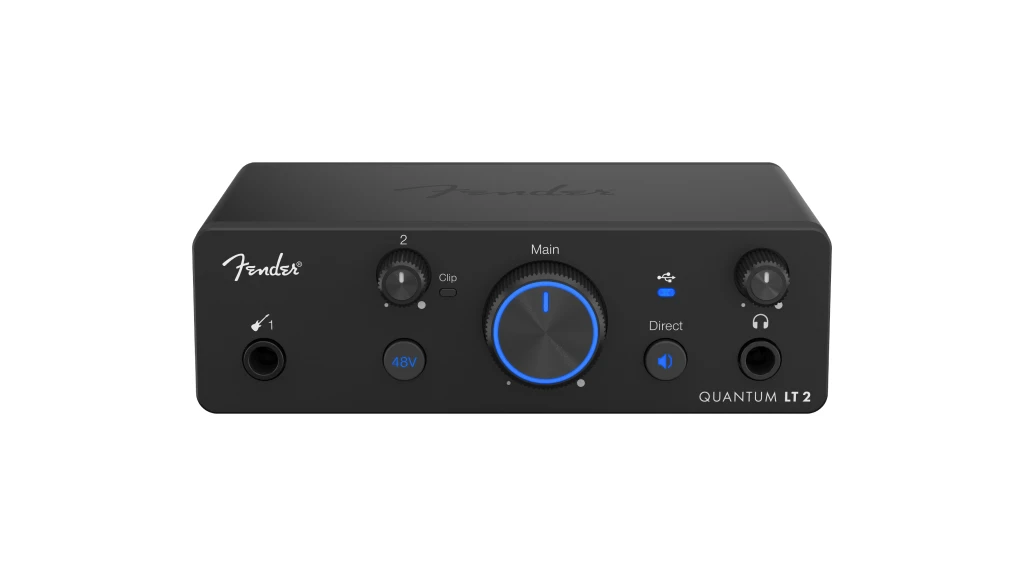
The front panel keeps controls and inputs within easy reach. From left to right, you’ll find the instrument input, a gain knob with LED ring metering, main output volume, headphone volume, and the headphone jack.
The gain knob’s LED ring provides visual feedback for input levels—green for good, yellow for hot, red for clipping. It’s intuitive and eliminates guesswork when setting levels. The knobs feel solid with appropriate resistance, and the 1/4″ jacks grab cables firmly.
At just 139mm wide, the interface doesn’t dominate desk space. The dark gray finish with silver accents looks professional without trying too hard.
Back Panel
The rear panel houses the XLR/TRS combo input, balanced TRS outputs, phantom power switch, and USB-C port.
Placing the combo input on the back keeps cables organized and out of the way during sessions. The balanced TRS outputs connect directly to studio monitors without additional adapters. The phantom power switch sits separately from the main controls, reducing the chance of accidentally engaging it.
Setup Experience
Getting started follows a familiar process. Connect via USB-C, download Universal Control from the Fender website (or use the built-in My Fender access feature), and the interface appears in your DAW’s audio settings.
The My Fender integration streamlines registration and software downloads. Rather than hunting for driver pages, the interface guides you through setup. It’s a thoughtful touch that reduces friction for beginners.
Driver installation on both macOS and Windows went smoothly. The interface is class-compliant on macOS, meaning it works immediately without additional software. Windows requires the ASIO driver for best performance, but the installation is straightforward.
One observation: the 6-month Fender Studio Pro trial requires registration. If you prefer a different DAW, you’ll still have Universal Control for interface management, but you’ll need your own recording software.
Getting the Most From Your Fender Quantum LT 2: Setup Tips and Best Practices
The Quantum LT 2 delivers good results out of the box, but understanding a few recording fundamentals will help you capture even better takes. Here are practical tips based on common questions beginners ask.
Setting Input Levels: Many new users record either too quiet or clipping constantly. The LED ring around the gain knob helps, but here’s the process:
- Set gain around 40-50%
- Play or sing at your loudest expected level
- Adjust until the ring stays mostly green with occasional yellow
- Leave headroom—you can always boost later, but clipping ruins takes
For guitar, factor in whether you’ll be using a clean or distorted tone. Clean sounds need less headroom than signals you’ll push into amp sim overdrive.
Direct Monitoring vs. Software Monitoring: Direct monitoring sends your input signal straight to your outputs with zero latency. Software monitoring routes through your DAW, adding plugins and effects but introducing some delay.
For tracking, use direct monitoring when latency becomes distracting. Use software monitoring when you need to hear your sound through effects—the Quantum LT 2’s low-latency drivers make this viable at low buffer sizes.
Positioning Matters: The front-panel instrument jack exists for a reason—quick access during sessions. Keep the interface within arm’s reach for gain adjustments and headphone volume changes.
For the rear XLR input, position your mic cable so it doesn’t cross power cables, which can introduce interference. Balanced XLR connections reject noise better than unbalanced cables, so use proper microphone cables.
Gain Staging for Guitar Plugins
When recording guitar for amp simulation:
- Record at moderate levels (peaks around -12dB to -6dB)
- Use the amp sim’s input gain to drive the virtual amp
- Avoid maximizing the interface gain—digital headroom matters
This approach gives you flexibility to change amp tones later without re-recording.
Comparing Options: If you’re also considering other interfaces in this price range, the Best Budget Audio Interface (Tested & Reviewed) guide breaks down the alternatives. The Quantum LT 2 stands out for its instrument input quality, while other options might suit different priorities.
Fender Quantum LT 2 Review: Final Thoughts and Recommendations
After spending time with the Fender Quantum LT 2, my conclusion is straightforward: it’s a focused interface that does its job well.
The 75dB MAX-HD preamp delivers on its promise. I didn’t need external boost for any microphone I tested, including a ribbon mic that typically requires a Cloudlifter. The noise floor stayed low, and the recordings sounded clean.
But the real differentiator is the Fender-designed instrument input. This isn’t marketing speak—the guitar and bass recordings captured dynamics that budget interfaces typically lose. If you’ve ever felt like direct recording made your instrument sound lifeless, the Quantum LT 2 addresses that problem.
The trade-off is channel count. With one preamp, you’re limited to recording one mic source at a time. For solo creators who track layer by layer, that’s fine. For anyone wanting to record a singer-songwriter setup or podcast with two hosts, the single preamp becomes limiting. The Fender Quantum LT 4 adds a second preamp for those scenarios.
The 6-month software trial is worth noting. Unlike the larger LT 16, which includes a perpetual Fender Studio Pro license, the LT 2 requires you to either purchase the software after six months or use your own DAW. Budget accordingly.
At $145, the Fender Quantum LT 2 competes well against the Focusrite Scarlett Solo (4th Gen) and sits below the Universal Audio Volt 2. Choose the Quantum LT 2 if guitar and bass recording quality is your priority. Choose the competition if you need features like built-in vintage compression or dual mic preamps.
For solo guitarists, podcasters, students, and mobile creators who record one source at a time and want that source to sound great, the Fender Quantum LT 2 makes a compelling case. It’s not trying to do everything—it’s trying to do one thing well. And it succeeds.
8. FAQ
Can the Fender Quantum LT 2 record guitar and vocals at the same time?
Technically yes, but with limitations. You can record the instrument input and the XLR input simultaneously as two separate tracks. However, both share a single preamp with one gain control. This means you can’t independently adjust mic and instrument gain levels, which makes proper gain staging difficult. For true simultaneous recording with independent control, consider the Quantum LT 4 with its two preamps.
Does the Fender Quantum LT 2 work with GarageBand and other free DAWs?
Yes. The Quantum LT 2 is class-compliant on macOS, meaning it works immediately with GarageBand, Logic Pro, Ableton Live, and any other DAW without additional drivers. On Windows, you’ll need to install the ASIO driver (available from Fender’s website), but it then works with Reaper, FL Studio, and other Windows DAWs. The interface also works with iOS apps like GarageBand on iPad and iPhone via USB-C.
Is the Fender Quantum LT 2 better than the Scarlett Solo for guitar recording?
They serve similar purposes but have different strengths. The Quantum LT 2 offers 75dB of preamp gain compared to the Scarlett Solo’s 56dB, which matters for quiet microphones. The Fender-designed instrument input is specifically voiced for guitar and bass, while the Scarlett offers its Air mode for brightness. Both deliver quality recordings. If guitar recording is your primary use, the Quantum LT 2’s instrument input design gives it an edge. If you want a proven ecosystem with extensive documentation and community support, the Scarlett line has a longer track record.
| Why Can You Trust Us

| ALSO REVIEWED