Best Audio Interface for iPhone: For Video & Streaming in 2026
- Audio Interface, Buying Guides
- by Bruno Bontempo
Find the best audio interface for iPhone to upgrade your sound. I review 5 top tools to help you record audio to iPhone video or stream anywhere easily today.
Our articles may include affiliate links and we may earn a commission. Here how it works.
Jump to...
| QUICK OVERVIEW
Introduction
Creating professional content on a mobile device used to require a massive bag of gear. However, that era is over. I remember trying to record a simple guitar idea on my phone years ago and giving up because of the noise. Today, you can achieve studio results anywhere if you have the correct tools. Therefore, choosing the best audio interface for iPhone is the secret to unlocking professional mobile production.
Many creators think they need a computer to sound good. But modern interfaces are small and powerful. For instance, you might want to record audio to iPhone video for social media. Or perhaps you need solid lightning to usb camera adapter alternatives to clean up your messy cables. Consequently, I have selected five distinct products that solve different problems for mobile creators.
I have grouped these by their best use case to help you decide. Let us look at the gear that will turn your phone into a production studio.
Best for Pocket Portability
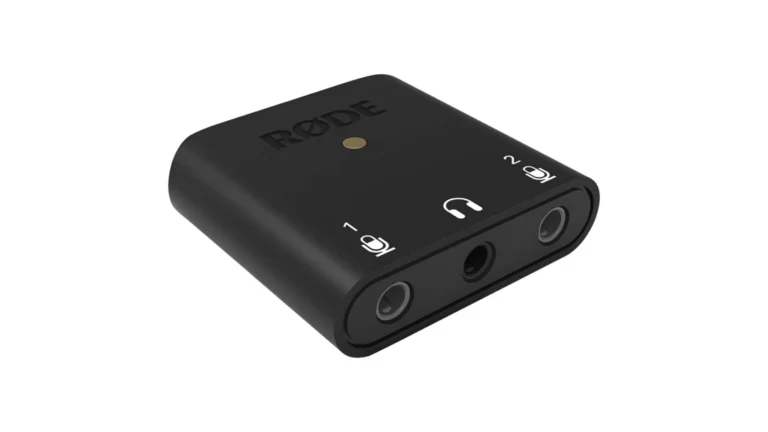
Rode AI-Micro
4.6
This device is incredible for creators who value speed and minimal setups. It fits right in your coin pocket and practically disappears when you are recording. You can connect two microphones simultaneously, which is perfect for interviews. Most importantly, it works seamlessly with your phone without needing complex adapters. If you want to record clear speech anywhere, this is your best bet.
| Key Features
- Inputs: Two auto-sensing 3.5mm TRS or TRRS microphone inputs
- Outputs: One 3.5mm TRS headphone output
- Compatibility: macOS, Windows, iOS, and Android
- Connectivity: USB-C with Lightning, USB-C, and USB-A cables included
- Resolution: 24-bit / 48 kHz
- Plus: It gives you access to the Rode Central app for easy settings control
| Best for...
- Recording interviews with two subjects using lapel mics.
- Vlogging on the go with high-quality audio.
- Creating a lightweight podcast setup for travel.
- Improving video call audio on a laptop or phone.
- Recording clear voice memos in noisy places.
| Not ideal for...
- Connecting professional XLR microphones directly.
- Recording electric instruments like guitars.
- Projects requiring sample rates above 48 kHz.
Overview
I tested the Rode AI-Micro during a week of field recording, and honestly, the “auto-sensing” inputs are a feature every mobile interface should have. Usually, with 3.5mm mics, you are constantly worrying about whether you have a TRS (camera mic) or TRRS (smartphone mic) connector. This device detects exactly what you plugged in and adjusts the internal wiring instantly. I plugged in a generic lavalier and a shotgun mic at the same time, and it handled both without a single menu dive. It removes the friction from the creative process, allowing you to focus entirely on the subject you are filming.
While the hardware is tiny, the real power lies in the software ecosystem. Connecting it to the Rode Central app unlocks features you wouldn’t expect in something this size, like a high-pass filter to cut wind noise and precise gain control. The sound is surprisingly transparent; it doesn’t add that hiss you often get from cheap dongles. It feels like a piece of pro kit shrunk down. The plastic build is lightweight, which is great for mounting on a phone gimbal, but you wouldn’t want to step on it. For journalists and vloggers who need to move fast, this is the most friction-free audio tool I have used.
Best for Microphone
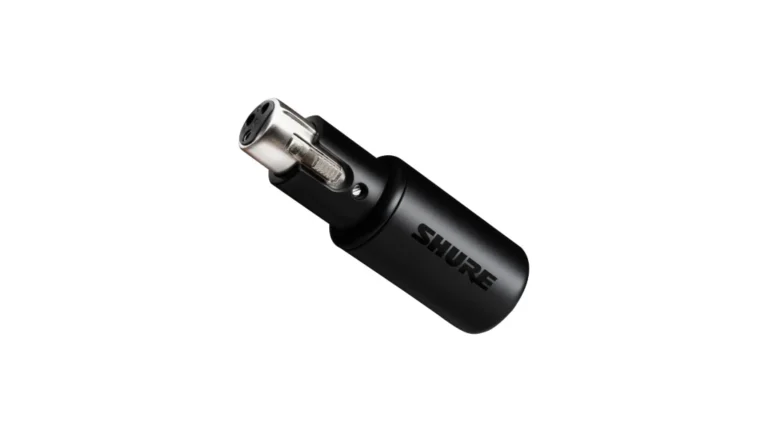
Shure MVX2U
4.5
This adapter is the missing link for anyone who owns a high-quality studio microphone. It connects your XLR mic directly to your computer or mobile device. I love that it provides enough power for gain-hungry dynamic mics like the SM7B. Therefore, you do not need a bulky preamp to get professional sound. It is sleek, rugged, and keeps your setup looking very clean.
| Key Features
- Inputs: One XLR microphone input
- Outputs: One 3.5mm headphone output
- Compatibility: macOS, Windows, and most mobile devices
- Connectivity: USB-C output
- Resolution: 24-bit / 48 kHz
- Plus: It features Auto Level Mode to keep your volume consistent automatically
| Best for...
- Streamers using professional dynamic microphones.
- Podcasters who travel with a high-end XLR mic.
- Musicians recording simple vocal demos on a laptop.
- Voiceover artists needing a portable backup solution.
- Users who want to convert an old mic to USB.
| Not ideal for...
- Recording more than one microphone at a time.
- Connecting instruments like keyboards or guitars.
- Users who need physical control knobs on the device.
Overview
When I first picked up the MVX2U, I was skeptical that something looking like a simple XLR barrel could drive a Shure SM7B. However, it delivers up to +60dB of clean gain, which is impressive. I connected it to a dynamic mic and recorded a voiceover directly into my iPhone. The result was indistinguishable from my desktop setup with a dedicated preamp. The “Auto Level Mode” is particularly useful for mobile creators; it acts like a virtual engineer, riding your volume levels so you don’t peak when you laugh or disappear when you whisper. This is a lifesaver when you are recording solo and can’t watch meters.
The physical design is strictly utilitarian—it’s a heavy, metal dongle that feels bulletproof. It plugs directly into the back of your microphone, which keeps your desk or travel setup incredibly tidy. However, because it lacks physical buttons, you are entirely dependent on the ShurePlus MOTIV app to change settings like EQ, compression, or phantom power. Once you set it, the device remembers your settings, which is a smart touch. It effectively turns any legacy microphone into a modern USB smart mic. It’s a niche tool, but for that specific niche, it is the best solution on the market.
Best for Multi-Instrument
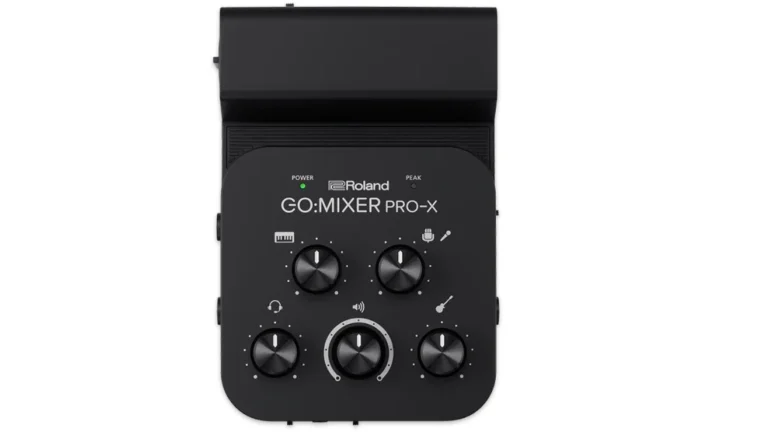
Roland GO:MIXER PRO-X
4.7
If you play music and want to share it online, this mixer is designed for you. It allows you to plug in a guitar, a keyboard, and a vocal mic all at once. I found it incredibly useful for filming live performance videos. You can mix your sound on the spot and record audio to iPhone video directly. It takes the headache out of syncing audio later.
| Key Features
- Inputs: Eleven channels including XLR Combo, 1/4-inch, and 3.5mm jacks
- Outputs: Headphone out and TRRS smartphone connection
- Compatibility: iOS, Android, macOS, and Windows
- Connectivity: USB Micro-B to Lightning, USB-C, and TRRS cables included
- Resolution: Standard mobile audio resolution
- Plus: Loop Back function lets you play along with music from your phone.
| Best for...
- Singer-songwriters performing with guitar and vocals.
- Keyboard players who need stereo inputs for rich sound.
- Creating high-quality social media music videos.
- Practicing with backing tracks from a mobile device.
- Recording a small band rehearsal with one device.
| Not ideal for...
- Studio recording requiring high-resolution 24-bit audio.
- Users who need 48V phantom power without using batteries.
- Connecting studio monitors for a loud playback mix.
Overview
This device is less of a traditional interface and more of a “performance hub.” I set it up for a living room session with a keyboard, a vocal mic, and a backing track coming from my phone. The ability to grab physical knobs to balance the mix instantly is satisfying and much faster than swiping through screens. The “Loop Back” feature is the MVP here; it allows you to play music from your phone, sing over it, and record the combined audio back into the video camera app. This makes it the ultimate tool for TikTok or Instagram musicians who want one-take videos with good sound.
However, it does have some quirks. The build quality is plasticky and the knobs are quite small, feeling a bit like a toy compared to pro audio gear. Also, managing power can be tricky. While it can run off your phone, enabling Phantom Power for a condenser mic requires you to pop in 4 AAA batteries. Despite the lower audio resolution compared to some competitors, the convenience of having so many inputs in a palm-sized device is unmatched. It simplifies the technical side of performance so you can just play.
Best for Streaming and Music
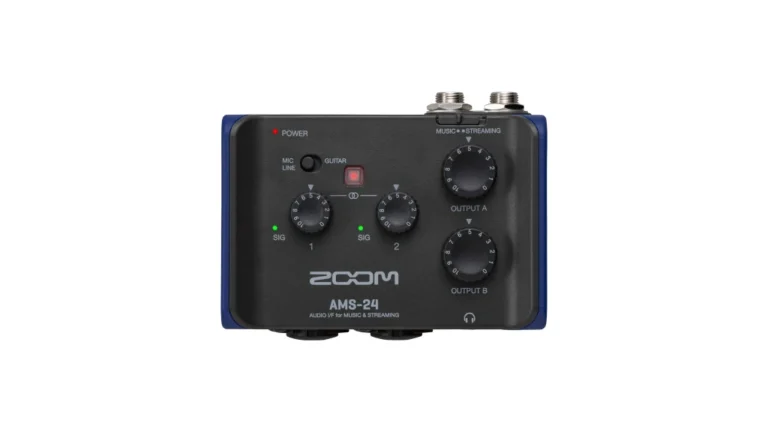
Zoom AMS-24
4.8
This interface offers a brilliant balance between music production and live streaming. It has a switch that changes its internal routing instantly. I found this very practical when switching from recording a song to chatting on a stream. It is small enough to carry, yet it has the inputs of a serious audio tool. It runs on batteries, making it very reliable for mobile use.
| Key Features
- Inputs: Two XLR/TRS combo inputs
- Outputs: Two TRS main outs and two 3.5mm headphone jacks
- Compatibility: macOS, Windows, iOS, and Android
- Connectivity: USB-C for data and separate USB-C for power
- Resolution: 24-bit / 96 kHz
- Plus: Hardware switches for Music and Streaming modes
| Best for...
- Musicians recording guitar and vocals simultaneously.
- Two-person live streams with separate headphones.
- Mobile recording at high-resolution 96 kHz.
- Content creators who switch between music and talk.
- Using a tablet as a portable DAW production center.
| Not ideal for...
- Users who need more than two input channels.
- People who want built-in effects like reverb or delay.
- Situations requiring a very slim pocket-sized device.
Overview
The Zoom AMS-24 solves the “Jack of all trades” problem with a simple hardware switch. In “Music Mode,” it behaves like a standard interface, sending separate tracks to your DAW for editing. But flip it to “Streaming Mode,” and it merges all inputs into a single stereo signal—perfect for YouTube or Twitch where you don’t want to mess with routing software. I used this for a remote podcast recording with a guest, and having two dedicated headphone outputs on such a small unit was a game-changer. We could both monitor our levels accurately without needing a separate splitter amp.
Powering the unit is also very well thought out. It runs on two AA batteries, which means it doesn’t drain your iPad or iPhone battery during a long session. This makes it a true mobile studio. The build is lightweight plastic, which is great for portability but doesn’t feel as premium as the metal Zoom recorders. The preamps are clean, quiet, and offer enough gain for most mics. If you are a creator who does a bit of everything—recording demos one day and live streaming the next—this is the most flexible tool in the lineup.
Best for Live Streaming
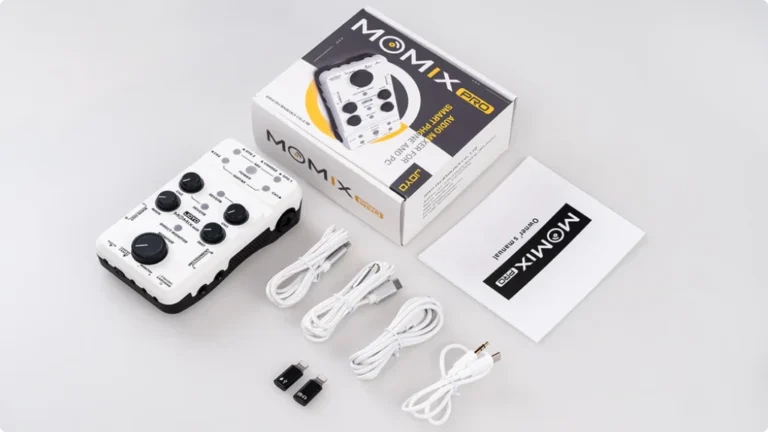
Joyo Momix Pro
4.5
This interface is built for the adventurous creator who goes outside. It has an internal rechargeable battery that can actually charge your phone while you use it. I took it to a park to test this, and it kept my stream running without issues. It is packed with features like reverb and center cancel for karaoke. It is a fun and practical tool for buskers.
| Key Features
- Inputs: Two XLR Combo inputs plus stereo line and aux in
- Outputs: Two headphone jacks and two OTG ports
- Compatibility: iOS, Android, macOS, and Windows
- Connectivity: USB-C for charging and data
- Resolution: 16-bit / 48 kHz
- Plus: Built-in Reverb and Pass-Through Charging for mobile devices.
| Best for...
- Busking musicians who stream long sets outdoors.
- Live streamers who need to charge their phone while live.
- Singers who want built-in reverb without extra gear.
- Streaming to two different smartphones at the same time.
- Guitarists using amp simulator apps on their phone.
| Not ideal for...
- Recording critical studio audio at 24-bit depth.
- Users who need extremely low latency for plugins.
- Creators who prefer metal gear over plastic builds.
Overview
he Joyo Momix Pro addresses the biggest anxiety of mobile streaming: battery life. Unlike other interfaces that leech power, this one has its own internal battery and can actually pass power to your phone. I tested this by streaming for an hour in a park; my phone stayed at 100% the whole time. That feature alone makes it indispensable for buskers or IRL streamers. Additionally, the dual OTG ports allow you to connect two phones simultaneously, so you can broadcast to TikTok and Instagram Live at the exact same time with the same high-quality audio.
It’s definitely geared more towards live performance than studio precision. The built-in reverb effect is a nice touch for adding “vibes” to a dry vocal without needing external pedals, although it’s basic. The “Center Cancel” feature is fun for karaoke, effectively removing vocals from a backing track. The audio quality is decent (16-bit), but if you crank the gain too high, you might hear a little noise floor hiss. It’s not an audiophile device; it’s a content creation workhorse designed to keep you online and sounding good anywhere.
Comparison Table
Stop guessing and look at the specs side-by-side. I’ve compiled the essential data for each interface so you can see exactly which one matches your gear. Whether you need battery power or specific inputs, this breakdown tells the story at a glance.
| Feature | Rode AI-Micro | Shure MVX2U | Roland GO:MIXER PRO-X | Zoom AMS-24 | Joyo Momix Pro |
|---|---|---|---|---|---|
| Category | Pocket Portability | XLR Adapter | Multi-Instrument | Versatile Streaming | Outdoor Streaming |
| Inputs | 2x 3.5mm (Auto-sensing TRS/TRRS) | 1x XLR (Microphone) | 11 Ch (XLR, Inst, Line, Guitar/Bass) | 2x XLR/TRS Combo (Mic/Inst) | 2x XLR/Combo, Guitar, Aux |
| Outputs | 1x 3.5mm Headphone | 1x 3.5mm Headphone | Headphone, TRRS Smartphone Out | 2x Headphone, 2x TRS Main | 2x Headphone, 2x OTG Digital |
| Resolution | 24-bit / 48 kHz | 24-bit / 48 kHz | 16-bit / 48 kHz (Mobile Standard) | 24-bit / 96 kHz | 16-bit / 48 kHz |
| Compatibility | iOS, Android, macOS, Windows | iOS, Android, macOS, Windows | iOS, Android | iOS, Android, macOS, Windows | iOS, Android, macOS, Windows |
| Connectivity | Lightning, USB-C, USB-A (Cables included) | USB-C (Direct connect) | USB Micro-B to Lightning/USB-C/TRRS | USB-C (Data) + USB-C (Power) | USB-C |
| Plus | Rode Central App Control | Auto Level Mode & +60dB Gain | Loop Back & Physical Knobs | Music/Streaming Hardware Switch | Pass-Through Phone Charging |
Pass-Through Charging for the Best Audio Interface for iPhone
Keeping your gear running is a major concern when recording on a mobile device. For example, using a power-hungry interface can drain your phone in an hour. Therefore, many pros use a MagSafe Power Bank or a dedicated USB hub with power delivery. Official Apple dongles like the Camera Adapter also allow you to charge while you work.
However, choosing battery-powered audio interfaces like the Zoom or Roland models is often easier. These units take the load off your phone battery. In addition, some interfaces use a separate USB-C port for power. This allows you to plug into a wall outlet or a portable battery. Always plan your power needs before you start a long recording session.
CHECK ALSO
Final Thoughts on the Best iPhone Audio Interface
The best audio interface for iPhone depends on your daily workflow. If you want something that fits in a pocket, the Rode AI-Micro is perfect. On the other hand, the Shure MVX2U is the right choice for professional XLR microphones. Musicians who need multiple inputs will love the Roland GO:MIXER PRO-X for its versatility.
The Zoom AMS-24 offers the best balance of features and high-resolution sound. Meanwhile, the Joyo Momix Pro is the king of convenience with its built-in battery. Go beyond the marketing and think about your real-world setup. For instance, consider how you will carry it and how you will keep your phone charged. Choosing the right tool makes the creative process much more enjoyable and productive.
FAQ
Do I still need the Apple Lightning to USB Camera Adapter if I have an iPhone 15 or newer?
This is a huge point of confusion. If you have an iPhone 15 or 16 with a USB-C port, you generally do not need the bulky Camera Adapter. You can usually plug a class-compliant USB-C audio interface directly into the phone using a high-quality USB-C data cable. However, the old “Camera Adapter” is strictly for Lightning port devices (iPhone 14 and older). That said, if your interface requires more power than the phone can give, you might still need a powered USB-C hub, but the proprietary Apple dongle is largely a thing of the past for new phones.
Will I hear a delay (latency) when I record or stream on my phone?
You might, but you can fix it. Audio travels into the phone, gets processed by the app, and comes back out to your headphones—this trip causes a delay called “latency.” To avoid this, look for the “Direct Monitor” feature on your interface (or “Loopback” on some models). This switch sends the audio from your microphone directly to your headphones before it goes into the phone. The Zoom AMS-24 and Roland GO:MIXER handle this via hardware switches, allowing you to hear yourself instantly with zero delay, which is critical for keeping your timing tight.
Does the native iPhone Camera app record in stereo or mono?
This trips up a lot of creators. By default, the native iOS Camera app often sums audio inputs to mono or handles stereo inputs unpredictably depending on the iOS version and the interface used. If you are recording a stereo synth or a podcast with two people panned left and right, the native Camera app might smash everything into the center. For true stereo control, it is often better to use a dedicated video app like Blackmagic Camera (which is free) or Filmic Pro. These apps allow you to select your audio sample rate and force stereo recording, ensuring your spatial audio remains intact.
| Why Can You Trust Us

Bruno Bontempo
I've been recording, producing, and playing bass for over 20 years—from touring with my first band at 15 to playing progressive metal across Europe today. Through multiple albums, projects (Madness of Light, Rising Course, Roots of Ascendant, Human|Archive), and production work, I've tested audio interfaces in every scenario imaginable. At Best Audio Hub, I combine my historian background with years of hands-on music and audio experience. No marketing fluff—just honest insights from someone who's been in the trenches.
| ALSO REVIEWED