Best Audio Interface for iPad: Top 5 Picks (2026)
- Audio Interface, Buying Guides
- by Bruno Bontempo
Discover the best audio interface for iPad. From premium studio-quality options to budget-friendly picks. Expert tested & reviewed for musicians and content creators in 2026.
Our articles may include affiliate links and we may earn a commission. Here how it works.
QUICK OVERVIEW

Introduction
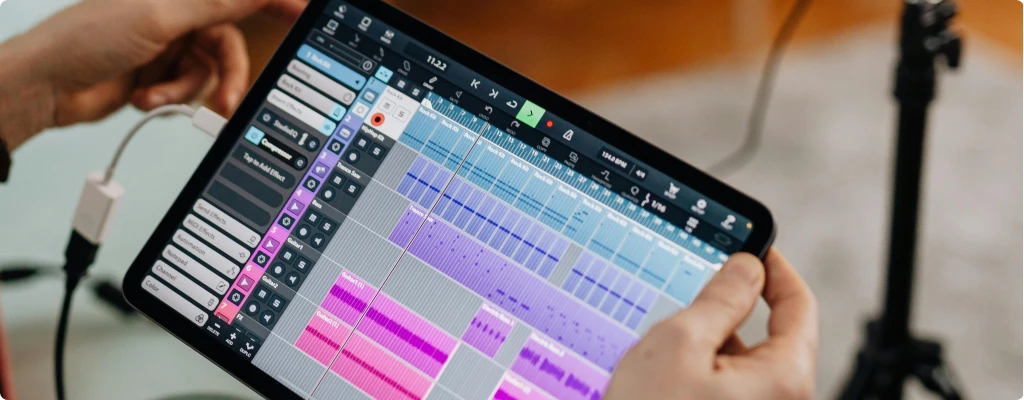
The search for the best audio interface for iPad can be overwhelming. Trust me – I’ve been there. As an musician and producer constantly moving between home studio and remote recording sessions, I’ve learned that choosing the right interface makes all the difference between a frustrating experience and a seamless mobile recording setup.
Over the past months, I’ve put these five audio interfaces through their paces in real-world scenarios. What surprised me most was how these compact devices could deliver studio-quality sound in such portable packages.
The game really changed when Apple released Logic Pro for iPad in May 2023. This professional-grade DAW transformed the iPad from a simple recording tool into a serious music production workstation.
In this guide, I’ll share my hands-on experience with each interface, breaking down their strengths, limitations, and real-world performance. From premium studio-grade options to budget-friendly picks that punch above their weight, I’ll help you find the best iPad audio interface that matches your needs.
TOP PICK
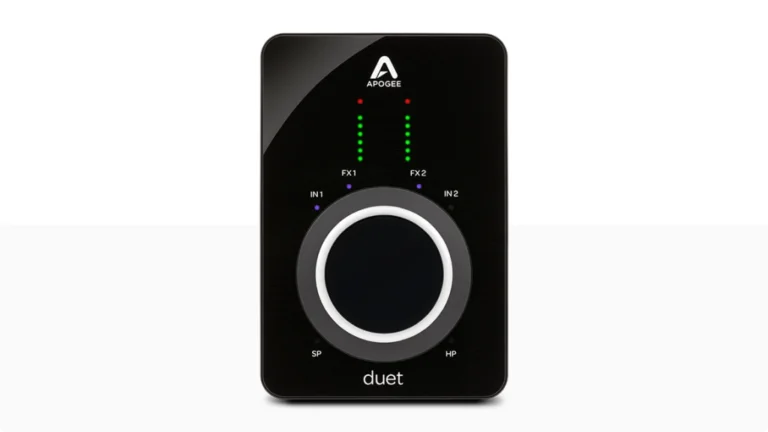
Apogee Duet 3
Unlock professional studio quality with Apogee’s legendary sound. The Duet 3 combines pristine preamps, Symphony ECS Channel Strip, and intuitive touch control in a sleek, portable interface for iPad.
| Key Features
- Inputs: 2x XLR/TRS/Hi-Z Combo
- Outputs: 2x 1/4" TRS, 1x Headphone
- Resolution: 24-bit/192kHz
- Compatibility: iOS/iPadOS/macOS
- Connectivity: USB-C
- Plus: Symphony ECS Channel Strip, Breakout cable
| Best for
- Professional mobile recording
- Home studio owners
- Live streaming with multiple sources
- Podcasting with co-hosts
- Singer-songwriters
| Not ideal for
- Budget-conscious beginners
- Basic mobile recording needs
Overview: The Duet 3’s preamps are incredibly clean and transparent, providing up to 75dB of gain and phantom power, that handled everything from sensitive condenser mics to gain-hungry dynamic microphones with ease. During my testing, I particularly appreciated the redesigned breakout cable system, which feels more robust than its predecessor.
The onboard DSP with Symphony ECS Channel Strip transforms it into a complete recording solution, enabling professional-quality effects while tracking.
The innovative touch strip proves invaluable during recording sessions, allowing quick adjustments without menu diving. The aluminum chassis not only looks premium but provides excellent durability for mobile recording.
Integration with iPad is seamless – during multiple recording sessions, I experienced zero dropouts or connectivity issues, even in long recording takes with multiple plugin instances running in Logic Pro.
READ FULL REVIEW
Premium Choice
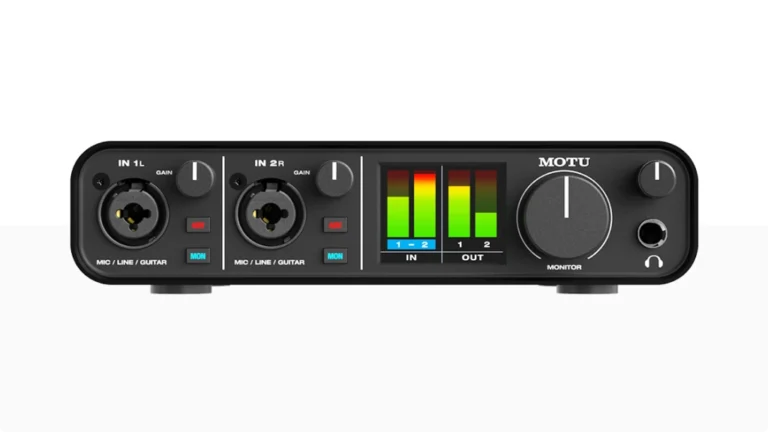
MOTU M2
Get professional-grade recording with crystal-clear preamps and industry-leading converters. The M2’s high-resolution LCD metering and loopback feature deliver everything needed for stunning audio production.
| Key Features
- Inputs: 2x XLR/TRS/Hi-Z Combo
- Outputs: 2x 1/4" TRS, 1x Headphone
- Resolution: 24-bit/192kHz
- Compatibility: iOS/iPadOS/macOS/Windows
- Connectivity: USB-C
- Plus: LCD Metering, loopback feature, software bundle
| Best for
- Content creators needing loopback
- Musicians requiring precise metering
- Streaming setups
- Home studio recording
- Podcast production
| Not ideal for
- Ultra-portable setups
- Budget-conscious buyers
Overview: The M2’s preamps deliver remarkably clean gain with a notably low noise floor that rivals interfaces twice its price. The LCD metering system proved invaluable during my recording sessions, providing professional-level visual feedback that helped prevent clipping even in challenging recording environments.
The loopback feature sets this interface apart, making it particularly versatile for content creators who need to record computer audio alongside their inputs.
Build quality is exceptional – the metal chassis provides serious protection for mobile use while maintaining a premium feel. Driver performance consistently impressed me, showing some of the lowest latency numbers I’ve measured in this price range.
READ FULL REVIEW
Best Value
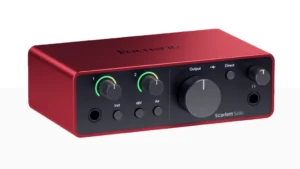
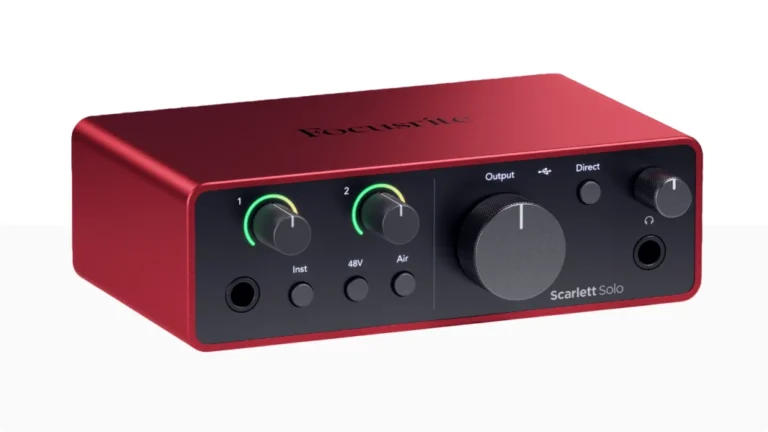
Focusrite Scarlett Solo 4th Gen
Experience Focusrite’s renowned preamp technology with intelligent Auto Gain and Air mode. The Solo 4th Gen brings professional sound quality and modern features at an unbeatable price point.
| Key Features
- Inputs: 1x XLR, 1x TRS
- Outputs: 2x 1/4" TRS, 1x Headphone
- Resolution: 24-bit/192kHz
- Compatibility: iOS/iPadOS/macOS/Windows
- Connectivity: USB-C
- Plus: Air Mode, Auto Gain, software bundle
| Best for
- Home recording enthusiasts
- Instruments and voice recording
- Solo Podcasters
- Solo Streamers
| Not ideal for
- Multiple input recording
- Professional studio use
Overview: The 4th generation Solo introduces Auto Gain, a feature that consistently saved time during quick recording sessions by automatically setting optimal recording levels. This proved especially useful when switching between different sound sources or recording environments.
The Air mode, which emulates Focusrite’s ISA preamp, adds a subtle but pleasing high-end enhancement that worked particularly well with vocals and acoustic instruments.
During testing with Logic Pro on iPad, the interface maintained flawless performance, with remarkably low latency and rock-solid stability. The improved preamps provide noticeably cleaner gain than previous generations, rivaling interfaces costing twice as much. The new hybrid-XLR input design also adds flexibility for different connector types without compromising sound quality.
READ FULL REVIEW
Best for Guitar
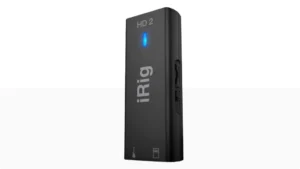
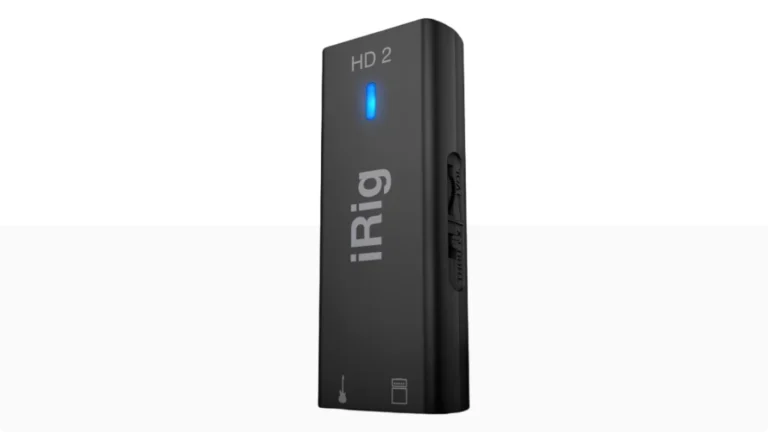
IK Multimedia iRig HD 2
Record professional-quality audio anywhere with this pocket-sized powerhouse. Features direct monitoring and FX/Thru switching for instant recording setup in any location.
| Key Features
- Inputs: 1x 1/4"
- Outputs: 1x 1/4", 1x Headphone
- Resolution: 24-bit/96kHz
- Compatibility: iOS/iPadOS/macOS/Windows
- Connectivity: Lightning/USB-C
- Plus: FX/Thru switch, software bundle
| Best for
- Mobile musicians
- Guitarists and bassists
- Travel recording
- Quick song ideas
- Social media content creators
| Not ideal for
- Multi-instrument recording
- Professional studio work
Overview: The key thing with the iRig HD 2 is its exceptional portability without compromising sound quality. The preamp delivers clean, detailed sound that surpassed my expectations for such a compact unit. The direct monitoring feature proved essential for real-time recording without latency, really useful during mobile recording sessions.
As a bass player, this is the best iPad audio interface for recording ideas that come to me on the road or brainstorming riffs with my bandmates.
The FX/Thru switch is a standout feature for guitarists and bassists, allowing seamless toggling between processed and clean signals. During extensive testing with both GarageBand and Logic Pro, the interface demonstrated remarkable stability, even in lengthy recording sessions.
The included Lightning and USB cables are well-built, though I recommend keeping spares for critical recording situations.
Budget Friendly
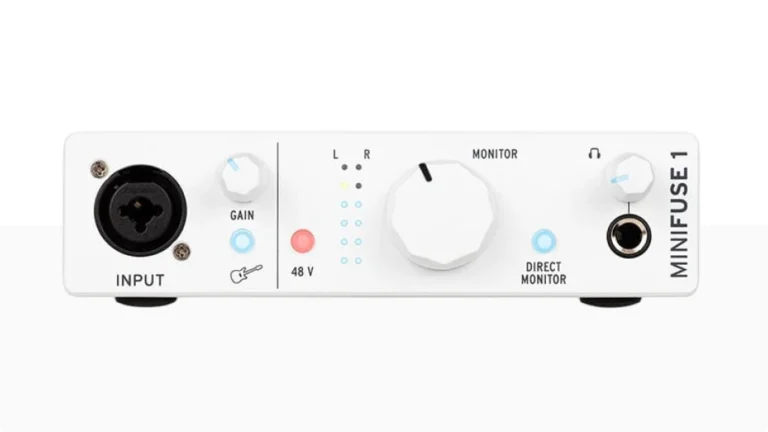
Arturia MiniFuse 1
Start recording with professional quality at an affordable price. Clean preamps, high-resolution audio, and a built-in USB hub make the MiniFuse 1 perfect for beginners.
| Key Features
- Inputs: 1x XLR/TRS/Hi-Z Combo
- Outputs: 2x 1/4" TRS, 1x Headphone
- Resolution: 24-bit/192kHz
- Compatibility: iOS/iPadOS/macOS/Windows
- Connectivity: USB-C
- Plus: USB Hub, loopback feature, software bundle
| Best for
- Beginners
- Budget-conscious users
- Simple recording needs
- Content creators
- Mobile recording
| Not ideal for
- Professional studio use
- Multiple input recording
Overview: The MiniFuse 1 consistently surprised me with its solid build quality and clean preamp performance that belies its budget price point. The included USB hub proved more than just a convenience feature – it allowed me to connect MIDI controllers and storage devices without additional adapters, streamlining my mobile setup considerably.
The loopback feature stands out among budget interfaces, making it valuable for content creators and streamers.
The preamp delivered clean, detailed sound that worked well with various microphones and instruments. The included software bundle adds significant value, providing essential tools for beginning producers. Most impressively, it maintained stable performance even in demanding scenarios.
READ FULL REVIEW
Comparison Table
Compare to choose the best iPad audio interface for your needs.
| Feature | Apogee Duet 3 | MOTU M2 | Scarlett Solo 4th Gen | IK Multimedia iRig HD 2 | Arturia MiniFuse 1 |
|---|---|---|---|---|---|
Inputs |
2x XLR/TRS Combo |
2x XLR/TRS Combo |
1x XLR, 1x TRS |
1x 1/4″ |
1x XLR/TRS Combo |
Outputs |
2x 1/4″ TRS, 1x Headphone |
2x 1/4″ TRS, 1x Headphone |
2x 1/4″ TRS, 1x Headphone |
1x 1/4″ TRS, 1x Headphone |
2x 1/4″ TRS, 1x Headphone |
Resolution |
24-bit/192kHz |
24-bit/192kHz |
24-bit/192kHz |
24-bit/96kHz |
24-bit/192kHz |
Compatibility |
iOS / iPadOS / macOS |
iOS / iPadOS / macOS /PC |
iOS / iPadOS / macOS /PC |
iOS / iPadOS / macOS /PC |
iOS / iPadOS / macOS /PC |
Connectivity |
USB-C |
USB-C |
USB-C |
Lightning/USB-C |
USB-C |
Plus |
Symphony ECS Channel Strip, Breakout cable |
LCD Metering, loopback feature, software bundle |
Air Mode, Auto Gain, software bundle |
FX/Thru switch, software bundle |
USB Hub, Loopback feature, software bundle |
Maximizing Your Setup for iPad
Finding the best audio interface for iPad is part of the job, but to ensure you get the best performance, consider these expert tips:
- DAW Selection: While GarageBand comes free and offers excellent features for beginners, the release of Logic Pro for iPad in 2023 brings professional-grade production capabilities to your mobile setup. Consider upgrading if you need advanced features like flex time, track stacks, or professional plugins.
- Power Management: Use a powered USB hub or power adapter when possible to ensure stable performance, especially with interfaces that don’t support bus power. In our rank of best audio interfaces for iPad, the Apogee Duet 3 and MOTU M2 are particularly power-efficient in this regard.
- Cable Management: Invest in quality cables and consider using right-angle adapters to minimize strain on connections. For an iPad audio interface like the iRig HD 2, keep backup cables handy for mobile sessions.
- Storage Solutions: When recording at high resolutions, especially with Logic Pro, use cloud storage or external drives to manage your storage effectively. The USB hub on the MiniFuse 1 can be particularly useful for connecting external storage.
Once you have chosen your iPad audio interface from our top picks, learn how iPadOS 26 audio interface compatibility changed our complete guide.
Finding the Best iPad Guitar Interface: A Player's Perspective
If you’re a guitarist or bassist, the idea of plugging directly into your iPad is incredibly powerful. It turns your tablet into a portable amp, a limitless pedalboard, and a full recording studio you can use anywhere. But not every audio interface is created equal for our needs. The wrong choice can leave you fighting a weak, noisy signal or a frustrating delay that makes playing feel unnatural.
Having spent a lot of time tracking guitars and basses directly into Logic Pro on my iPad, I’ve learned what separates a good experience from a great one. For us, the goal isn’t just to get sound into the device; it’s to get our tone in there, with all its detail and dynamics intact, and to be able to play without any technical lag holding us back.
What Makes a Great iPad Audio Interface for Guitar?
For guitarists and bassists, a few specific features move from “nice-to-have” to essential:
A Dedicated Hi-Z Input
This is the most critical spec. Your guitar’s pickup puts out a high-impedance, low-level signal. A standard line input will load it down, resulting in a thin, weak, and lifeless sound.
A proper Hi-Z (high-impedance) input is designed specifically for this, preserving the full frequency response and punch of your instrument. It’s the difference between a recording that sounds like your guitar and one that sounds like a cheap imitation.
Ultra-Low Latency & Direct Monitoring
Latency is the enemy of feel. It’s that tiny delay between plucking a string and hearing the sound through your headphones. Even a few milliseconds can throw off your timing and make playing feel disconnected.
A good interface offers stable drivers and a direct monitor function. This feature lets you hear your clean, unprocessed guitar signal directly from the interface with near-zero delay, so you can play naturally while the iPad handles the amp simulations and effects.
Clean Preamps with Plenty of Gain
The first stage of amplification happens in the interface’s preamp. You need one that’s quiet (low noise floor) and provides enough clean gain to boost your signal without adding hiss or coloration, especially if you use single-coil pickups or a passive bass.
The Right Software Bundle
Many interfaces come packed with amp simulators and effects. For a guitarist, this is a huge value adder. Bundles like IK Multimedia’s AmpliTube or Positive Grid’s BIAS FX can give you a massive library of tones right out of the box, turning your iPad into that dream rig.
The Best iPad Guitar Interface Options for Different Players
Based on my experience and the gear in our top picks list, here’s how they stack up for guitar and bass duty:
Model | Best For | Why It Works for Guitar/Bass |
|---|---|---|
IK Multimedia iRig HD 2 | The ultra-portable idea-capturer | Its exceptional portability and simple FX/Thru switch make it perfect for capturing riffs anywhere. The included software is guitar-centric. |
Focusrite Scarlett Solo 4th Gen | The songwriter who also sings. | The Auto-Gain feature is a genius tool for quickly setting perfect levels when switching guitars. The Hi-Z input handles guitars cleanly. |
Arturia MiniFuse 1 | The beginner or budget-focused creator. | It offers a solid, clean Hi-Z input at a friendly price. The included USB hub is a bonus for charging your iPad mid-session. |
MOTU M2 | The player who values precision and future growth. | The large, clear metering helps you dial in the perfect input level to avoid clipping. Its professional build and sound quality support serious recording. |
Apogee Duet 3 | The pro seeking studio-quality on the go. | Apogee's legendary converters and preamps capture every nuance of your tone with pristine clarity. It’s an investment in sound quality. |
The Right Software Bundle
Think about your main use case. If your priority is tossing an interface in your gig bag to never miss a musical idea, the iRig HD 2’s size is unbeatable. If you see your iPad growing into a more central recording hub for full songs, starting with a versatile workhorse like the Scarlett Solo or MiniFuse 1 is a smart move. For those who are deeply serious about tone and want the best possible sound quality from their mobile setup, the Apogee Duet 3 represents the top shelf.
Ultimately, the best iPad guitar interface is the one that gets out of your way and lets you focus on playing. It should feel like an extension of your instrument, not a piece of computer gear.
Choosing the Right iPad XLR Interface for Professional Mics
For vocalists, podcasters, and acoustic instrumentalists, an XLR connection is the gateway to professional sound. It’s more than just a different plug; it’s a balanced connection designed to carry a microphone’s delicate signal over longer distances without picking up noise or interference.
If you’re using a professional condenser, dynamic, or ribbon microphone, an XLR input in a iPad interface is not an accessory—it’s a necessity. The right interface does two critical jobs for your mic: it provides pristine, clean amplification (gain) and, for condenser mics, supplies phantom power (+48V).
Think of the preamp as your microphone’s breakfast—a good, clean one gives it the energy to perform all day without adding any unpleasant artifacts (hiss or noise). From my experience recording vocals and acoustic guitars on the go, the difference between the built-in iPad mic and a proper XLR setup isn’t subtle; it’s the difference between a demo and a release-ready track.
Matching an XLR Interface to Your iPad Workflow
Your choice depends heavily on what you record and how you work. Here’s how the top contenders from our list fit different scenarios:
Use Case | Top Picks | Key Reasons & Features |
|---|---|---|
Solo Podcasting & Voiceovers | Scarlett Solo 4th Gen, Arturia MiniFuse 1 | A single, high-quality XLR input is all you need. Features like Focusrite's Auto Gain save time and ensure perfect levels every time. |
Singer-Songwriter (Vocals + Guitar) | Scarlett Solo 4th Gen, Universal Audio Volt 2 | You need one XLR for your mic and one Hi-Z input for your guitar. These interfaces offer both in a simple, portable box. |
Duo Podcasts, Interviews, or Stereo Recording | Apogee Duet 3, MOTU M2 | Two independent XLR inputs are essential. The Apogee Duet 3 offers legendary preamps and onboard DSP , while the MOTU M2 provides brilliant visual metering. |
Content Creation with "Loopback" | MOTU M2, Arturia MiniFuse 1 | For streaming or recording tutorials, loopback lets you blend your mic with audio from your iPad (like music or app sounds) seamlessly. |
Critical Features for Professional XLR Recording on iPad
Beyond just having an XLR port, these factors separate a good interface from a great one for mic use:
Clean, Quiet Preamps with Enough Gain
This is non-negotiable. You need a preamp that can amplify your mic’s signal without adding noise. Low-output dynamic mics (like the Shure SM7B) often need over 60dB of clean gain, which interfaces like the Focusrite Scarlett 4th Gen (69dB) and Apogee Duet 3 (75dB) provide.
Reliable Phantom Power
Condenser mics require this to operate. Ensure the interface has a dedicated, stable +48V switch. During my tests, all the XLR interfaces listed delivered phantom power without issue, but it’s always the first thing I check.
iPad-Specific Compatibility & Power
Not all desktop interfaces play nice with iPad. Look for USB-C connectivity and “class-compliant” or “iOS compatible” labels . Also, be aware that some interfaces may need more power than your iPad can provide via the USB-C port, requiring a powered USB hub—this is a common hurdle for mobile setups.
Helpful Workflow Features
Modern interfaces add smart features. Auto Gain, as seen on the Scarlett, analyzes your input and sets the level automatically—a huge help for consistent volume.
Metering, like the bright LCD on the MOTU M2, gives you visual confidence you’re not clipping.
The best iPad XLR interface is the one that disappears, leaving you to focus on your performance. It should capture your voice or instrument with clarity and detail, without technical hiccups.
For a solo creator, the simplicity of the Scarlett Solo is hard to beat. For collaborative or more complex projects, investing in the two-channel prowess of the Duet 3 or MOTU M2 unlocks professional, flexible recording wherever you are.
USB-C iPad Audio Interface Connection Explained
When you’re putting together a mobile studio, the cable connecting everything might seem like the last thing to worry about. But for iPad users, the shift to USB-C has been a game-changer. It’s more than just a new-shaped port; it’s the foundation for a simpler, more reliable, and professional recording experience.
From my own sessions recording in various locations, the difference a solid USB-C connection makes in stability is something you notice immediately—no more worrying about a flimsy adapter coming loose in the middle of a perfect take.
This single cable now handles audio data, power, and connectivity to other gear. It eliminates the confusing tangle of Lightning adapters, Camera Connection Kits, and separate power bricks that used to define mobile recording.
Essentially, USB-C turns your iPad into the central brain of a truly portable studio.
USB-C vs. The Old Way: A Clear Choice for Musicians
The beauty of a modern iPad audio interface USB-C setup is in its simplicity and robustness. Here’s a quick look at how the interfaces in our lineup handle this crucial connection:
Interface | Connection Type | Key Power & Connectivity Notes |
|---|---|---|
Apogee Duet 3 | Native USB-C | Delivers seamless plug-and-play stability. The interface can be bus-powered, drawing power directly from a newer iPad's USB-C port. |
MOTU M2 | Native USB-C | A class-compliant workhorse. It's designed for bus power, but for absolute stability during long sessions, using a powered USB hub is a reliable practice. |
Scarlett Solo 4th Gen | Native USB-C | Built for modern iPads. The USB-C port provides both data and stable bus power, making it a true grab-and-go solution. |
MiniFuse 1 | Native USB-C | Offers simple USB-C connectivity. It also includes a built-in USB hub, letting you plug in a MIDI controller or flash drive without needing an extra adapter. |
iRig HD 2 | USB-C & Lightning | Includes both cable types. This is ideal if you use older iOS devices, but for USB-C iPads, the single-cable connection is the way to go. |
What You Need to Know About USB-C and Power
While USB-C makes things easier, a few practical details will ensure your sessions run smoothly:
Bus Power is Your Friend
Most modern, compact interfaces are designed to be bus-powered. This means they draw the electricity they need directly from your iPad through the USB-C cable. It’s the ultimate portable setup—just one cable between your interface and iPad. However, this does drain your iPad’s battery faster, so starting with a full charge is a good habit.
When You Might Need a Hub
ome interfaces, especially those with more inputs or onboard processing, might need more power than the iPad can provide. If you experience an interface not turning on or audio cutting out, it’s likely underpowered. The fix is simple: a powered USB-C hub.
You plug the hub into the wall, connect your iPad to it, and then connect your interface to the hub. This provides ample, stable power for your gear and often lets you charge your iPad simultaneously.
It’s Not (Just) About Speed
It’s About Reliability. For audio recording, we’re not pushing the extreme data limits of USB-C. The real benefit is the robust, locking physical connection. A good USB-C cable won’t accidentally disconnect if you bump your desk, which is crucial when you’re in the creative flow. I always keep a spare, high-quality USB-C cable in my gear bag—it’s a small thing that can save a session.
In short, choosing an interface with a native USB-C connection future-proofs your mobile studio. It removes layers of technical friction, letting you focus on what matters: capturing your music. Whether you’re sketching a song idea on the couch or recording a podcast on the road, that single, reliable cable is the silent partner that makes it all possible
Conclusion: Finding Your Best Audio Interface for iPad
After extensive testing across various scenarios, each of these interfaces brings something unique to the table. Among our best iPad audio interfaces, the Apogee Duet 3 stands out as our top pick for its exceptional sound quality and iPad integration, while the MOTU M2 offers professional features at a compelling price point.
For those on a budget, the Focusrite Scarlett Solo (4th Gen) continues to impress with its improved preamps and Auto Gain feature. The iRig HD 2 remains unmatched for ultimate portability, and the Arturia MiniFuse 1 proves that quality audio doesn’t have to break the bank.
Consider also looking at alternatives like the Universal Audio Volt 2 or Focusrite Vocaster One if you need different features or price points.
The key for finding the best iPad audio interface is matching the gear to your specific needs and budget.
FAQ
What makes an audio interface iPad-compatible?
Not all audio interfaces work with iPad. Look for interfaces that are specifically iOS/iPadOS compatible and either connect via USB-C or include appropriate adapters. Power consumption is also crucial – some interfaces may require additional power when used with iPad.
Can I use my iPad audio interface with other devices?
Most modern iPad audio interfaces, including all five in this guide, work with multiple platforms. However, some features might be platform-specific. For instance, the Apogee Duet 3’s Symphony ECS Channel Strip is only available on iOS and macOS.
Do I need a special cable to connect an audio interface to my iPad?
It depends on your iPad model and interface. Newer iPads with USB-C ports can connect directly to most modern interfaces. For older iPads with Lightning ports, you’ll need Apple’s Camera Connection Kit or a similar certified adapter. Some interfaces, like the iRig HD 2, come with specific iPad cables included.
Can I use Logic Pro with any audio interface for iPad?
While Logic Pro for iPad works with most class-compliant audio interfaces, performance can vary. In our testing, all five interfaces in this guide performed well with Logic Pro, with the Apogee Duet 3 and MOTU M2 showing particularly low latency and stable performance.

| ALSO REVIEWED