Apollo Twin X Review: Honest Verdict After Real Studio Use
- Audio Interface, Reviews
- by Bruno Bontempo
Our articles may include affiliate links and we may earn a commission. Here how it works.
OUR VERDICT
If you want professional studio sound on your desktop, the Apollo Twin X is still the king of the hill in 2026. This interface bridges the gap between bedroom recording and a commercial facility better than anything else I have tested. The Gen 2 updates, specifically the improved converters and Sonarworks integration, make a tangible difference in how you trust your monitors.
It is not cheap, and the DSP limitations on the Duo model can be frustrating when you start stacking heavy plugins. However, the ability to record through Unison preamps with near-zero latency is a workflow cheat code that changes how you approach recording sessions. For serious solo artists and producers who need to wear multiple hats simultaneously, this is the one to beat.
Release Date
Oct 2019
16x15x6.6 cm
6.3x5.9x2.4 in
1 kg
2.2 lb
| Pros
- Unison preamps emulate classic analog gear perfectly
- Near-zero latency recording with effects
- Apollo Monitor Correction ensures accurate mixing decisions
- Auto-gain feature speeds up the setup process
- Solid build quality
| Cons
- Thunderbolt cable is often not included in the box
- Duo Core DSP fills up quickly with heavy plugins
- High price point compared to native USB interfaces
| Key Features
- Inputs: 2 x XLR/TRS Combo (Mic/Line), 1 x 1/4" Hi-Z (Instrument), 1 x Optical (ADAT/SPDIF)
- Outputs: 2 x 1/4" Monitor (L/R), 2 x 1/4" Line Out, 1 x 1/4" Headphone
- Compatibility: macOS and Windows (Thunderbolt 3)
- Connectivity: Thunderbolt 3 (USB version available)
- Resolution: 24-bit / 192 kHz
-
Plus:
Realtime UAD Processing (DSP), Apollo Monitor Correction (Sonarworks), Auto-Gain, Built-in Talkback. Duo core and Quad core available.
| Best for...
- Solo musicians and vocalists who record themselves and need to perform with confidence while monitoring through polished, inspiring effects chains
- Producers who require high-quality DSP mixing tools and want to commit to sounds during tracking rather than endlessly tweaking dry recordings later
- Guitarists wanting realistic amp modeling and pedalboard feel without maintaining physical amplifiers or disturbing neighbors with volume
- Mixing engineers needing a reliable monitor controller with speaker correction built directly into the audio path before it hits your DAW
- Voiceover artists requiring broadcast-ready vocal chains that can be saved as presets and recalled instantly for consistent professional sound
| Not ideal for...
- Recording full bands simultaneously, as the two analog inputs limit you to capturing only a stereo pair or two individual sources without expansion
- Users on a tight budget who primarily need clean recording and plan to process everything with native plugins inside their DAW after tracking
- Beginners who find the Console software routing intimidating or who don't yet understand signal flow concepts like pre-fader sends and aux buses
1. Apollo Twin X Review: The Desktop Standard Refined
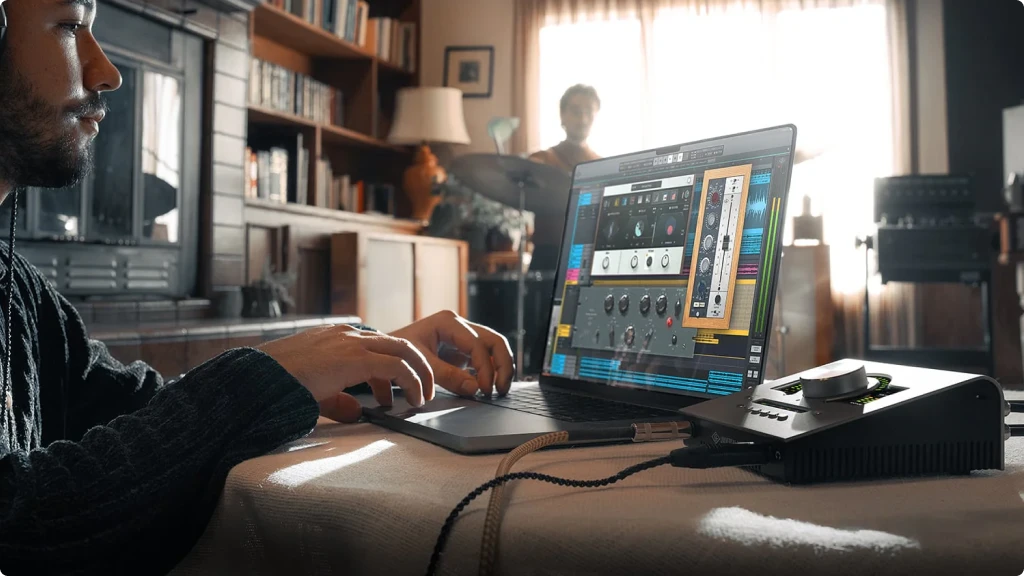
The Apollo Twin X has sat on the desks of hitmakers for years, and for good reason. Universal Audio successfully shrank the massive racks of gear found in places like Abbey Road into a grey metal box that fits in a backpack. The engineering achievement here is not just miniaturization but maintaining the signal quality and workflow philosophy that defined those legendary studios.
In this Apollo Twin X review, I am examining the Gen 2 model specifically, which Universal Audio released to tighten their grip on the desktop interface market. The improvements are incremental but meaningful. The upgraded AD/DA converters push the dynamic range to 129 dB on monitor outputs, and the integration of Sonarworks correction directly into the DSP chain addresses a pain point that home studio owners have struggled with for years.
This interface is for the creator who wears every hat. You are the talent, the engineer, and the producer, often within the same hour. You need gear that acts as a partner rather than just a passive tool. Universal Audio carries a legacy rooted in analog hardware design, and they bring that philosophy to this digital interface. They do not just want you to record audio. They want you to record a finished record. If you are tired of dry, lifeless recordings that require hours of post-processing to sound decent, and you want that polished sound going in, this is built specifically for you.
2. Features Explained: Under the Hood
The Apollo Twin X is dense with features, but I will focus on the ones that actually change how you make music rather than listing specifications that look good on paper but do not affect your workflow.
Unison Mic Preamps
This is the secret sauce that separates the Apollo from conventional interfaces. The two preamps do not just amplify sound. They physically change their impedance and gain staging characteristics to match the classic gear they are emulating. When you load a Neve 1073 plugin, the hardware circuit literally reconfigures itself to interact with your microphone the way the original 1973 British console would.
- What It Means for You: Think of this like a chameleon changing colors based on its environment. Most interfaces are just a clean window between your microphone and your computer. This interface is more like a lens filter that adds color and character before the signal even becomes digital. If you want your vocals to sound warm and thick like a 1970s rock record, you load the appropriate plugin, and the interface physically transforms to give you that sound instantly. You commit to a tone during recording, which helps you make faster creative decisions and reduces the paralysis of infinite digital options later.
Realtime UAD Processing
The unit contains dedicated SHARC processors (either two in the Duo or four in the Quad version) to run plugins in realtime. Your computer does not have to do any of the processing work. You can track through compressors, EQs, reverbs, and delays with latency measured in single-digit milliseconds, which is imperceptible to human performers.
- What It Means for You: Imagine trying to sing with a slight echo between when you make a sound and when you hear it in your headphones. That disconnect, even if it is just 20-30 milliseconds, makes it impossible to perform naturally. Your brain fights the delay, and your timing suffers. This feature removes that echo entirely. You hear yourself with reverb, compression, and EQ immediately, as if you were standing in a treated room with hardware processors. It helps vocalists sing with more confidence and better pitch accuracy because the monitoring feels natural. For guitarists, it means you can play through amp simulators that respond to your touch dynamics exactly like a tube amp would, without the uncomfortable latency that makes digital amps feel disconnected.
Apollo Monitor Correction
New to the Gen 2 model, this integrates Sonarworks SoundID Reference directly into the interface DSP chain. It calibrates your speakers or headphones to flatten your room’s acoustic problems. The correction happens before the audio reaches your DAW, so every application benefits from it automatically.
- What It Means for You: Your room is almost certainly lying to you about what your music sounds like. Most untreated home studios have problems. Bass builds up in corners, making you think you have more low end than you actually do. High frequencies might be harsh because of reflective surfaces like windows or hard walls. This feature is like putting corrective glasses on your ears. You hear what is actually in your mix, not what your room is adding or subtracting. The result is that your mixes translate better to car stereos, laptop speakers, and phones because you were not fighting invisible acoustic problems while mixing. You make better EQ decisions because you are working with accurate information.
Assistive Auto-Gain
This feature listens to you perform and sets the recording level automatically. You hit a button, play or sing your loudest passage, and the interface adjusts the gain to prevent clipping while maintaining healthy signal levels.
- What It Means for You: Setting recording levels while holding a guitar or sitting at a microphone is frustrating. You have to stop being a musician, become an engineer, tweak a knob, return to being a musician, play again, check if the level is right, and repeat the process. With Auto-Gain, you just hit a button, play your loudest section, and the interface handles the technical work. It keeps you in creative flow instead of breaking your momentum with technical tasks. More importantly, it prevents you from accidentally ruining a great performance with digital clipping distortion because the level was set too high.
Elite-Class Conversion
The analog-to-digital and digital-to-analog converters have been upgraded in Gen 2. The dynamic range now reaches 129 dB on the monitor outputs, which puts this interface in the same league as converters used in mastering studios.
- What It Means for You: This is about clarity and depth in what you hear. It is similar to the difference between watching a movie in standard definition versus 4K resolution. The improved converters reveal more detail in your recordings. You hear reverb tails fade out longer and more naturally. You can pinpoint exactly where instruments sit in the stereo field with more precision. The noise floor drops so low that during silent passages, you hear actual silence instead of a faint hiss. This level of clarity reveals mistakes in your arrangement and mix that lesser interfaces might hide under a blanket of noise, which makes you a better engineer because you are working with more accurate information.
Bass Management
This allows you to integrate a subwoofer into your monitoring setup and manage the crossover frequency directly from the interface. You can set where the Apollo sends low frequencies to the subwoofer and everything else to your main monitors.
- What It Means for You: If you produce bass-heavy genres like hip-hop, EDM, or any modern pop, you need to hear the low end accurately to make good mixing decisions. This feature acts like a traffic cop for your frequency spectrum. It sends the sub-bass frequencies (typically below 80 Hz) to your subwoofer and the mids and highs to your main speakers. This division of labor means your main speakers work more efficiently because they are not struggling to reproduce frequencies they were not designed to handle, and you get a clear, punchy representation of the sub-bass that helps you make better decisions about kick drums and bass lines.
3. Specs Table
Before you invest in the Apollo Twin X, check these specifications to ensure it fits your studio setup. This detailed breakdown covers everything from input/output configurations to DSP processing power, helping you make an informed decision.
| Feature | Specification | Practical Benefit |
|---|---|---|
| Simultaneous I/O | 10 x 6 (with ADAT expansion) | Record up to 10 inputs at once when using ADAT expansion, perfect for small band sessions |
| Analog Inputs | 2 x XLR/TRS Combo (Mic/Line) 1 x 1/4" Hi-Z (Front Panel) | Record vocals and instruments simultaneously, with quick access to guitar input on the front |
| Digital Inputs | 1 x Optical (ADAT/SPDIF) | Expand to 10 total inputs using an external ADAT preamp for larger recording sessions |
| Analog Outputs | 2 x 1/4" Monitor (L/R) 2 x 1/4" Line Out 1 x 1/4" Headphone | Connect studio monitors, external processors, and headphones without constant cable swapping |
| Digital Outputs | 1 x Optical (ADAT/SPDIF) | Send processed audio to external digital gear or additional converters if needed |
| Compatibility | macOS 11 or later Windows 10 or later (64-bit) | Works with modern Mac and PC systems running professional DAW software |
| Connectivity | Thunderbolt 3 (USB-C connector) | High-speed connection with low latency and stable performance (cable often sold separately) |
| Resolution | 24-bit / 192 kHz | Professional audio quality that captures every detail of your performance |
| Dynamic Range | 129 dB (Monitor Outputs) 127 dB (Line Outputs) 119 dB (Mic Preamps) | Exceptional clarity with ultra-low noise floor, revealing subtle details in your recordings |
| Frequency Response | 20 Hz - 20 kHz (±0.1 dB) | Flat, accurate reproduction across the entire audible spectrum for trustworthy mixing |
| Phantom Power | +48V (Switchable per channel) | Powers condenser microphones independently on each input for flexible recording setups |
| Preamp Gain Range | 0 to 65 dB | Enough clean gain to drive even demanding microphones like the SM7B without external boosters |
| Direct Monitor | Yes (DSP-powered with effects) | Hear yourself with compression, EQ, and reverb in real-time with near-zero latency |
| DSP Processing | Duo: 2 x SHARC processors Quad: 4 x SHARC processors | Run UAD plugins in real-time without taxing your computer's CPU during tracking |
| Bus Powered | No (External power supply included) | Dedicated power ensures clean, stable performance without drawing from your computer |
| Power Consumption | 30W maximum | Efficient operation with locking power connector to prevent accidental disconnection |
| MIDI | No | Not designed for MIDI workflow; use a separate MIDI interface if needed |
| Included Software | UA Connect App Console Software Apollo Monitor Correction (Sonarworks) Realtime Analog Classics Bundle | Complete recording and mixing environment with professional emulations out of the box |
| Special Features | Unison Technology Auto-Gain Built-in Talkback Bass Management Alt Speaker Switching | Professional studio features that streamline workflow and improve recording quality |
| Headphone Output Power | 130 mW per channel @ 60Ω | Drives professional headphones with plenty of clean volume and headroom |
| THD+N | < 0.001% (Mic Preamps) < 0.0005% (Line Outputs) | Extremely low distortion preserves the natural character of your recordings |
| Dimensions | 6.25" W x 3.4" H x 9.4" D (159 mm x 87 mm x 238 mm) | Compact desktop footprint that doesn't dominate your workspace |
| Weight | 3.4 lbs (1.54 kg) | Solid build quality with enough weight to stay put during cable connections |
4. Performance: Sound and Speed in Real Use
When I sat down to test the Apollo Twin X for this review, the first thing that struck me was the silence. Not the absence of music, but the absence of noise. The improved converters and headphone amplifier circuit deliver an incredibly low noise floor. When you stop playing, the silence is genuinely dead quiet. No hiss, no hum, just blackness.
I tested the Unison preamps with a Shure SM7B, which is a notoriously gain-hungry dynamic microphone. Usually, this mic needs an additional booster like a Cloudlifter to get clean, strong signal levels. The Apollo drove it comfortably without any external gain device. The preamps have enough clean gain to handle even difficult microphones. I loaded the Manley Voxbox plugin, and the transformation was immediate. The dull, somewhat lifeless sound typical of a dynamic mic suddenly became airy, open, and expensive-sounding. The EQ curve and tube saturation from the emulation gave the vocal a presence that would normally require careful post-processing.
The latency performance is genuinely impressive. I tracked electric guitar through a UAD Marshall Plexi amp simulator while monitoring with plate reverb on an aux send. There was no perceptible disconnect between when I played a note and when I heard it. The response felt immediate and natural, exactly like playing through a real amplifier in a room. This matters tremendously for performance quality. When monitoring feels wrong, even slightly delayed, performers compensate unconsciously. Timing suffers, and the takes feel stiff.
However, I need to address the DSP limitations on the Duo model honestly. The two SHARC processors fill up faster than you might expect. If you load a heavy channel strip plugin like the Neve 1073 or API Vision on both input channels simultaneously, you have already consumed a significant portion of your available processing. Try to add a reverb plugin on an auxiliary send for monitoring, and you might hit the DSP limit. The interface will warn you that processing is maxed out, and you will have to make choices about which effects to disable.
For tracking a single vocal with a guitar accompaniment, the Duo handles everything comfortably. But if you plan to mix entire sessions using only UAD plugins within the Console application, or if you regularly track with multiple heavy processors running simultaneously, the Quad Core version is the safer investment. The Duo works well for its intended purpose, which is tracking small sessions with professional sound. You just have to manage your DSP resources consciously and make decisions about which effects matter most during recording.
5. Design and Usability: Built to Last
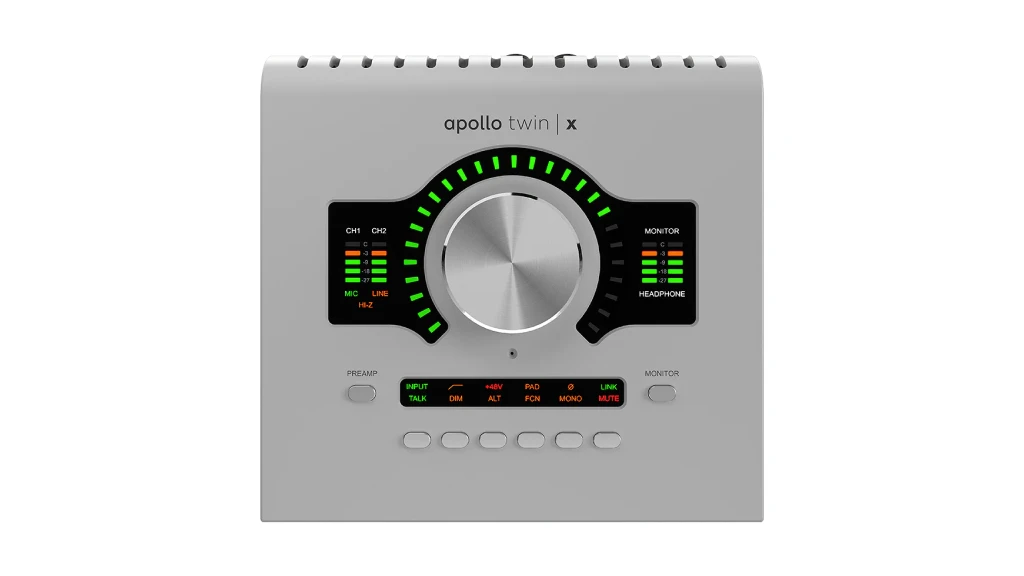
The Apollo Twin X follows a design philosophy of functional elegance. Universal Audio did not reinvent the form factor for Gen 2 because the original design works. The unit sits on your desktop with a reassuring weight that prevents it from sliding around when you plug and unplug cables. The brushed aluminum chassis feels substantial and premium, not like plastic consumer electronics.
Front Panel
The main control is a large, infinite rotary encoder that dominates the front panel. It feels smooth and precise under your fingers, with just enough resistance to prevent accidental adjustments. The encoder is surrounded by dedicated buttons for selecting what you are controlling: Preamp gain, Monitor volume, or Headphone volume. Press a button, and the encoder immediately controls that parameter. The feedback is clear and immediate.
The Hi-Z instrument input is positioned right on the front panel, which is a detail that matters more than it might seem. When you want to track guitar, you do not have to reach around the back of the interface to plug in. You just grab a cable and plug directly into the front. This small convenience eliminates frustration and keeps you focused on music instead of cable management. The LED metering is bright enough to see clearly across the room, providing constant visual feedback on your input and output levels.
Back Panel
The back panel is compact but well-organized. The power supply connection uses a locking mechanism, which is a crucial detail for anyone who might move the interface between locations or use it in live situations. A standard power connector can vibrate loose during transport. The locking mechanism ensures the connection stays secure.
The Thunderbolt 3 port feels solid and well-constructed. The optical input provides future expansion capability. If you eventually need to record more than two inputs simultaneously, perhaps a full drum kit, you can purchase an 8-channel ADAT preamp and connect it through the optical port. This expands your input count to 10 channels without replacing the Apollo interface. The flexibility is there when you need it.
Setup Experience
Universal Audio has improved the onboarding process for new users, but it remains more involved than plug-and-play USB interfaces. You must install the UA Connect application and register your device online. The software downloads drivers and plugin installers, which can take substantial time depending on your internet connection. The initial setup process might take 30-45 minutes between downloading, installing, and restarting your computer.
Once installed, the Console software becomes your virtual mixer. The interface resembles an analog mixing board, with channels flowing from top to bottom following the natural logic of gravity. For users coming from simple interfaces that just show input and output meters, the Console might feel intimidating at first. There are aux sends, bus routing options, insert slots for plugins, and multiple monitoring paths to configure.
However, the complexity is logical rather than arbitrary. Everything follows standard mixing console conventions. If you have ever used a hardware mixer or studied basic audio engineering, the layout will make sense. The learning curve exists, but it teaches you proper signal flow concepts that make you a better engineer. After a few sessions, the routing becomes second nature, and you appreciate having granular control over your monitoring and recording paths.
6. Duo vs. Quad Core - Twin X vs. Twin X USB
When buying the Apollo Twin X, you are forced to make a confusing choice: Duo or Quad? They look identical, but the Quad costs significantly more. The difference lies in the DSP chips inside—the engine that powers the plugins.
The Duo Core: This unit has two SHARC processors. It is like a sports car with a small trunk. It is fast and high-quality, but you can’t pack too much into it.
- Best for: Musicians who mostly want to track vocals or guitar through a few key plugins (like a preamp, a compressor, and a reverb). It handles a typical recording chain perfectly fine.
- The Limitation: If you try to load heavy plugins across all channels and then add a massive reverb, you will hit the “DSP Limit Exceeded” wall. You might find yourself freezing tracks to free up power.
The Quad Core: This unit has four SHARC processors. It is the same sports car, but with a trailer.
- Best for: Power users who want to mix entire songs using mostly UAD plugins. If you want to run a Neve EQ and an 1176 compressor on every single drum track, plus tape emulations on the master bus, you need the Quad.
- The Advantage: You rarely have to worry about hitting the ceiling. You have double the horsepower, which gives you the freedom to experiment with complex chains without doing math in your head.
If you can afford the stretch, buy the Quad. Nobody ever complained about having too much power. But if you are strictly using this to record one track at a time, the Duo will serve you well.
The “Standard” Apollo Twin X (Thunderbolt 3): This is the “Gen 2” model. If you want the new features I mentioned above—like the SoundID Monitor Correction, Assistive Auto-Gain, and the upgraded converters—this is the one you buy.
- Connection: Thunderbolt 3 (USB-C connector with the lightning bolt symbol).
- Compatibility: Works on Mac and Windows (provided your PC has a Thunderbolt 3/4 port).
- LUNA Integration: Deep. You get the full “Accelerated Realtime Monitoring” experience, meaning the DAW feels like an analog console with zero latency.
- Expansion: You can daisy-chain this with other Thunderbolt Apollos later as your studio grows.
The Apollo Twin X USB: This is mostly for Windows users without Thunderbolt. If your PC only has standard USB ports (even if they are USB-C shape), you must get this version.
- Connection: USB 3 (USB-C connector, but strictly USB protocol).
- Compatibility: Windows ONLY. This unit will not work on a Mac. Do not try it.
- The Trade-off: This version is based on the previous generation (Gen 1) architecture. You generally miss out on the new Gen 2 specific features like the onboard Sonarworks integration and the slightly better D/A conversion specs.
- LUNA: You can use the LUNA recording software, but it runs natively on your CPU. You lose the “magical” DSP-integrated monitoring workflow that makes LUNA special.
If you are on a Mac, get the Thunderbolt version (Gen 2). Period. If you are on Windows, check your motherboard. If you have a Thunderbolt 3/4 port, get the Thunderbolt version (Gen 2). If you only have standard USB ports, get the USB version, but know that you are buying slightly older tech.
7. Final Thoughts: The Verdict
To conclude this Apollo Twin X review, I believe this interface remains the benchmark in its category for legitimate reasons that go beyond marketing. It is not just about impressive specifications on a data sheet. It is about workflow philosophy and how the tool shapes your creative process.
The Gen 2 improvements are meaningful, particularly for home studio owners working in untreated rooms who need the Sonarworks correction to make trustworthy mixing decisions. The converter upgrades provide a level of clarity that reveals details in your recordings that lesser interfaces mask. The Auto-Gain feature seems minor until you use it regularly and realize how much time and frustration it eliminates from your tracking sessions.
If you are recording podcasts, conducting Zoom calls, or capturing basic voiceovers, this interface is overkill. You can save considerable money with a simpler USB interface that handles those tasks perfectly well. The Apollo Twin X is not designed for those applications.
However, if you are a musician or producer who wants the recording process itself to feel like a creative instrument rather than a technical obstacle, the Apollo Twin X is an investment in your creative output and workflow efficiency. It forces you to work with professional discipline, committing to sounds and performing with confidence because the monitoring experience is inspiring rather than discouraging.
The price of entry is undeniably high. You will spend more on this interface than on many complete recording setups. But the cost of bad recordings, wasted time, and creative frustration is ultimately higher. If you are serious about your craft and you want to close the gap between your creative vision and your technical execution, the Apollo Twin X delivers on that promise better than any other desktop interface I have tested.
8. FAQ
Can I use my 3rd party plugins (like Waves, FabFilter, or Slate) inside the Apollo Console app?
No, you cannot. The Console application—the digital mixer where you set up your low-latency monitoring—exclusively runs UAD-2 DSP plugins. This is because those plugins run on the interface’s chips, not your computer’s CPU. However, you can absolutely use all your Waves and FabFilter plugins inside your DAW (Logic, Pro Tools, Ableton) just like normal. You just can’t track through them with zero latency in the Console app.
I’m a streamer. Can I route my game audio and microphone to OBS using this interface?
Yes, and it is actually one of the best interfaces for this once you set it up. The Apollo driver includes “Virtual Channels.” Essentially, you can tell your computer to send Spotify or Game Audio to “Virtual 1-2” and your Microphone to “Analog 1.” Inside the Console app, you can mix them together, add broadcast-quality compression to your voice, and send a single, polished stereo mix straight into OBS. It replaces the need for a physical mixer like a GoXLR.
Can I bypass the preamps if I want to use my own external hardware preamp?
Yes. If you have a fancy external preamp (like a warm Audio WA-73) that you want to use, you can connect it to the TRS Line inputs on the back. While the signal technically passes through the variable gain circuit, setting the Apollo input to “Line” mode creates an incredibly clean, transparent path that does not color the sound of your external gear. You get the benefit of your external hardware tone combined with the Apollo’s elite-class conversion.
| Why Can You Trust Us

| ALSO REVIEWED