

Best Audio Interface Under 200: Top 5 Picks (2026)
- Audio Interface, Buying Guides
- by Bruno Bontempo
What can you get from the best audio interface under 200? I break down 5 affordable picks for home studios, mobile creators, and musicians in this guide.

Our articles may include affiliate links and we may earn a commission. Here how it works.
Jump to...
| QUICK OVERVIEW
Intro: Best Audio Interface Under 200
The best audio interface under 200 opens up serious recording possibilities. At this price point, you move beyond entry-level compromises into territory where converters, preamps, and build quality start to rival gear costing twice as much.
Expect cleaner preamps, better headphone amps, higher sample rates, and features like MIDI I/O or individual phantom power switches. Some models in this range include character-adding options like vintage preamp modes or automatic gain staging.
I compared five affordable audio interfaces to help you find the right fit for home studio recording, podcasting, streaming, or mobile production. Each serves a different workflow, so let me break down what sets each one apart.
Top Pick
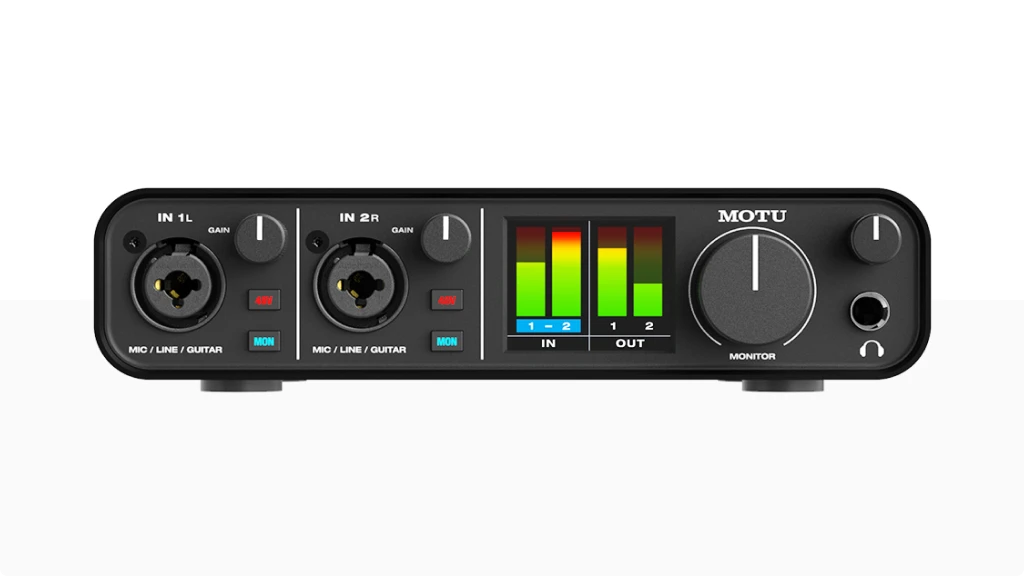
MOTU M2
4.7
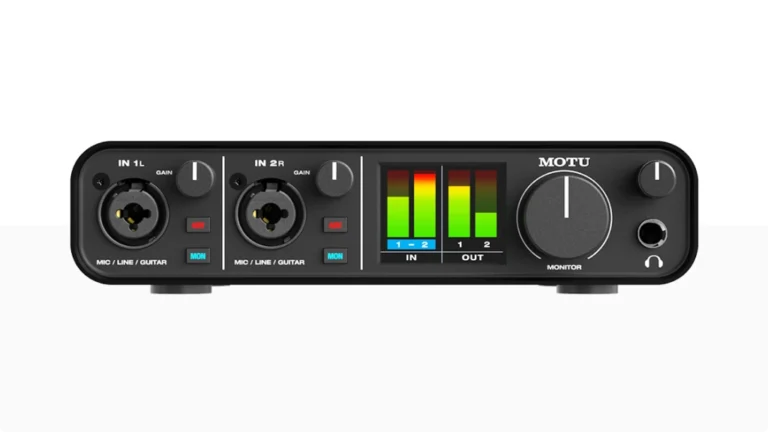
The MOTU M2 brings ESS Sabre32 Ultra converters—the same technology found in interfaces costing thousands—into a $200 package. With 120dB dynamic range, individual phantom power per channel, MIDI I/O, and a full-color LCD meter, it’s the most technically capable audio interface under 200.
| Pros
- ESS Sabre32 Ultra DAC (120dB dynamic range)
- Individual 48V phantom power per channel
- Full-color LCD level meters
- MIDI In/Out (5-pin DIN)
- Ultra-low latency (2.5ms round-trip at 96kHz)
| Cons
- Limited to 2 XLR inputs
- Limited routing options
- No Air mode or character options
| Key Features
- Inputs: 2x XLR/TRS combo (mic/line/Hi-Z)
- Outputs: 2x 1/4" TRS balanced + 2x RCA (mirrored) + 1x 1/4" headphone
- Compatibility: macOS, Windows, iOS (with adapter)
- Connectivity: USB-C (USB 2.0, bus-powered)
- Resolution: 24-bit / 192kHz
- Plus: Independent monitor buttons per channel, loopback, on/off switch, DC-coupled outputs, Performer Lite + Ableton Live Lite
| Best for...
- Home studio recording with demanding monitoring
- Mixing and mastering (high-quality DAC)
- Connecting external synths via MIDI
- DJs needing RCA outputs
- Anyone prioritizing converter quality
| Not ideal for...
- You need preamp character options (Vintage/Air mode)
- You want auto-gain features for simplified setup
- You prefer a larger software bundle
Overview
MOTU quietly raised the bar for what an affordable audio interface can deliver. The M2 uses the same ESS Sabre32 Ultra DAC technology found in their high-end interfaces and professional studio gear. The result: 120dB dynamic range on the outputs and -129dBu EIN on the mic inputs. Those numbers rival interfaces costing three to four times as much.
The full-color LCD meters are unique at this price. They show input and output levels clearly enough that you can set gain without opening your DAW. Most competitors offer basic LED indicators—the M2 gives you actual metering.
Individual phantom power switches per channel let you use a condenser mic alongside a ribbon mic without risking damage. Individual monitor buttons let you direct-monitor one input while processing the other through your DAW—a level of flexibility usually reserved for pricier units.
MIDI I/O on 5-pin DIN connectors is increasingly rare on affordable interfaces. If you work with hardware synths, drum machines, or MIDI controllers that don’t use USB, this matters.
What the M2 lacks: any built-in character options. No Vintage mode, no Air button. If you want the sound shaped before it hits your DAW, look at the Universal Audio Volt 2. The M2 is about transparency—capturing exactly what you put into it.
For pure audio quality in an audio interface under 200, the MOTU M2 sets the standard.
Full review
Best for Beginners
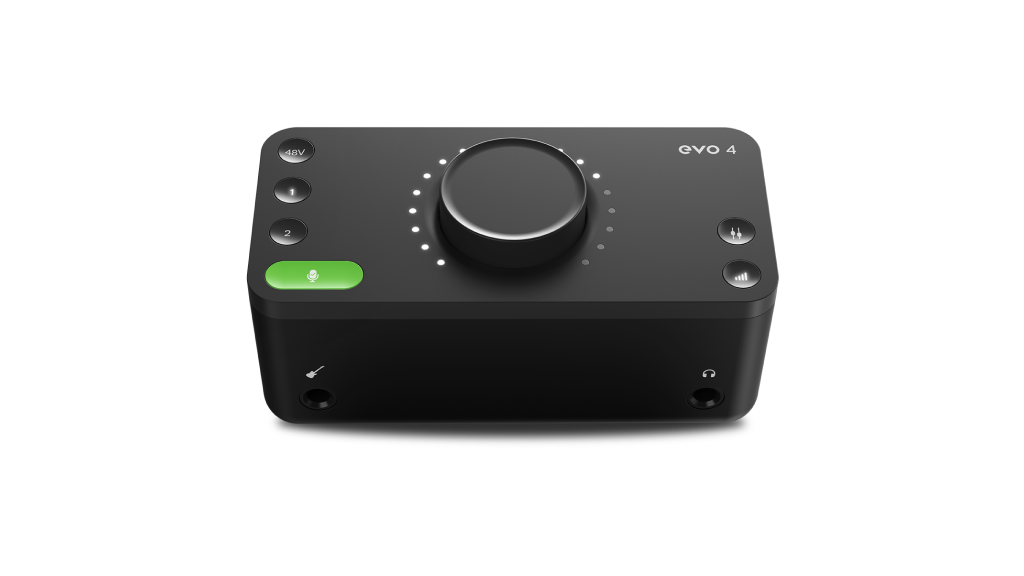
Audient EVO 4
4.5
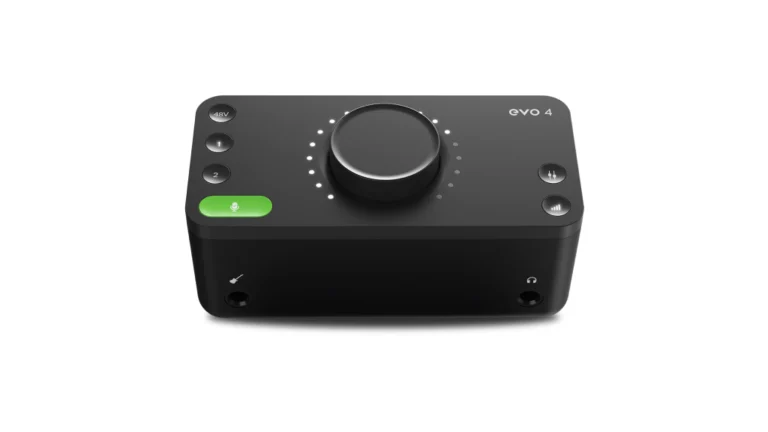
The Audient EVO 4 strips away complexity without sacrificing sound quality. One large knob controls everything, Smartgain sets your levels automatically, and the JFET instrument input handles guitars with warmth. It’s the simplest path from microphone to recording.
| Pros
- Smartgain auto-levels your inputs accurately
- Single-knob interface reduces confusion
- JFET instrument input for guitar character
- Loopback built-in for streaming
- Solid software bundle (Cubase LE, plugins)
| Cons
- Plugging in headphones mutes monitors (hardwired)
- Limited to 96kHz sample rate
- No MIDI I/O
| Key Features
- Inputs: 2x XLR/TRS combo (rear) + 1x 1/4" Hi-Z (front, overrides input 1)
- Outputs: 2x 1/4" TRS balanced + 1x 1/4" headphone
- Compatibility: macOS, Windows, iOS
- Connectivity: USB-C (USB 2.0, bus-powered)
- Resolution: 24-bit / 96kHz
- Plus: Smartgain automatic level setting, JFET DI, loopback, EVO software mixer, Cubase LE, Two Notes cab sims, Loopmasters samples
| Best for...
- First-time home recordists
- Podcasters wanting simple setup
- Guitarists tracking direct
- Streamers using loopback
- Anyone who dislikes manual gain staging
| Not ideal for...
- You need to switch between headphones and monitors frequently
- You require higher sample rates for video work
- You want MIDI connectivity
Overview
Audient built their reputation on expensive mixing consoles used in professional studios. The EVO 4 distills that experience into a beginner-friendly format.
Smartgain is the standout feature. Press the green button, select your inputs, speak or play for ten seconds, and the EVO sets your levels automatically. It aims for -12dB headroom—a safe target that leaves room for dynamics while keeping your signal clean. I’ve used it with condensers, dynamics, and DI guitar, and it consistently nails the level without clipping.
The single-knob interface takes some adjustment. The large encoder controls everything: input gain, monitor volume, headphone level. You select which function using the illuminated buttons, then turn the knob. It’s elegant once you understand it, but the first few sessions require attention to which mode you’re in.
The JFET instrument input on the front adds subtle warmth to DI guitar and bass. It’s not dramatic coloration—just a bit of life that helps direct recordings sit better in a mix.
One frustration: plugging in headphones automatically mutes the main outputs. Audient designed this intentionally, but if you frequently switch between monitors and cans, it gets old. This limitation is hardwired and can’t be fixed with firmware.
For beginners who want Audient preamp quality without manual gain staging, the EVO 4 is the most approachable audio interface under 200.
Best Value
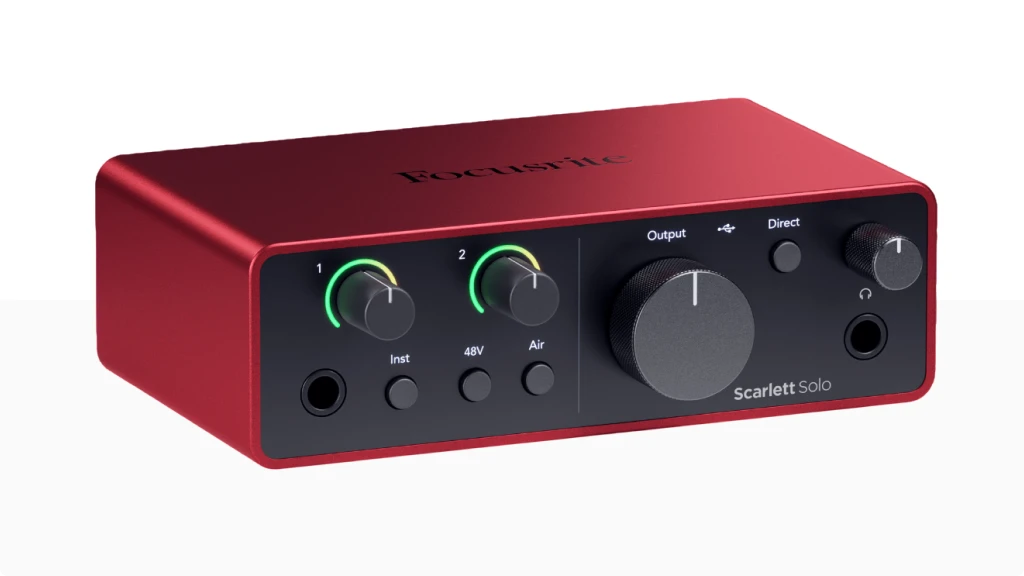
Scarlett Solo 4th Gen
4.6
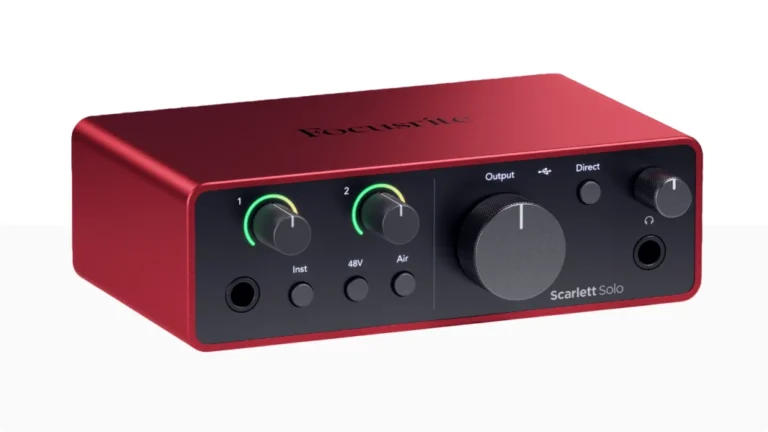
The Scarlett Solo 4th Gen delivers Focusrite’s legendary preamp quality and 120dB converters at the lowest price in the lineup. Air mode adds high-end presence, and the included software bundle provides everything needed to start producing immediately.
| Pros
- 120dB dynamic range converters (RedNet-derived)
- Air mode with Presence and Harmonic Drive
- Massive software bundle (Pro Tools Intro+, Ableton Live Lite, FL Studio 6-month)
- Ultra-compact and lightweight
- 3-year warranty
| Cons
- Single mic input limits multi-source recording
- No Auto Gain or Clip Safe (those are on 2i2+)
- 57dB preamp gain (lower than 2i2)
| Key Features
- Inputs: 1x XLR (rear) + 1x 1/4" Hi-Z (front)
- Outputs: 2x 1/4" TRS balanced + 1x 1/4" headphone
- Compatibility: macOS, Windows, iPadOS
- Connectivity: USB-C (USB 2.0, bus-powered)
- Resolution: 24-bit / 192kHz
- Plus: Air mode (Presence + Harmonic Drive), loopback, Dynamic Gain Halos, Focusrite Control 2 app, Hitmaker Expansion bundle
| Best For...
- Singer-songwriters recording vocal + guitar
- Solo content creators and podcasters
- Beginners wanting an industry-standard interface
- Guitarists who want Air mode character
- Tight desk space
| Not ideal for...
- You need two simultaneous mic inputs
- You require Auto Gain for hands-off level setting
- You want individual phantom power per channel
Overview
The Scarlett Solo is Focusrite’s entry point into their flagship lineup. The 4th generation brings the same 120dB dynamic range converters from their RedNet professional interfaces down to a $140 price point.
Air mode is the signature feature. Engage it and the preamp adds a broad high-shelf boost in the upper midrange—like the presence lift from a vintage console. The 4th gen adds a second Air option: Presence + Harmonic Drive, which layers subtle saturation on top of the EQ. For vocals and acoustic guitars, it can add polish that would otherwise require plugins.
The limitation: Air mode only works on the mic input, not the instrument input. If you record guitar DI and want that character, you’ll need to use a DI box into the XLR.
The included software bundle is among the most generous in this category. Pro Tools Intro+, Ableton Live Lite, six months of FL Studio Producer Edition, plus a collection of plugins including Auto-Tune Access, Softube Marshall amp sim, and Native Instruments Massive. For beginners, this bundle alone justifies the purchase.
What the Solo misses compared to the Scarlett 2i2: Auto Gain and Clip Safe features. If you want automated level setting, step up to the 2i2. But for solo recording where you only need one mic at a time, the Scarlett Solo 4th Gen is the best cheap entry into the Focusrite ecosystem.
FULL REVIEW

Best Sound Character
Universal Audio Volt 2
4.6
The Volt 2 brings Universal Audio’s analog preamp heritage into an affordable format. The Vintage mode—modeled on UA’s legendary 610 tube preamp—adds warmth and saturation before the signal hits your DAW. It’s the most colored audio interface under 200.
| Pros
- Vintage mode adds tube-style warmth and saturation
- Clean preamps with good gain range
- Solid metal construction
- Excellent software bundle (Melodyne Essential, Marshall amp sim)
- Works directly with iPad (USB-C)
Label
- Single headphone jack
- Small LED metering only
- No MIDI I/O
| Key Features
- Inputs: x XLR/TRS combo (mic/line/Hi-Z)
- Outputs: 2x 1/4" TRS balanced + 1x 1/4" headphone
- Compatibility: macOS, Windows, iOS
- Connectivity: USB-C (USB 2.0, bus-powered), 5V DC input for low-power USB
- Resolution: 24-bit / 192kHz
- Plus: Vintage preamp mode (610-style), direct monitoring with stereo/mono toggle, Ableton Live Lite, Melodyne Essential, Marshall Plexi, Softube amps
| Best for...
- Wanting analog character without outboard gear
- Recording vocals that need warmth
- Singer-songwriters tracking demos
- iPad-based mobile recording
- Fans of UA's analog sound
| Not ideal for...
- You need independent phantom power per channel
- You want transparent, uncolored recording
- You require multiple headphone outputs
Overview
Universal Audio built their reputation on high-end preamps and processors used in professional studios worldwide. The Volt series brings that legacy to a price point accessible to bedroom producers.
The Vintage mode is what sets the Volt 2 apart. Based on UA’s 610 tube preamp—the same design used on countless classic records—it adds harmonic saturation and a slight EQ curve that imparts warmth to the signal. Engage it and vocals get smoother, guitars get rounder.
A reality check: at proper recording levels (-12dB or so), the Vintage mode effect is subtle. You won’t get dramatic tube distortion—it’s more of a gentle polish. Push the gain harder and you’ll hear more saturation, but that’s not how you’d typically track.
The metal construction feels more premium than the Audient EVO 4 or even the Scarlett Solo. The knobs are solid, the buttons have good tactile feedback, and the illuminated indicators are easy to read in any lighting.
One design choice that annoys some users: phantom power is shared across both channels. You can’t use a condenser on input 1 and a ribbon on input 2 safely. If you need independent phantom power, the MOTU M2 is the better choice.
The software bundle includes Melodyne Essential—a $99 pitch and timing correction tool—alongside amp sims and Ableton Live Lite. For the price, you’re getting significant production tools.
If you want character from your audio interface under 200, the Volt 2 delivers UA’s analog flavor.
FULL REVIEW
Best Portability
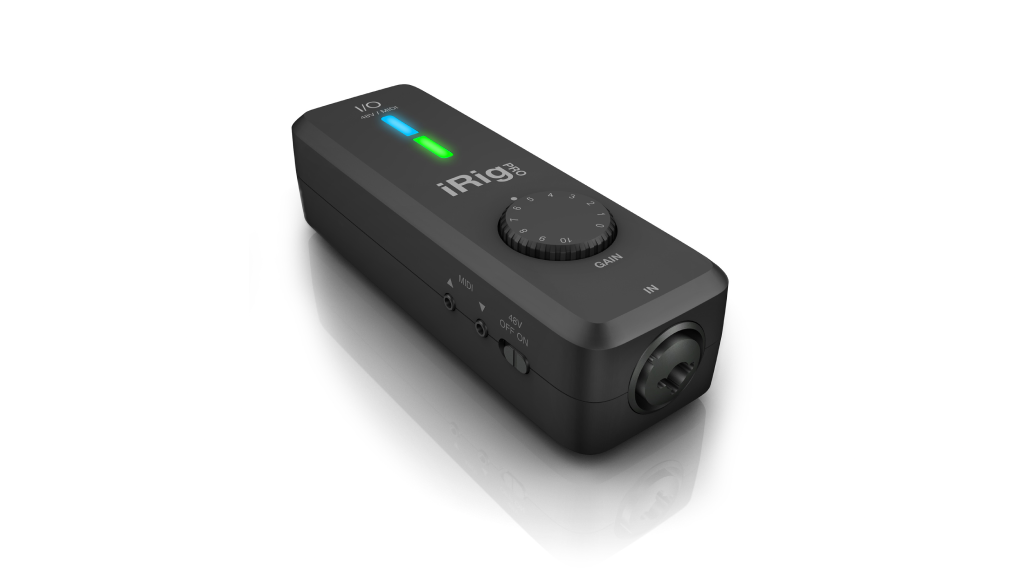
iRig Pro I/O
4.5
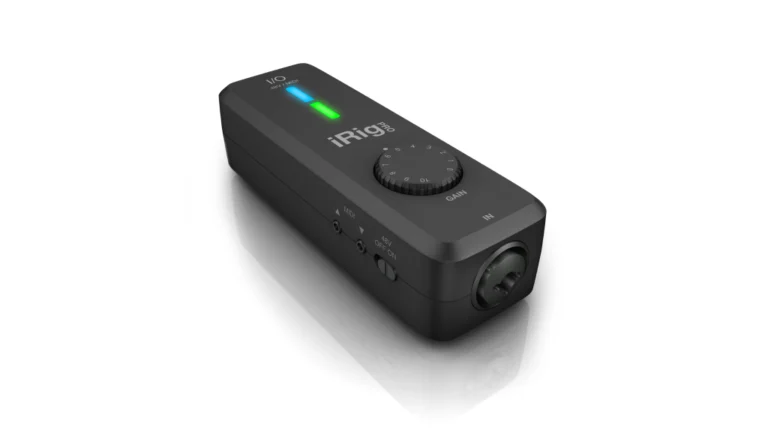
The iRig Pro I/O packs a full audio/MIDI interface into a pocket-sized unit. Battery-powered, iOS/Android/Mac/PC compatible, with a Neutrik combo input and included Lightning and USB cables—it’s built for recording anywhere.
| Pros
- Fits in a jacket pocket
- Battery-powered (2x AA) for true mobile use
- Works with iOS, Android, Mac, and PC
- MIDI In/Out included
- Generous software bundle (AmpliTube 4, SampleTank SE)
| Cons
- Single input only
- 96kHz maximum sample rate
- Weak headphone output
| Key Features
- Inputs: 1x XLR/TRS combo (mic/line/Hi-Z)
- Outputs: 1x 1/8" stereo headphone
- Compatibility: macOS, Windows, iOS, Android
- Connectivity:
- Resolution: 24-bit / 96kHz
- Plus: 48V phantom power, MIDI In/Out (2.5mm with adapters), gain LED, AmpliTube 4, SampleTank SE, T-RackS 5
| Best for...
- Recording on iOS devices (iPhone, iPad)
- Field recording and mobile podcasting
- Traveling musicians capturing ideas
- MIDI controller integration on the go
- Android recording
| Not ideal for...
- Need two simultaneous inputs
- Require high-quality headphone monitoring
- Want a desktop-focused interface
Overview
IK Multimedia pioneered the mobile music-making category, and the iRig Pro I/O represents their most capable single-channel interface. It’s small enough to fit in your hand, yet includes features usually found on desktop units.
The Neutrik combo input accepts XLR mics (with 48V phantom power) or 1/4″ instruments/line sources. The gain knob has multicolor LED feedback: green for good levels, red for clipping. It’s minimal but effective.
MIDI I/O is rare on ultra-portable interfaces. The iRig Pro I/O includes both MIDI In and Out via 2.5mm jacks with adapters included. If you work with hardware synths or MIDI controllers in mobile sessions, this matters.
Power flexibility is a highlight. Run it on two AA batteries for complete portability, USB bus power when connected to a computer, or the optional iRig PSU 3A to power the interface while charging your iOS device during extended sessions.
The headphone output is functional but not powerful. High-impedance studio headphones may struggle with volume. For critical monitoring, bring efficient cans.
Some users report reliability issues—crashes with certain iOS apps, crackling on inputs, or inconsistent behavior. Others have used theirs for years without problems. Build quality is plastic, which keeps weight down but won’t survive abuse.
For musicians who need an audio interface under 200 that travels everywhere, the iRig Pro I/O offers the most complete mobile solution.
Specs Table
| Feature | MOTU M2 | Audient EVO 4 | Focusrite Scarlett Solo 4th Gen | Universal Audio Volt 2 | IK Multimedia iRig Pro I/O |
|---|---|---|---|---|---|
| Category | Top Pick | Best for Beginners | Best Value | Best Sound Character | Best Portability |
| Resolution | 24-bit/192kHz | 24-bit/96kHz | 24-bit/192kHz | 24-bit/192kHz | 24-bit/96kHz |
| Mic Inputs | 2x XLR/TRS | 2x XLR/TRS | 1x XLR | 2x XLR/TRS | 1x XLR/TRS |
| Instrument Input | Yes (Hi-Z) | Yes (JFET) | Yes (Hi-Z) | Yes (Hi-Z) | Yes (Hi-Z) |
| Outputs | 2x TRS + 2x RCA + HP | 2x TRS + HP | 2x TRS + HP | 2x TRS + HP | 1x 1/8 HP |
| Phantom Power | Individual per channel | Shared | Shared | Shared | Yes |
| MIDI I/O | Yes (5-pin DIN) | No | No | No | Yes (2.5mm) |
| Character Mode | No | No | Air (Presence + Drive) | Vintage (610-style) | No |
| Auto Gain | No | Smartgain | No (Solo model) | No | No |
| USB Type | USB-C | USB-C | USB-C | USB-C | Lightning + USB |
| Battery Power | No | No | No | No | Yes (2x AA) |
| Dynamic Range | 120dB | 115dB | 120dB | N/A | N/A |
| Mobile Compatible | iOS (adapter) | iOS | iPadOS | iOS | iOS + Android |
Final Thoughts: Choosing the Best Audio Interface Under 200
Selecting an audio interface under 200 depends on what matters most: converter quality, ease of use, analog character, or portability.
The MOTU M2 wins on technical performance. ESS Sabre32 Ultra converters, individual phantom power, MIDI I/O, and full-color metering give it capabilities that rival interfaces at much higher prices. If you prioritize sound quality and flexibility, this is the one.
Audient EVO 4 is the easiest path for beginners. Smartgain removes the guesswork from level setting, and the single-knob interface keeps things simple. The tradeoff—headphones muting monitors automatically—may frustrate some workflows.
Focusrite Scarlett Solo 4th Gen offers the best value. RedNet-derived converters, Air mode character options, and an industry-leading software bundle make it hard to beat at $140. Just know you’re limited to one mic input.
Universal Audio Volt 2 brings analog character to the affordable tier. The Vintage mode adds warmth that typically requires outboard gear or plugins. For vocalists and singer-songwriters wanting that polished sound baked in, it delivers.
IK Multimedia iRig Pro I/O is built for mobility. Battery power, iOS/Android compatibility, MIDI I/O, and pocket-sized design let you record anywhere. The single input and plastic build are the tradeoffs for that portability.
Each audio interface under 200 on this list serves a specific purpose. Match your primary use case to the right tool, and you’ll have gear that can grow with you.
While we’ve selected these specific models for their price, you can see how they compare to other priced options in our master guide to the best budget audio interface.If you are on a very tight budget, we recommend checking out our full list of the best audio interfaces under $50 and best audio interface under 100 where we test the ultra-budget options.
FAQ
Can I use an audio interface under 200 for professional recording?
Yes. Interfaces like the MOTU M2 and Focusrite Scarlett Solo 4th Gen use converters and preamps that meet professional standards. Albums, podcasts, and commercial voiceovers have been recorded on gear in this price range. What matters more than the interface is your recording environment, microphone choice, and technique. An audio interface under 200 won’t be the weak link in your signal chain.
What's the difference between Air mode and Vintage mode?
Air mode (Focusrite) and Vintage mode (Universal Audio) both add character to your recordings, but work differently. Air mode applies a broad high-frequency EQ boost and optional harmonic saturation—it brightens and adds presence. Vintage mode (modeled on the UA 610 tube preamp) adds warmth, soft compression characteristics, and tube-like saturation—it rounds and thickens. Air mode suits vocals and acoustic instruments that need clarity. Vintage mode suits recordings that need warmth and body.
Which audio interface under 200 is best for podcasting?
For podcasting, the Audient EVO 4 offers the simplest setup with Smartgain automatic level setting. For a two-person podcast, the Universal Audio Volt 2 or MOTU M2 provide two mic inputs with clean preamps. The Focusrite Scarlett Solo 4th Gen works well for solo podcasters with its loopback feature and reliable drivers. All of these include enough gain for dynamic broadcast mics like the Shure SM58, though gain-hungry mics like the SM7B may benefit from the M2’s cleaner preamps at higher gain settings.
Read: Best Audio Interface for Podcasting: Expert Tested
| Why Can You Trust Us

Bruno Bontempo
I've been recording, producing, and playing bass for over 20 years—from touring with my first band at 15 to playing progressive metal across Europe today. Through multiple albums, projects (Madness of Light, Rising Course, Roots of Ascendant, Human|Archive), and production work, I've tested audio interfaces in every scenario imaginable. At Best Audio Hub, I combine my historian background with years of hands-on music and audio experience. No marketing fluff—just honest insights from someone who's been in the trenches.
| ALSO REVIEWED