Fender Quantum HD 2 Review: Best for Guitarists?
- Audio Interface, Reviews
- by Bruno Bontempo
Our articles may include affiliate links and we may earn a commission. Here how it works.
OUR VERDICT
The Fender Quantum HD 2 delivers serious recording power in a compact form factor. With 75 dB of clean gain from its MAX-HD preamps, 32-bit/192 kHz conversion, and instrument inputs designed by Fender engineers, this interface earns its place in project studios and home setups alike.
The Auto Gain feature removes the guesswork from level setting, and the dedicated re-amp outputs let you experiment with tones without cutting multiple takes. Add in the included Fender Studio Pro software, and you have a complete recording solution that respects both your time and your budget.
Release Date
Jan 2026
21.5x19x5 cm
8.5x7.5x.9 in
1.32 kg
2.9 lb
| Pros
- MAX-HD preamps deliver 75 dB of clean gain for any microphone
- Fender-designed instrument inputs capture guitar and bass accurately
- Auto Gain sets recording levels automatically and reliably
- Built-in re-amp outputs eliminate the need for a separate re-amp box
- Fender Studio Pro DAW included as a perpetual license
| Cons
- Single rotary encoder requires scrolling through menu options
- Small display may be difficult to read from a distance
- No physical direct monitoring switch on the unit itself
| Key Features
- Inputs: 2x XLR/TRS combo + 2x 1/4" instrument inputs
- Outputs: 4x 1/4" balanced TRS + 2x Re-amp + 1x headphone output
- Compatibility: macOS, Windows, iOS, iPadOS, Android
- Connectivity: USB-C (USB 2.0 protocol)
- Resolution: 32-bit / 192 kHz
- Plus: 16 channels ADAT optical input (up to 48 kHz), Stereo S/PDIF input, Fender Studio Pro perpetual license, Universal Control app, MIDI I/O (via breakout cable), Auto Gain, DSP monitor mixer, Loopback
| Best for...
- Guitarists and bassists who record at home
- Singer-songwriters tracking vocals and instruments
- Content creators needing loopback for streaming
- Project studios requiring expandable I/O via ADAT
- Producers who work with amp simulations and re-amping
| Not ideal for...
- Users who need more than 2 simultaneous mic preamps without expansion
- Those seeking Thunderbolt-level latency performance
- Beginners who prefer a simpler two-knob interface
1. Fender Quantum HD 2 Overview: A Guitar-First Interface with Serious Studio Credentials
The Fender Quantum HD 2 marks an interesting chapter in audio interface history. Following Fender’s acquisition of PreSonus, the Quantum series now carries the Fender name while building on three decades of PreSonus engineering expertise. This rebranding isn’t just cosmetic – the collaboration between Fender engineers and PreSonus resulted in instrument inputs specifically designed for guitar and bass, a feature that immediately caught my attention as a working musician.
The Quantum HD 2 sits in competitive territory. It competes with interfaces like the Universal Audio Volt 476, Focusrite Clarett+ 4Pre, and IK Multimedia Axe I/O. However, the Quantum HD 2 differentiates itself through its 20×24 I/O count (when you factor in digital expansion), 32-bit conversion, and the inclusion of Fender Studio Pro – a full-featured DAW that would cost several hundred dollars on its own.
2. Fender Quantum HD 2 Features Explained: What Each Spec Actually Means
Understanding audio interface specifications can feel overwhelming. So let me walk through the key features of the Quantum HD 2 and explain what they mean in practical recording situations.
MAX-HD Preamps with 75 dB Gain
The preamps in the Quantum HD 2 represent PreSonus’s latest design work. With 75 dB of available gain, these preamps can handle everything from hot condenser microphones to gain-hungry dynamic mics like the Shure SM7B – a microphone notorious for requiring external boosters on many budget interfaces.
- What It Means for You: You won’t need a separate preamp or cloudlifter to record with most microphones. The high gain ceiling gives you clean signal at any level, which means less noise in your recordings and more flexibility when choosing mics for your setup.
32-bit / 192 kHz Conversion
The Quantum HD 2 uses high-performance converters capable of recording at 32-bit depth and sample rates up to 192 kHz. The 124 dB dynamic range ensures your recordings capture both the quietest details and loudest transients without distortion.
- What It Means for You: Think of dynamic range like a bucket – the bigger it is, the more audio information you can capture without clipping or losing quiet details. In practical terms, this means forgiving recordings where small level mistakes don’t ruin a take.
Fender-Designed Instrument Inputs
The front-facing instrument inputs weren’t just placed there for convenience. Fender engineers specifically designed the impedance and frequency response for guitar and bass, ensuring the natural dynamics and harmonic content of your instrument translate accurately into your recordings.
- What It Means for You: When you plug your guitar or bass directly into the Quantum HD 2, it responds like plugging into a good amplifier. The tone stays full and dynamic rather than thin or lifeless. For guitarists using amp simulation plugins, this makes a significant difference.
Auto Gain Function
Press the Auto Gain button, play your instrument or speak into your microphone, and the Quantum HD 2 sets the optimal recording level automatically. The interface listens to your performance and adjusts gain staging to prevent clipping while maximizing signal strength.
- What It Means for You: No more guessing about input levels or watching meters while you’re trying to perform. Play naturally, let the interface do the math, and focus on your music. It’s particularly useful when inspiration strikes and you want to capture an idea immediately.
Re-Amp Outputs
Two dedicated re-amp outputs on the front panel let you send recorded DI signals back through physical amplifiers, effects pedals, or other analog gear. The output impedance is set correctly for guitar equipment, so you don’t need a separate re-amp box.
- What It Means for You: Record a clean DI track of your guitar, then experiment with different amps and effects later without needing to play the part again. Made a mistake in the mix? Send the signal through a different amp. It’s like having infinite takes of your best performance.
ADAT and S/PDIF Digital I/Ov
With 16 channels of ADAT input and output plus stereo S/PDIF, the Quantum HD 2 expands far beyond its two built-in preamps. Connect an external 8-channel preamp via ADAT, and you have a 10-input interface for recording full bands or drums.
- What It Means for You: Your interface can grow with your needs. Start with two channels, then add more preamps later without replacing your entire setup. For project studios, this expandability justifies the investment.
DSP Monitor Mixer and Loopback
The built-in DSP mixer lets you create headphone mixes with near-zero latency, independent of your DAW. Loopback routing captures audio from any application on your computer, which streamers and podcasters use to include game audio or music in their broadcasts.
- What It Means for You: Singers can hear themselves with reverb while recording dry. Streamers can mix multiple audio sources easily. Content creators get professional routing flexibility typically found in more expensive interfaces.
Universal Control App Integration
Control preamp gain, phantom power, routing, and monitoring from the Universal Control software on desktop or mobile devices. Settings integrate directly with Fender Studio Pro, allowing you to adjust hardware parameters without leaving your DAW.
- What It Means for You: Make adjustments from your phone or tablet while standing in front of your microphone. No more running back and forth between your recording position and your desk. For self-producing musicians, this workflow improvement is substantial
3. Fender Quantum HD 2 Specifications Table
Here are the complete specifications for the Quantum HD 2. I’ve verified these against multiple sources to ensure accuracy.
| Feature | Specification | Practical Benefit |
|---|---|---|
| Simultaneous I/O | 20 inputs / 24 outputs | Record full bands with ADAT expansion; multiple monitor mixes |
| Analog Inputs | 2x XLR/TRS combo (rear), 2x 1/4" instrument (front) | Mic/line flexibility plus dedicated guitar/bass inputs |
| Analog Outputs | 2x TRS main, 2x TRS line, 2x re-amp, 1x headphone | Multiple monitor sets, re-amping capability, private monitoring |
| Digital I/O | 16 ch ADAT optical, stereo S/PDIF, MIDI (via breakout) | Connect external preamps, synths with MIDI, digital processors |
| Compatibility | macOS, Windows, iOS, iPadOS, Android | Works with any computer or mobile device |
| Connectivity | USB-C (USB 2.0 protocol) | Universal compatibility; bus power support |
| Resolution | 32-bit / 192 kHz | Maximum audio fidelity and future-proof recordings |
| Dynamic Range | 124 dB (converters) | Capture quiet nuances and loud transients without distortion |
| Preamp Gain | 75 dB (MAX-HD) | Sufficient for gain-hungry dynamic mics like SM7B |
| Mic Preamp EIN | -130 dBu (A-weighted, 150Ω) | Low self-noise for clean recordings |
| Phantom Power | +48V (discrete per channel) | Use condenser mics without compromise |
| Software Included | Fender Studio Pro (perpetual license) | Complete DAW with Fender amp plugins, no subscription required |
| Dimensions | 8.5" x 7.5" x 1.9" (216 x 191 x 48mm) | Half-rack width; fits desktop or mobile setups |
| Weight | 2.9 lbs (1.3 kg) | Portable for mobile recording |
| Power | 12V DC external supply (included) | Reliable power for all features; no USB power limitations |
4. Fender Quantum HD 2 Performance: Recording Quality and Real-World Results
Preamp Performance: The MAX-HD preamps deliver on their promise of clean, transparent gain. During testing, I recorded acoustic guitar, electric bass DI, and vocals through a Neumann TLM 102 condenser. At moderate gain levels, the results were detailed and accurate, with no noticeable coloration. When I pushed the gain higher for ribbon microphone testing, the noise floor remained impressively low.
For guitarists, the real test is the instrument input. Plugging my Telecaster directly into the front input, the signal felt immediate and responsive. The pick attack came through clearly, and palm-muted passages retained their low-end weight. This responsiveness matters when working with amp simulations – a weak input stage can make even the best plugins sound flat.
Latency and Monitoring: The custom low-latency drivers perform well within USB 2.0 limitations. Round-trip latency sits in the middle range compared to competitors, not as fast as Thunderbolt interfaces but competitive with other USB options at this price point. The DSP mixer provides near-zero latency monitoring, which solves the practical problem of hearing yourself while recording.
One quirk worth noting: the low-latency monitoring requires the Universal Control software when connected to a computer. Without it, you lose this functionality, though the interface works fine in standalone mode. Given that Universal Control is free and lightweight, this shouldn’t be an issue for most users.
Audio Quality: The 32-bit conversion and 124 dB dynamic range translate to forgiving recordings with plenty of headroom. During band tracking sessions using ADAT expansion, the results remained consistent across all channels. The converters handle transients well, and the overall character is neutral – your microphones and instruments sound like themselves, not like the interface.
Auto Gain Accuracy: I tested the Auto Gain function with various sources: acoustic guitar strumming, electric guitar through a clean amp, spoken word, and singing. In each case, the automatic level setting landed within a safe range – not optimal for every situation, but always usable and never clipping. For quick idea capture, it works as advertised.
Re-Amp Functionality: The re-amp outputs function correctly without requiring a dedicated re-amp box. I sent DI guitar tracks back through a Line 6 Helix and various pedals with consistent results. The output level is fixed, so DAW fader adjustments control the signal strength. Once you understand this workflow, the feature works smoothly.
5. Fender Quantum HD 2 Design and Build Quality: Desktop-Ready Construction
The Quantum HD 2 uses a metal chassis that feels substantial without being heavy. At 2.9 pounds, it travels easily but stays put on your desk during use. The overall aesthetic is professional and understated – black finish with clean labeling that won’t look dated in a few years.
Front Panel
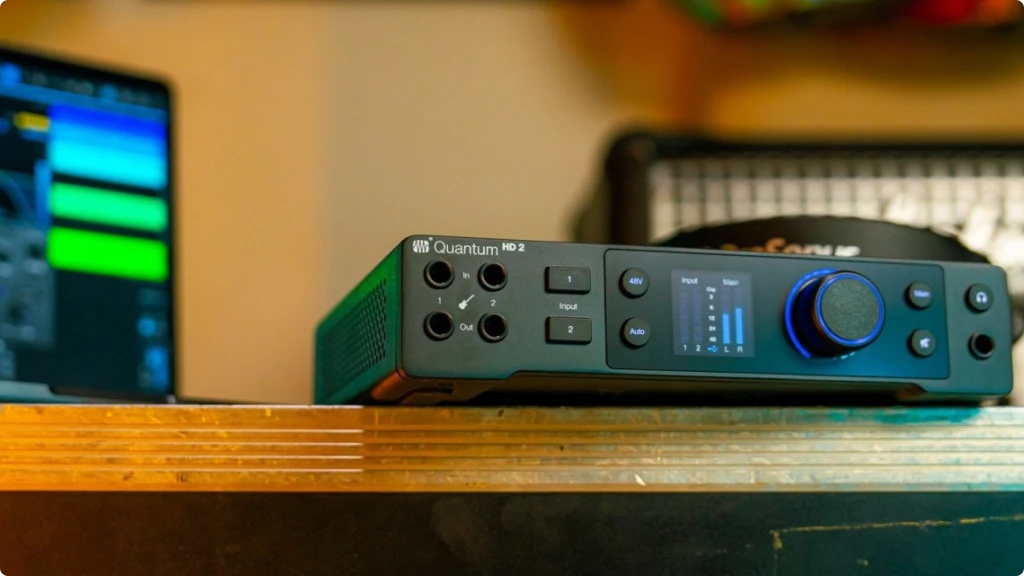
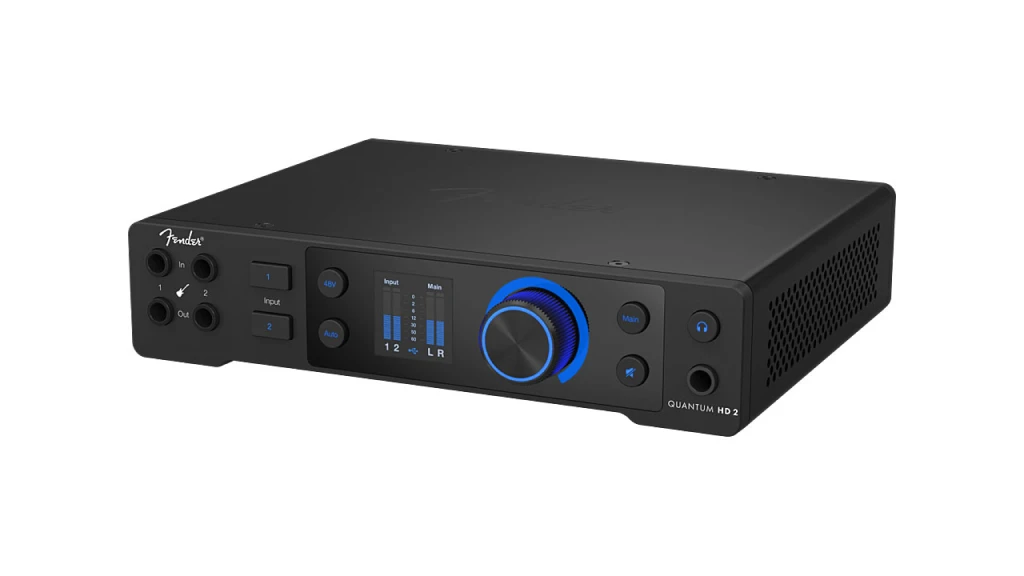
The front panel layout prioritizes the most common adjustments: two instrument inputs with visible level indicators, the main rotary encoder, dedicated buttons for phantom power and Auto Gain, plus the main output and mute controls. A full-color display shows input/output meters and current settings.
The single rotary encoder handles most adjustments. Click to select, rotate to adjust, hold for menu access. While this minimalist approach keeps the front panel clean, it does require scrolling through options that competing interfaces handle with dedicated knobs. Users who frequently adjust multiple parameters may find this slower than a multi-knob design.
The display, while high-quality, is relatively small. In a typical desk setup with the interface at arm’s length, reading the text requires leaning in. For critical adjustments, the Universal Control software on your computer screen provides a better view.
Back Panel
The rear panel houses the XLR/TRS combo inputs, main and line outputs, ADAT optical connections, and the USB-C port. A breakout cable handles MIDI and S/PDIF, keeping the back panel organized. All connections feel solid, with XLR locks that hold securely.
The external 12V power supply connects at the rear. While bus power might seem more convenient, the dedicated supply ensures consistent performance and powers the phantom power without compromise.
Setup Experience
Getting started with the Quantum HD 2 takes about 15 minutes. Download Universal Control from the PreSonus/Fender website, install it, connect the interface, and register for your software licenses. The registration process requires creating a MyPreSonus account, but it’s straightforward.
The interface works immediately on macOS and Windows with basic class-compliant drivers, but installing Universal Control unlocks the full feature set including DSP monitoring and software control. On iOS and Android, the Universal Control app provides similar functionality for mobile recording.
One minor friction point: the user manual and software reference manual are separate downloads. Having them combined would simplify the learning process, though both are well-written and comprehensive.
6. Getting the Most from Your Fender Quantum HD 2: Tips for Guitarists and Home Studios
Optimizing Guitar Recording: The Fender-designed instrument inputs work best when you treat them like a quality amp input. Use a good cable (capacitance matters for guitar), and don’t run unnecessarily long distances from your instrument. The high-impedance input preserves your guitar’s natural tone, so what goes in is what you record.
For amp simulation work, the transparent preamp character becomes an advantage. Many guitarists add tube preamps or boost pedals to warm up budget interfaces – with the Quantum HD 2, you can run straight in and let your plugins do the tone shaping.
Re-Amping Workflow: Record your guitar part as a clean DI signal while monitoring through your DAW’s amp simulation. Once you have the performance, disable the plugin and route the track to the re-amp output. Connect this output to your physical amp or pedals, mic the speaker, and record the result back into your DAW.
This workflow lets you experiment endlessly with different amp tones after the fact. It also works for creative applications – run vocals through guitar pedals, process drums through distortion, or add analog character to synthesizers.
ADAT Expansion Strategy: If you need more preamps, an 8-channel ADAT preamp like the PreSonus DigiMax DP88 or Focusrite Clarett OctoPre connects via a single optical cable. This gives you 10 total preamps for drum recording or band sessions while maintaining consistent audio quality through the Quantum HD 2’s converters.
Streaming and Content Creation: Enable loopback in Universal Control to route computer audio back into your recording. This lets streamers include game sound, music, or other applications in their broadcast without external routing. Combined with the DSP mixer, you can balance multiple sources and send a polished mix to your streaming software.
Mobile Recording: The Quantum HD 2 works with iOS and Android devices via USB-C adapters. For songwriters, this means capturing ideas on a tablet with better audio quality than built-in microphones. The Universal Control app provides full mixer access, so mobile recordings benefit from the same features as desktop sessions.
7. Final Thoughts: Who Should Buy the Fender Quantum HD 2?
The Fender Quantum HD 2 occupies an interesting position in the interface market. It’s not the cheapest option, but it’s far from the most expensive. What you get for the $599 price point is a thoughtfully designed interface that addresses real recording needs without unnecessary complexity.
For guitarists and bassists specifically, the Fender collaboration delivers tangible benefits. The instrument inputs preserve your tone, the re-amp outputs open creative possibilities, and the Auto Gain function removes technical friction when inspiration strikes. If you spend significant time recording guitar or bass, these features justify the investment over generic interfaces.
The interface scales well from simple two-channel recording to more complex setups with ADAT expansion. This growth potential means you won’t outgrow the Quantum HD 2 quickly – it can serve as the center of a project studio for years. The included Fender Studio Pro license adds substantial value, giving new users a professional DAW without additional cost.
However, the Quantum HD 2 isn’t perfect for everyone. Musicians who prefer dedicated knobs for each function may find the single encoder limiting. Users requiring the absolute lowest latency should consider Thunderbolt alternatives. And those who only need two channels without expansion might find simpler interfaces more practical.
Based on my time with this interface, the Fender Quantum HD 2 earns its recommendation for guitar-focused home studios, self-producing musicians, and content creators who value audio quality. It’s a serious tool that happens to be approachable – exactly what the home recording market needs.
8. FAQ
Does the Fender Quantum HD 2 have enough gain for an SM7B microphone?
Yes. The MAX-HD preamps provide 75 dB of gain, which is sufficient for the Shure SM7B and similar dynamic microphones. You won’t need a Cloudlifter or external preamp to achieve usable recording levels with gain-hungry mics. The high gain ceiling also keeps noise low, so your recordings stay clean even when pushing the preamp harder.
Can I use the Fender Quantum HD 2 without installing any software?
The interface works as a basic class-compliant audio device without installing Universal Control. You can record and playback audio immediately after connecting via USB-C. However, you’ll miss features like DSP monitoring, loopback, speaker switching, and software control of preamp parameters. Since Universal Control is free and lightweight, installing it unlocks the full potential of the interface.
Is the Fender Quantum HD 2 compatible with Logic Pro, Ableton Live, and other DAWs?
Yes. The Quantum HD 2 works with any DAW that supports standard audio interfaces on macOS, Windows, iOS, and Android. This includes Logic Pro, Ableton Live, Pro Tools, FL Studio, Reaper, GarageBand, and many others. The included Fender Studio Pro is optional – you can use whatever DAW you prefer.
| Why Can You Trust Us

| ALSO REVIEWED