Universal Audio Volt 2 Review: Worth It or Not in 2026?
- Audio Interface, Reviews
- by Bruno Bontempo
Universal Audio Volt 2 Review 2026: Hands-on insights into this budget-friendly interface with vintage tones and pro-quality preamps. Perfect for music creators!
Our articles may include affiliate links and we may earn a commission. Here how it works.
Jump to...
OUR VERDICT
4.6
The Universal Audio Volt 2 brings studio heritage to your desktop without the studio budget. With clean preamps, a genuine Vintage mode that adds warmth to vocals and instruments, and 24-bit/192kHz conversion, it handles everything from podcast recording to music production. The software bundle alone justifies attention, including LUNA DAW, Melodyne, and UAD plugins. Two inputs let you record vocals while playing guitar, or host a two-person podcast. If you want character in your recordings without complex signal chains, this interface delivers.
Release Date
Oct 2021
17.4X5.3x13 cm
6.85x2.09x5.12 in
650 g
1.43 lb
| Pros
- Clean preamps with 55dB gain handle dynamic microphones without external boosters
- Vintage mode adds analog warmth and character to vocals and instruments
- Strong software bundle includes professional plugins worth hundreds
- Powerful headphone amp drives high-impedance headphones easily
- All-metal construction feels solid and built to last
| Cons
- Phantom power shared between both inputs simultaneously
- LUNA DAW works only on macOS
- No onboard DSP for real-time UAD plugin processing

| Key Features
- Inputs: 2 XLR/TRS combo inputs (mic, line, Hi-Z instrument)
- Outputs: 2 balanced 1/4 inch TRS monitor outputs, 1 headphone output
- Compatibility: macOS 10.14 or later, Windows 10 or later, iOS 14 or later (iPad and iPhone)
- Connectivity: USB-C (USB 2.0 compatible), bus-powered, optional 5V DC power input
- Resolution: 24-bit / 192 kHz
-
Plus:
Vintage Mic Preamp mode (UA 610 emulation), MIDI In/Out, zero-latency direct monitoring, comprehensive software bundle including LUNA DAW, Ableton Live Lite, Melodyne Essential, UAD Producer Suite plugins
| Best for...
- Singer-songwriters recording vocals and acoustic guitar simultaneously
- Podcasters who want clean audio with minimal post-production
- Guitarists seeking warm direct recording tones with amp simulation plugins
- Bedroom producers building their first serious home studio
- Content creators and streamers requiring reliable USB audio
| Not ideal for...
- Users needing independent phantom power control per channel
- Those requiring more than two simultaneous recording channels
- Windows users who want full access to LUNA DAW features
1. Overview: What Makes the Universal Audio Volt 2 Stand Out
Universal Audio built its reputation on professional studio equipment. The company has been making preamps, compressors, and converters since the 1950s. Their Apollo interfaces became industry standards in professional studios worldwide. Then in 2021, they introduced the Volt series, bringing that expertise to home studios at accessible costs.
The Volt 2 sits in the sweet spot of the lineup. It provides two inputs instead of one, which opens up recording possibilities significantly. You can record yourself singing while playing guitar. You can have a guest on your podcast. You can mic an acoustic guitar from two angles. These options matter when inspiration strikes.
What separates this interface from competitors is the Vintage Mic Preamp mode. This analog circuit, inspired by the legendary UA 610 tube preamp, adds harmonic saturation and warmth to your recordings. Therefore, instead of capturing flat digital audio and adding character later with plugins, you can print that analog texture directly during recording.
The interface connects via USB-C and draws power from your computer, so no wall adapter clutters your desk. It works with Mac, Windows, iPad, and iPhone, making it versatile for studio and mobile recording alike. MIDI ports on the back connect keyboards and drum machines directly.
In the following sections, I will break down how each feature performs in real recording situations and help you decide if this is the right interface for your needs.
2. Features Explained: Understanding the Universal Audio Volt 2 Specifications
The specifications look good on paper, but what do they actually mean for your recordings? Here is a breakdown of each feature and how it affects your work.
24-bit/192kHz Audio Conversion
The Volt 2 converts analog sound to digital at up to 24-bit depth and 192kHz sample rate. In other words, it captures more detail than CD quality, which runs at 16-bit/44.1kHz.
- What It Means for You: Recording at higher resolution gives you more flexibility during mixing. You can make larger adjustments to EQ and volume without introducing noise or artifacts. Most sessions run at 48kHz, which is perfectly adequate, but having the headroom for 192kHz means the interface will not limit you as your skills grow.
Two Combo XLR/TRS Inputs
Each input accepts both XLR cables from microphones and 1/4 inch cables from instruments or line-level sources. The preamps automatically adjust their settings based on what you plug in.
- What It Means for You: You do not need adapters or separate input types. Plug in your condenser mic with an XLR cable, and plug your guitar directly into the same type of jack using a regular instrument cable. The interface handles the routing internally.
Vintage Mic Preamp Mode
This is the headline feature. Pressing the Vintage button engages an analog circuit that emulates the Universal Audio 610 tube preamp. It adds second-order harmonics, smooths harsh transients, and introduces subtle compression characteristics.
- What It Means for You: It adds the sound of classic recordings from the 1960s and 1970s. Vocals gain body and presence. Acoustic guitars sound warmer and more three-dimensional. Electric guitars through the Hi-Z input lose that thin digital quality. The effect is subtle but noticeable, like the difference between a photo taken with natural light versus fluorescent light.
Hi-Z Instrument Inputs
Pressing the INST button optimizes the input impedance for electric guitars and basses. High impedance preserves the full frequency range and dynamics of passive pickups.
- What It Means for You: Your guitar sounds like your guitar, not a thin approximation of it. The instrument input captures the full character of your pickups, including the resonance and harmonic content that makes each guitar unique. As a result, amp simulation plugins respond more naturally.
55dB Preamp Gain
The preamps offer 55 decibels of clean gain before noise becomes an issue. This measurement matters for quiet sources like ribbon microphones or dynamic broadcast mics.
- What It Means for You: You can use an SM7B or similar dynamic microphone without needing an external preamp booster like a Cloudlifter. The gain knobs provide enough headroom to achieve proper recording levels while keeping the noise floor low.
48V Phantom Power
Condenser microphones require external power to operate. The Volt 2 provides standard 48 volt phantom power through the XLR inputs.
- What It Means for You: Any condenser microphone will work with this interface. One limitation exists, however: phantom power activates on both channels simultaneously. If you use a condenser on channel one and a ribbon microphone on channel two, you would need to check that your ribbon mic can tolerate phantom power, as some vintage ribbons can be damaged by it.
Zero-Latency Direct Monitoring
The Direct button sends your input signal straight to the outputs without passing through your computer. This means you hear yourself in real time with no delay.
- What It Means for You: Recording vocals while hearing yourself delayed by even a few milliseconds feels uncomfortable and affects your performance. Direct monitoring eliminates this problem completely. You hear exactly what you play or sing the moment you do it.
MIDI Input and Output
Standard 5-pin DIN connectors on the back panel connect MIDI keyboards, drum machines, and synthesizers to your computer through the interface.
- What It Means for You: If you have older MIDI gear without USB connections, you can integrate it into your setup without buying a separate MIDI interface. This keeps your desk cleaner and reduces the number of devices you need to manage.
3. Volt 2 Specs Table
Ready to see what the Universal Audio Volt 2 offers at a glance? This table breaks down every specification that matters for your recording setup. Check the practical benefits column to understand how each feature affects your daily workflow.
| Feature | Specification | Practical Benefit |
|---|---|---|
| Simultaneous I/O | 2 in / 2 out | Record vocals and guitar at the same time, or host a two-person podcast |
| Inputs | 2 XLR/TRS combo (mic, line, Hi-Z) | Connect any microphone, instrument, or line-level source without adapters |
| Outputs | 2 balanced 1/4" TRS + 1 headphone | Connect studio monitors and headphones simultaneously for flexible monitoring |
| Compatibility | macOS 10.14+, Windows 10+, iOS 14+ | Works with your Mac, PC, iPad, or iPhone for studio and mobile recording |
| Connectivity | USB-C (USB 2.0), optional 5V DC | Single cable connection to your computer, external power available for iOS |
| Resolution | 24-bit / 192 kHz | Captures detail beyond CD quality for professional mixing flexibility |
| Phantom Power | +48V (shared, both channels) | Powers condenser microphones directly without external equipment |
| Direct Monitor | Yes, stereo/mono selectable | Hear yourself with zero delay while recording vocals or instruments |
| Bus Powered | Yes | No wall adapter needed, just plug into your computer and start recording |
| Preamp Gain | 55 dB | Enough gain for dynamic mics like SM7B without external boosters |
| Dynamic Range | 112 dB (A-weighted) | Clean recordings from whisper-quiet to loud sources without distortion |
| MIDI | 1 In / 1 Out (5-pin DIN) | Connect keyboards, drum machines, and synths directly to your DAW |
| Vintage Mode | Per-channel, UA 610 emulation | Add analog warmth and character during recording without plugins |
| Software Bundle | LUNA DAW, Ableton Live Lite, Melodyne Essential, UAD Producer Suite, Marshall Plexi, Ampeg SVT-VR, and more | Complete production toolkit included, saving hundreds on software purchases |
| Dimensions | 6.89" W x 5.12" D x 1.96" H (175 x 130 x 50 mm) | Compact footprint fits any desk or travels in your backpack |
| Weight | 1.4 lbs (0.65 kg) | Light enough for mobile recording without adding bulk |
| Construction | All-metal chassis | Built to withstand years of studio and travel use |
4. Performance: How the Universal Audio Volt 2 Sounds in Real Sessions
Numbers and features tell part of the story. What matters more is how the interface performs when you press record.
The preamps sound clean and detailed. Recording vocals through a large-diaphragm condenser, the Volt 2 captures nuance well. Breath control, subtle dynamics, and room ambiance all come through clearly. The 112dB dynamic range specification translates to recordings that sound open rather than compressed or flat.
With dynamic microphones, the 55dB of gain proves adequate for most situations. Recording spoken word with an SM58, I set the gain around 75 percent and achieved healthy levels around -24 LUFS with peaks at -12dB. No additional amplification was necessary, and the preamps remained quiet even at higher gain settings.
The Vintage mode creates audible differences. On vocals, it adds presence in the upper midrange and a touch of warmth in the low end. The effect works best when you drive the input a bit hotter, approaching -10dBFS or so. At conservative levels around -18dBFS, the effect is more subtle, primarily adding a slight EQ curve with boosted highs and a touch more low end.
For acoustic guitar, the Vintage mode smooths out pick attack and adds body to the sound. It reduces the work needed during mixing because the recorded signal already has character. For those who prefer maximum flexibility, leaving Vintage mode off captures a neutral signal that responds well to any processing you add later.
Guitar direct into the Hi-Z input sounds usable for demos and practices. Combined with the included Marshall Plexi amp simulation plugin, the results work for tracking ideas quickly. However, the Hi-Z input does not replace a dedicated DI box for critical recordings. Some users report that Vintage mode on instrument inputs makes less noticeable improvement compared to its effect on microphones.
Latency performance depends on your buffer settings and computer power. At 128 samples, round-trip latency runs around 6 milliseconds in most DAWs. This feels responsive enough for tracking with software monitoring enabled. For zero latency, use the Direct monitoring feature instead of software monitoring.
The headphone amplifier deserves mention. It drives 250-ohm headphones to comfortable listening levels without strain. Many bus-powered interfaces struggle with high-impedance headphones, but the Volt 2 handles them well. The output remains clean without audible hiss, even at higher volume settings.
Monitor outputs connect to powered speakers through balanced TRS cables. The output level is lower than some competing interfaces, so you may need to turn your speakers up slightly compared to other interfaces. This is not a problem, just something to be aware of during setup.
Driver stability on both Mac and Windows has been solid. The interface is class-compliant on Mac, meaning it works without installing additional drivers. Windows users need to download drivers from Universal Audio, which install without issues. I experienced no dropouts, pops, or crashes during extended sessions.
5. Design and Usability: Build Quality and Daily Experience
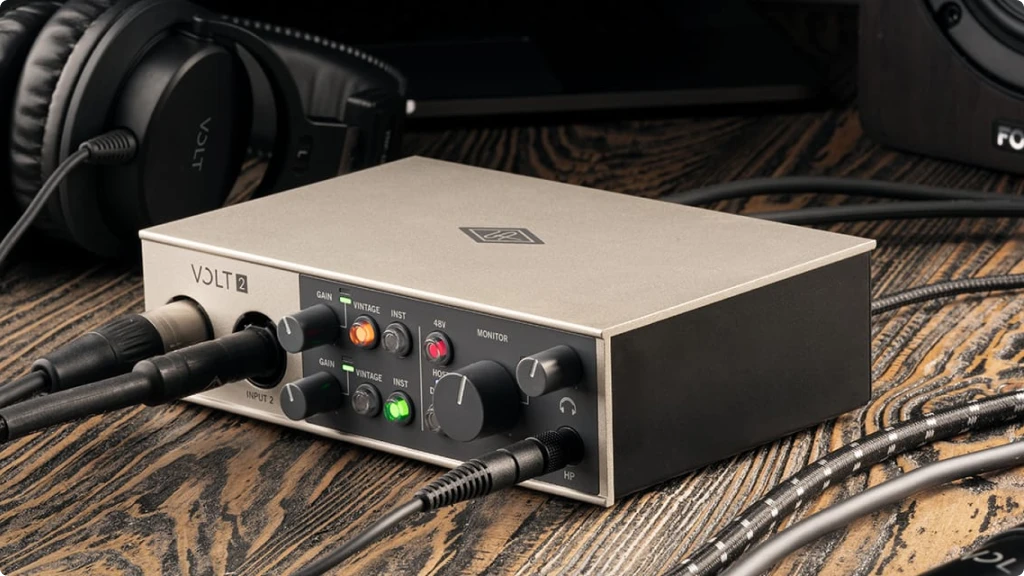
The Volt 2 makes a good first impression. The all-metal chassis feels substantial despite weighing only 1.4 pounds. The retro-inspired design references classic studio equipment without looking dated. The color scheme, dark gray body with a white control panel section, looks professional on any desk.
Front Panel
The front panel contains all your recording controls. Starting from the left, you have the two combo input jacks that accept both XLR and 1/4 inch cables. Each channel has its own gain knob, smooth in operation with enough resistance to prevent accidental adjustments.
Two small LED meters beside each gain knob show signal level. Green indicates healthy signal, yellow means you are approaching clipping, and red warns of overload. The meters provide quick visual feedback, though more detailed metering in your DAW gives better precision for setting levels.
The Vintage and INST buttons glow when engaged, orange for Vintage and green for instrument mode. Each channel has independent Vintage and INST buttons, so you can apply different settings to each input. The 48V phantom power button affects both channels simultaneously, glowing red when active.
On the right side, a large volume knob controls monitor output level, and a separate smaller knob controls headphone volume. The headphone jack sits conveniently on the front right corner, keeping the cable out of your way during mouse work.
A Direct monitoring button toggles between monitoring modes. Press once for stereo monitoring with inputs panned left and right. Press again for mono monitoring with both inputs centered. The button glows orange for stereo and blue for mono.
Back Panel
The back panel keeps cables organized and away from your workspace. Two balanced TRS outputs connect to powered monitors. The MIDI input and output use standard 5-pin DIN connectors, compatible with all MIDI gear.
The USB-C port connects to your computer with the included USB-C to USB-A cable. If your computer has USB-C ports, you can use a USB-C to USB-C cable instead. A 5V DC power input allows external power when USB bus power is insufficient or when connecting to iOS devices that cannot provide enough current.
A Kensington lock slot provides security for studio or classroom environments where theft might be a concern.
Setup Experience
Getting started takes minutes. Connect the USB cable, and macOS recognizes the interface immediately. Select it as your audio input and output in System Preferences or your DAW, and you can start recording.
Windows setup requires a driver download from Universal Audio. The installer is straightforward, and the interface appears in your DAW after a restart. Registration happens through the UA Connect application, which also handles downloading your bundled software.
The software bundle requires separate downloads and authorizations for each title, which takes time but presents no difficulties. Each plugin comes from different developers with their own authorization systems. Plan for an hour or so to get everything installed and authorized if you want the complete bundle.
6. Getting the Best Vocal Recordings with the Volt 2
Since the Volt 2 appeals strongly to vocalists, podcasters, and singer-songwriters, let me share specific techniques for getting the best results from this interface.
Setting Proper Gain Levels: Many beginners set their gain too high, causing distortion, or too low, resulting in noisy recordings. With the Volt 2, aim for peaks hitting the yellow LED occasionally during your loudest passages. Green should be your normal operating range.
Record a test take at normal volume, then check the waveform in your DAW. Peaks should sit around -12 to -6 dBFS. This gives you headroom for unexpected loud moments while keeping the signal well above the noise floor.
When to Use Vintage Mode: Vintage mode works best on sources that benefit from added warmth and presence. Spoken word, singing, and acoustic instruments generally sound better with it engaged. The effect becomes more pronounced as input levels increase.
For podcasting, Vintage mode can reduce the need for extensive post-processing. It adds a touch of compression and EQ that makes voices sound more polished straight out of the box. Consequently, you spend less time mixing and more time creating content.
For music production where you want maximum flexibility, consider recording without Vintage mode. You can always add warmth later with plugins, but you cannot remove analog coloration once it is printed to the track.
Dealing with Room Acoustics: No interface can fix a bad recording environment. The Volt 2 captures what the microphone hears, including room reflections and background noise. Before blaming your gear for muddy or echoey recordings, address your space.
Hang blankets or acoustic panels on walls behind and beside your recording position. Place a reflection filter behind your microphone if you cannot treat the room fully. Close windows and turn off fans, air conditioners, and other noise sources during recording.
Dynamic Versus Condenser Microphones: The Volt 2 works well with both microphone types. Condenser microphones offer greater sensitivity and detail, making them popular for studio vocals. Dynamic microphones reject background noise better and tolerate high sound pressure levels.
For home studios with ambient noise from computers, traffic, or neighbors, a dynamic microphone like the SM58 or Rode PodMic may produce cleaner results than a condenser that picks up everything. The 55dB of gain handles dynamic mics without external preamp boosters.
Direct Monitoring for Comfortable Recording: When recording vocals, enable Direct monitoring and turn down or mute the input track in your DAW. This way, you hear yourself through the Volt 2 with zero latency while still recording the dry signal. The backing track plays through your DAW as normal.
If you prefer hearing your voice with reverb or other effects while recording, you will need to use software monitoring instead. Set your DAW buffer size as low as your computer allows, typically 64 or 128 samples, to minimize delay.
7. Final Thoughts: Is the Universal Audio Volt 2 Worth Your Investment?
The Universal Audio Volt 2 delivers on its promise of bringing professional sound quality to home studios. The preamps capture detail and dynamics accurately. The Vintage mode adds genuine analog character that improves many recordings. The build quality suggests this interface will last years of daily use.
Compared to the Focusrite Scarlett 2i2, its most direct competitor, the Volt 2 offers a different flavor. The Scarlett provides transparent, neutral recordings with its Air mode adding brightness. The Volt 2 offers warmth and saturation with its Vintage mode. Neither is objectively better. Your preference depends on the sound you want to achieve.
The software bundle adds substantial value. LUNA DAW, while Mac-only, provides a complete recording environment designed specifically for UA hardware. Ableton Live Lite gets you started with one of the most popular DAWs. Melodyne Essential handles pitch correction. The UAD plugins including LA-2A compressors and Pultec EQs would cost hundreds if purchased separately.
For musicians recording demos, singer-songwriters capturing ideas, podcasters creating content, and streamers wanting better audio, the Volt 2 handles these tasks confidently. It records two channels simultaneously, which covers most home studio scenarios.
The limitations are minor but worth noting. Shared phantom power means you cannot use some ribbon microphones alongside condensers. The lack of onboard DSP means UAD plugins run on your computer rather than the interface, increasing CPU load. LUNA exclusivity to Mac excludes Windows users from one of the main software benefits.
For anyone building their first serious recording setup or upgrading from a basic interface, the Volt 2 makes sense. It provides headroom to grow into without compromising on sound quality today. The UA name carries weight in professional circles, and the Volt 2 earns that reputation honestly.
If you need more than two inputs, look at the Volt 4 or Volt 476. If you want the built-in 1176-style compressor, the Volt 276 adds that feature. But for most home recording situations, the Volt 2 provides everything you need to make recordings that sound genuinely professional.
CHECK ALSO
8. FAQ
Does the Universal Audio Volt 2 work with Android phones and tablets?
No, the Volt 2 is not compatible with Android devices. Universal Audio explicitly states that Volt interfaces are not tested or supported with Android. The interface works with macOS, Windows, iOS (iPhone), and iPadOS (iPad). If you need an interface for Android recording, you will need to look at alternatives like the Focusrite iTrack series or interfaces specifically designed for Android compatibility.
Can I transfer the software bundle if I buy a used Volt 2?
No, the software bundle does not transfer to new owners. The UAD Producer Suite, third-party plugins, and the 30-day UAD Spark trial are tied to the account of the original owner who registered the interface. If you purchase a used Volt 2, you will get a fully functional interface, but you will not receive access to the bundled software. The hardware itself works perfectly regardless of registration status, but this is something to consider when comparing the value of new versus used units.
Why does my Volt 2 make a crackling or popping sound during recording?
Crackling and popping sounds typically result from buffer settings rather than hardware issues. Try increasing your buffer size in your DAW settings. Start at 256 or 512 samples and adjust from there. Also make sure you are connecting directly to a USB port on your computer rather than through a hub, as some hubs do not provide stable power or data transfer. On Windows, ensure you have installed the latest drivers from Universal Audio through the UA Connect application. If problems persist after these steps, try a different USB cable or port, as faulty cables can cause intermittent audio issues.
| Why Can You Trust Us

Bruno Bontempo
I've been recording, producing, and playing bass for over 20 years—from touring with my first band at 15 to playing progressive metal across Europe today. Through multiple albums, projects (Madness of Light, Rising Course, Roots of Ascendant, Human|Archive), and production work, I've tested audio interfaces in every scenario imaginable. At Best Audio Hub, I combine my historian background with years of hands-on music and audio experience. No marketing fluff—just honest insights from someone who's been in the trenches.
| ALSO REVIEWED