Electro-Harmonix Effects Interface Review: Pedals Meet Your DAW
- Audio Interface, Reviews
- by Bruno Bontempo
Our articles may include affiliate links and we may earn a commission. Here how it works.
OUR VERDICT
The Electro-Harmonix Effects Interface Review short answer: it does what it promises. If you have a pedalboard you love and a DAW you live in, this device connects those two worlds without the usual headaches. It works best for guitarists who want to use analog pedals as hardware inserts on their DAW tracks, or who want to run plugins live on stage. It’s not a full-featured audio interface, and latency is a real factor to manage. However, for hybrid rig builders, this is one of the most direct solutions available.
Release Date
Feb 2026
14.6x11.4x5.7 cm
5.75x4.5x2.25 in
660 g
1.45 lb
| Pros
- Bridges analog pedals and DAW plugins with a single USB-C connection
- Three distinct operating modes cover studio and live use cases
- 24-bit/96kHz converters for transparent signal transfer
- Compact form factor fits on a standard pedalboard
- Works with all major DAWs and plugin formats
| Cons
- Latency requires management, especially in Pedalboard Mode
- Not a primary recording interface — limited I/O for full sessions
- Setup for Pedalboard Mode is more involved than Hardware Plugin Mode
| Key Features
- Inputs: 2 x 1/4" instrument-level inputs (Left and Right, stereo or dual-mono)
- Outputs: 2 x 1/4" outputs (Left and Right) + 1 x 1/4" headphone output with dedicated volume control
- Compatibility: macOS, Windows (Compatible with Pro Tools, Ableton Live, Logic Pro, Cubase, Studio One, and other major DAWs)
- Connectivity: USB-C (audio interface connection and power), 9V DC center-negative power input (for standalone use without a computer)
- Resolution: 24-bit / 96kHz
-
Plus:
Companion software plugin included (VST3/AU/AAX), works as a DAW insert for hardware pedal routing. Automatic latency compensation via software. Wet/Dry blend control in the plugin. Single footswitch for bypass.
| Best for...
- Guitarists who want to use pedals as hardware inserts in their DAW
- Producers adding analog character to digital tracks
- Live performers integrating software amp sims into a physical rig
- Home studio players bridging a pedalboard with a DAW setup
- Hybrid rig builders who work both on stage and in the studio
| Not ideal for...
- Podcasters or vocalists needing a standard recording interface
- Users without an existing pedalboard or plugin collection
- Anyone looking for a simple plug-and-play interface with no learning curve
What Is the Electro-Harmonix Effects Interface and Who Is It For?
Electro-Harmonix has been making pedals since 1968. The Big Muff, the Memory Man, the Holy Grail — these are staples of pedalboards across five decades. So when EHX goes beyond the pedal format to build something that connects your physical rig to your DAW, that’s worth paying attention to.
The Electro-Harmonix Effects Interface is the brand’s most versatile attempt at hardware-software integration yet. It builds on the concept they first tested with the Big Muff Pi Hardware Plugin — a specific pedal that could also function as a DAW insert — but goes further. The Effects Interface is pedal-agnostic. It brings any pedal you own into your DAW, and conversely, sends any plugin you own back out to your pedalboard.
It operates in three modes: Hardware Plugin Mode, Pedalboard Mode, and Audio Interface Mode. Each one addresses a specific workflow problem that guitarists, producers, and hybrid rig players deal with regularly. The device connects via USB-C, runs on either USB power or a standard 9V supply, and includes a companion plugin in VST3, AU, and AAX formats.
The main audience here is guitarists and producers who already have a pedalboard they’re invested in and a DAW they work in regularly. If that’s you, the Effects Interface targets a very specific pain point you probably know well: the friction of getting analog gear and digital software to work together without a tangle of cables, impedance mismatches, or complex routing.
The next sections break down what each mode actually does, how it performs, and whether it’s worth adding to your setup.
Electro-Harmonix Effects Interface Features Explained
The Effects Interface is not a conventional audio interface. It’s a routing tool with conversion capabilities. Understanding what each mode does — and what it doesn’t do — is the most important thing before you decide if it belongs in your setup.
Here’s a breakdown of its core features.
Hardware Plugin Mode
In this mode, you connect a pedal (or chain of pedals) to the send and return jacks on the Effects Interface. You then open the companion plugin on a DAW track, and that track’s audio is routed out through the pedal and back in, exactly as if the pedal were a software insert. You get the analog character of your hardware applied directly to a recorded track.
- What It Means for You: Think of it like having a physical effects rack inside your DAW. That fuzz pedal or tape delay sitting in a drawer? It’s now a plugin you can drop onto a drum bus or a vocal track.
Pedalboard Mode
Here, the signal path reverses. Your guitar (or other instrument) goes into the Effects Interface, gets routed to your DAW, passes through a plugin there, and comes back out to your amp or the rest of your pedalboard. The plugin becomes a stompbox in your live chain.
- What It Means for You: If your favorite amp sound only exists in software — say, a Neural DSP preset — you can now run it live through your actual amp using your physical rig. The plugin becomes a real pedal on your board.
Audio Interface Mode
In this mode, the Effects Interface functions as a straightforward 2-in/2-out USB interface. Plug in an instrument or microphone, open your DAW, and record. It’s the most familiar of the three modes and the simplest to set up.
- What It Means for You: It’s a practical safety net. If you just need to track a quick idea without any routing complexity, this mode gets out of the way and lets you record.
Stereo I/O with Independent Level Control
Both inputs and outputs have dedicated slider controls for level management. The unit also supports dual-mono operation, so you can set up two different effects routings simultaneously on left and right channels.
- What It Means for You: Running a stereo reverb or a ping-pong delay on two separate pedals at the same time? This makes that possible without extra gear.
Wet/Dry Blend in the Companion Plugin
The software plugin that ships with the Effects Interface includes a mix knob for parallel processing. You can blend the processed (wet) signal from your pedal with the unaffected (dry) signal from the DAW track.
- What It Means for You: Parallel processing is a classic studio technique. Running a heavy fuzz at 30% wet keeps the low end tight while adding analog grit. The plugin handles this without any extra routing.
24-Bit / 96kHz Conversion
The converters run at 24-bit depth and 96kHz sample rate. This is in line with professional recording standards and ensures the signal going to and from your pedals doesn’t lose quality in the conversion.
- What It Means for You: The analog-to-digital conversion is transparent enough that the character of your pedal comes through without digital artifacts coloring the result.
Automatic Latency Compensation
The companion plugin includes automatic latency compensation. The round-trip time — audio leaving the DAW, going through a pedal, and coming back — is measured and corrected so the track stays in sync with the rest of the session.
- What It Means for You: This removes the most annoying manual step in hardware insert workflows. You don’t need to manually nudge the track back into time every time you change your routing.
Footswitch Bypass
A single footswitch on the unit enables bypass, which is useful when using the Effects Interface as part of a live rig.
- What It Means for You: In Pedalboard Mode during a live set, you can engage or disengage the plugin-into-pedal routing with your foot, just like any other stompbox.
Specs Table
Before you dive into the full review, here’s a quick look at what the Electro-Harmonix Effects Interface brings to the table. If any of these specs make you pause, the sections below will put them in context.
| Feature | Specification | Practical Benefit |
|---|---|---|
| Simultaneous I/O | 2-in / 2-out | Handles stereo pedal loops and dual-mono routing at the same time |
| Inputs | 2 × 1/4" instrument/line-level (L/R, stereo or dual-mono) | Connects directly to pedal outputs or instrument signals — no DI box needed |
| Outputs | 2 × 1/4" (L/R) + 1 × 1/4" headphone with dedicated volume slider | Routes processed signal back to your amp, DAW, or monitoring headphones |
| Compatibility | macOS, Windows — works with Pro Tools, Ableton Live, Logic Pro, Cubase, Reaper, Studio One (VST3, AU, AAX) | Fits into any major DAW workflow without extra adapters or workarounds |
| Connectivity | USB-C (audio + power) / 9V DC center-negative (standalone pedalboard use) | USB powers the unit in the studio; the 9V supply keeps it running on a live board |
| Resolution | 24-bit / 96kHz | Professional-grade conversion — the character of your pedal comes through cleanly |
| Phantom Power | Not available | This unit is optimized for instrument and line-level signals, not condenser microphones |
| Direct Monitor | Yes — dedicated Direct Monitor button on front panel | Hear your input signal in real time without routing it through your DAW first |
| Bus Powered | Yes — fully USB bus-powered for studio use | One less cable to manage when you're working at a desk |
| Operating Modes | Hardware Plugin Mode / Pedalboard Mode / Audio Interface Mode | Three distinct workflows in one unit — studio insert, live hybrid rig, or basic recording |
| Latency Compensation | Automatic — handled by the companion plugin | Processed tracks stay in time with your session without manual nudging |
| Level Control | Independent hardware sliders for input L/R and output L/R + software UI control | Adjust gain staging from either the unit itself or from inside your DAW |
| Bypass | Single footswitch — true bypass | Engage or disengage the effects loop with your foot during a live performance |
| MIDI | Not available | Switching between modes or patches requires manual selection in the plugin or on the hardware |
| Dynamic Range | Not published by manufacturer | — |
| Included Accessories | 9V DC power supply + USB-C cable | Ready to use out of the box — no additional purchases required for either studio or live use |
| Software | Companion plugin (VST3/AU/AAX) — free download from EHX; includes wet/dry blend and device status display | The plugin is what makes Hardware Plugin and Pedalboard modes work — install it before your first session |
Electro-Harmonix Effects Interface Performance: What It's Actually Like to Use
Hardware Plugin Mode is where this device earns its place. Running a physical pedal as a DAW insert is a genuinely useful capability, and the Effects Interface makes it more accessible than the traditional approach of routing through an interface’s direct outputs and inputs manually. The workflow is clear: connect the pedal to the send/return, load the plugin on the track, and the signal flows.
The active amplifier stage inside the unit adds a small amount of gain, which in practice tends to tighten up the attack of whatever goes through it. This is noticeable in a good way, especially on gain-focused pedals. Running a Tube Screamer or a Big Muff through it onto a recorded guitar track gives you analog saturation that most digital emulations still don’t fully replicate. Dynamic pedals — volume swells, wahs, expression-controlled effects — are where this setup really distinguishes itself from plugins, because the physical interaction is irreplaceable.
Latency in Hardware Plugin Mode is manageable with a fast computer and reasonably low buffer settings. The automatic compensation in the plugin takes care of alignment, so printed tracks stay in sync. For most static effects, the result is clean. With very fast attack transients, there’s a slight rounding effect, but it’s not distracting — it actually adds a subtle thickness that works well for double-tracking applications.
Pedalboard Mode takes more setup and is the trickier of the two active modes to get right. The signal path involves more roundtrips, and the latency is more noticeable when playing live. EHX provides suggestions for reducing it, and lowering your DAW’s buffer size helps significantly. However, on anything below a fairly recent computer, this mode may introduce enough delay to feel uncomfortable for real-time playing. It’s better suited to players with a dedicated laptop in their rig who’ve had time to optimize their system settings.
Audio Interface Mode performs cleanly. The 24-bit/96kHz converters handle recordings well, and the headphone output is a practical addition for monitoring on the fly. That said, this mode isn’t a replacement for a full-featured recording interface. With only 2 inputs and no mic preamp, it’s not suitable for multi-source sessions or anything requiring phantom power. Think of it as a utility recording mode for quick captures and basic tracking.
In dual-mono mode, running two separate pedals simultaneously on the left and right channels opens up creative routing options for stereo effect processing, re-amping, or parallel compression with hardware units.
Overall, the Effects Interface performs best as a hardware insert tool in the studio. It solves a real problem — getting analog pedals into a DAW session cleanly — in a more elegant way than manually patching through a standard interface.
Electro-Harmonix Effects Interface Design and Usability
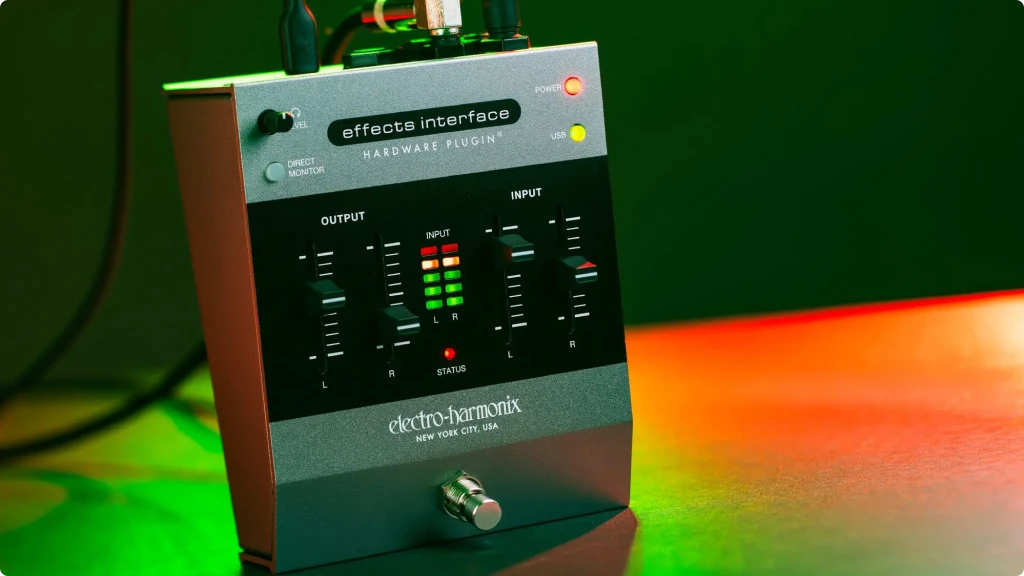
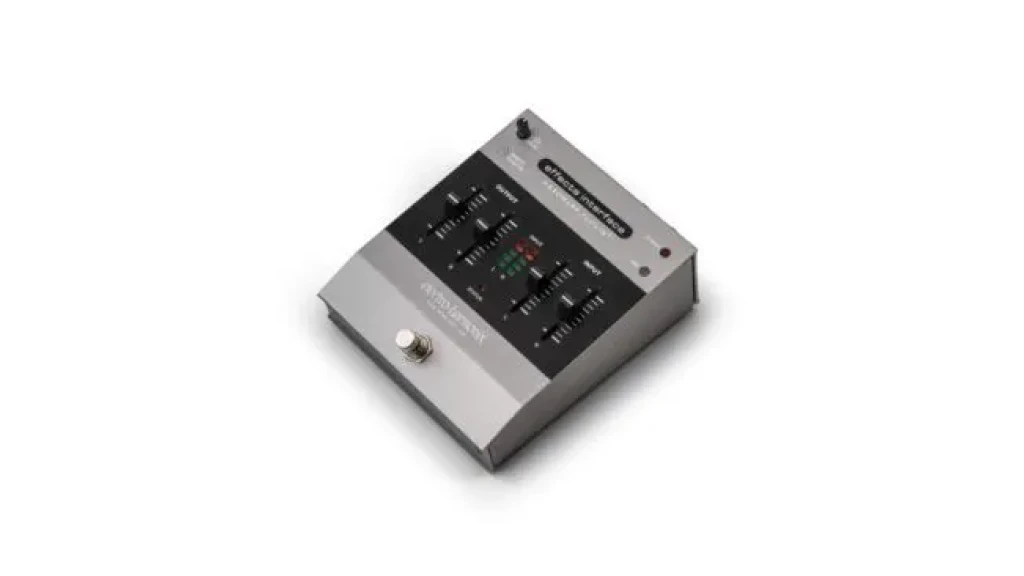
The Effects Interface looks and feels like an EHX pedal, which is a point in its favor. It has a compact enclosure roughly the size of a classic Big Muff, meaning it fits on a standard pedalboard without taking over the board. The build is solid metal, consistent with EHX’s typical construction, and the neo-retro aesthetic with chunky, tactile sliders suits both the studio floor and a live rig.
Front Panel
The front panel has two rows of sliders — one for input levels, one for output levels — along with the single footswitch, a direct monitor button, a power LED, and a USB status indicator that turns red when connected and green when the plugin link is established. The layout is logical and easy to read at a glance. The status LED system is genuinely useful: you know immediately whether the plugin is communicating correctly without opening your DAW.
Back Panel
The rear panel houses the 1/4″ stereo inputs and outputs, the headphone jack with its own volume slider, the USB-C port, and the 9V DC input. The send and return jacks — labeled as outputs and inputs for the pedal loop — are clearly marked. Cable access is straightforward, and the jack spacing is generous enough that bulky right-angle plugs don’t cause problems.
Setup Experience
Plugging in for the first time and getting Hardware Plugin Mode running takes about five minutes for anyone already familiar with DAWs. You install the companion plugin, select the Effects Interface as your audio device, load the plugin on a track, and the signal routes automatically. There’s a short learning curve for understanding the status LEDs and what each mode requires from the routing perspective, but EHX includes clear documentation.
Pedalboard Mode involves a few more steps, including adjusting buffer settings and potentially rerouting your signal chain. For that reason, the first time you try it, set aside time to experiment before a session or a gig.
USB power is a convenient option — the device draws power directly from your computer’s USB port, removing the need for a separate power supply in studio use. For live pedalboard use, you’ll want the 9V supply instead.
Getting the Most Out of Analog Pedals in Your DAW
One of the ongoing frustrations for guitarists who record at home is this: you have a pedalboard full of sounds you love, and then you sit down in your DAW and reach for software emulations of those same sounds. The real pedals are right there, but the process of routing them into a session is just inconvenient enough that most people skip it.
The Effects Interface directly addresses that friction, so it’s worth understanding what kinds of pedals benefit most from this approach and how to use them effectively once you’re set up.
Gain stages — overdrives, fuzz pedals, preamp pedals — are the most compelling use case. Digital emulations of these effects have improved dramatically over the years, but the dynamic response of a physical gain stage still behaves differently under the fingers. When you run a recorded guitar track through a real Tube Screamer as a DAW insert, the way the pedal interacts with the peaks and transients in the audio is uniquely analog. It compresses and saturates in ways that are difficult to replicate with processing after the fact.
Dynamic effects are even more interesting. A real compressor pedal applied to a programmed drum track, a wah on a bass line, or an optical tremolo on a Rhodes all bring a kind of movement that software approximations can come close to but rarely match exactly. Because the Effects Interface keeps latency low in Hardware Plugin Mode, these effects work in real time without feeling detached from the source material.
For reverbs and delays, the answer is a bit more nuanced. Large, lush reverbs and tape echo pedals work great as hardware inserts, especially when you want the quirks and imperfections of the analog circuit. However, if you’re already running high-quality reverb and delay plugins, the marginal difference may not justify the added routing complexity. Focus the Effects Interface on the pedals where the hardware character makes the biggest difference — dirt, compression, and dynamics.
One practical tip: print the hardware-processed track as a new audio file as soon as you like the result. This frees up the Effects Interface for other uses, removes the dependency on the physical pedal remaining connected for playback, and keeps your session portable.
Finally, if you’re using the Effects Interface in Pedalboard Mode for live performance, experiment with your laptop’s power settings and audio buffer size in advance. With optimized settings, latency can be reduced to the point where it’s usable for most playing situations. Just don’t try to configure that at soundcheck for the first time.
Final Thoughts on the Electro-Harmonix Effects Interface
The Electro-Harmonix Effects Interface review comes down to a simple question: do you have a pedalboard you love and a DAW you work in regularly? If yes, this device fills a gap that most standard interfaces don’t address.
It’s not a general-purpose recording interface and it’s not trying to be. The 2-in/2-out layout and the lack of a microphone preamp put it outside the scope of full studio sessions. But that’s not what it’s for. It’s a specialized routing tool that turns any pedal into a DAW insert and any plugin into a live stompbox — with the conversion quality and the workflow refinement to make both directions work in a real session.
Hardware Plugin Mode is the strongest application, particularly for guitarists who want to use analog gain stages, dynamic effects, or boutique pedals as hardware inserts on DAW tracks. The automatic latency compensation, the clean converters, and the companion plugin all work together to make the process genuinely smooth. Pedalboard Mode is powerful in theory and functional in practice, but it demands a more capable computer and more upfront configuration.
Beyond what EHX says about the device, there’s a practical angle worth noting: the Effects Interface also works well as a creative production tool for non-guitar sources. Running programmed drums through a real fuzz pedal, sending a synth through an analog flanger, or applying a plate reverb pedal to a vocal stem — these are applications the marketing doesn’t lean into, but the hardware handles them just as readily. The unit doesn’t know or care what source is going through it, which makes it more versatile than its guitar-focused positioning suggests.
If you’re a guitarist, producer, or home studio builder sitting on a collection of pedals that mostly gather dust when you’re recording, the Effects Interface is the most direct bridge between that hardware and your sessions available right now. It’s a focused tool, built for a specific problem, and it solves that problem well.
8. FAQ
Do I need to use the Effects Interface as my main audio interface, or can it work alongside the one I already have?
This is probably the most common point of confusion about the device, and it comes up regularly in forums. The answer depends on the mode. In Hardware Plugin Mode, the Effects Interface does need to be selected as your audio device in the DAW for the signal routing to work, which means you’d typically either switch your interface to it for that session or set up an aggregate device on Mac (or an ASIO multi-device setup on Windows) to run both simultaneously. In Audio Interface Mode, it functions as a standalone 2-in/2-out interface. However, some users have reported using it in a supplemental role — effectively expanding their existing I/O specifically for the effects loop — by routing it as an aggregate device. The companion plugin facilitates the routing, but you may need to do some initial configuration depending on your DAW and operating system.
How bad is the latency, and is it usable for live playing in Pedalboard Mode?
Latency is the most discussed real-world concern for this device, and it’s a fair one. In Hardware Plugin Mode, where you’re processing a pre-recorded track through a pedal, latency is largely a non-issue — the automatic compensation in the companion plugin handles alignment, and since you’re not playing in real time, the round-trip delay doesn’t affect your performance. Pedalboard Mode is a different situation. Here, your live instrument signal travels into the DAW, through a plugin, and back out to your amp — and every step adds latency. With a fast computer and a low buffer size (ideally 64 or 128 samples), most players find it usable, though it won’t feel as immediate as a fully analog signal chain. On older or slower machines, the delay can become distracting. The practical advice from users who’ve tested it extensively: optimize your system before a gig, and always have a bypass plan.
Can I run a whole pedalboard through it, or just one pedal at a time?
You can run a chain of pedals through it, not just a single one. The send and return jacks act as a standard effects loop, so connecting the output jack of the Effects Interface to the first pedal in a chain, and the last pedal’s output back into the input jack, works the same way it would in any parallel or serial effects loop setup. Stereo chains are also supported via the L/R jacks. There’s no built-in limit on the number of pedals in the loop, as long as the signal stays clean through the chain. The practical limit, as with any effects loop, is noise accumulation and impedance — longer chains with mismatched impedance levels can introduce hum or tone loss, but that’s a general pedal-chaining consideration rather than anything specific to the Effects Interface.
| Why Can You Trust Us

| ALSO REVIEWED