Behringer U-Phoria UM2 Review: Is it Still worth it in 2026?
- Audio Interface, Reviews
- by Bruno Bontempo
Our articles may include affiliate links and we may earn a commission. Here how it works.
OUR VERDICT
The Behringer U-Phoria UM2 delivers solid performance for its incredibly low price point. This compact interface handles the basics well: recording vocals, capturing guitar, and getting your sound into your computer. The XENYX preamp provides clean gain for most microphones, and the direct monitoring feature eliminates latency when tracking. However, the 16-bit/48kHz resolution limits its potential for serious production work. If you’re testing the waters of home recording or need a portable backup interface, the UM2 gets the job done. For musicians ready to commit to quality recordings, consider saving up for something with higher resolution.
Release Date
Dec 2013
13x12x4.5 cm
5x4.5x1.8 in
550 g
1.2 lb
| Pros
- Extremely affordable entry point into home recording
- XENYX preamp with +48V phantom power for condenser mics
- Direct monitoring eliminates latency during recording
- Hi-Z input for guitar and bass without needing a DI box
- Compact and USB-powered for maximum portability
| Cons
- Limited to 16-bit/48kHz resolution
- RCA outputs instead of balanced TRS
- No MIDI I/O
| Key Features
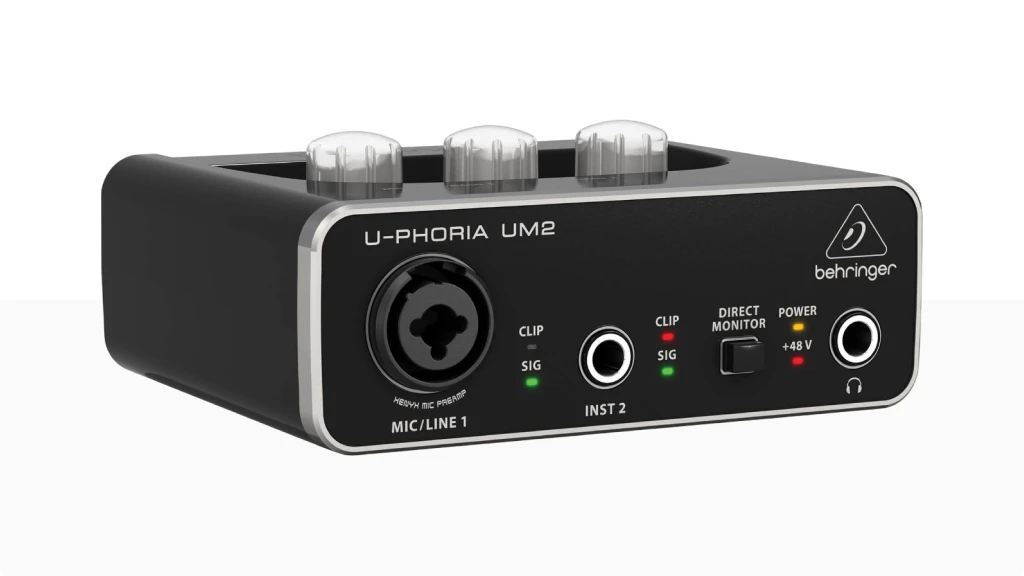
- Inputs: 1 x XLR/TRS combo input (mic/line), 1 x 1/4" Hi-Z instrument input
- Outputs: 2 x RCA stereo outputs, 1 x 1/4" headphone output
- Compatibility: Windows XP and higher, macOS (class-compliant)
- Connectivity: USB 2.0 (USB-powered)
- Resolution: 16-bit/48kHz
- Plus: Free Tracktion DAW software + 150 instrument/effect plugins
| Best for...
- First-time home studio builders on a tight budget
- Singer-songwriters recording demos
- Podcasters starting their first show
- Students learning audio production basics
- Streamers needing basic voice capture
| Not ideal for...
- Professional music production requiring 24-bit resolution
- Multi-microphone recording setups
- Users needing balanced monitor connections
The Behringer UM2: A Budget Gateway to Home Recording
The Behringer U-Phoria UM2 sits at the entry point of the audio interface market. At around $40-50, it costs less than most competitors. So the natural question becomes: can something this affordable actually produce usable recordings?
Behringer has built its reputation on making affordable gear accessible to musicians everywhere. The U-Phoria series represents their approach to USB audio interfaces, and the UM2 is the most stripped-down model in the lineup. It’s designed for one purpose: getting a microphone and an instrument into your computer without complications.
The UM2 targets a specific user. Someone who has never owned an audio interface before. Perhaps a guitarist who wants to try amp simulation software. Or a podcaster who realizes their laptop microphone sounds terrible. Maybe a vocalist who wants to capture song ideas before they vanish.
For these users, the UM2 makes sense. It removes the barrier of cost that often keeps people from exploring recording. And while it has clear limitations, understanding what this interface can and cannot do helps you decide if it fits your needs.
In the following sections, I break down the features, explain what the specs actually mean for your recordings, and share my real-world experience with this ultra-budget interface.
UM2 Features Explained: What You Actually Get
The Behringer U-Phoria UM2 packs essential features into its compact body. Let me walk you through each one and explain what it means for your recordings.
XENYX Microphone Preamp
The UM2 includes Behringer’s XENYX preamp technology. This preamp amplifies the weak signal from your microphone to a usable level for recording.
- What It Means for You: Preamp are like translator between your microphone/instrument and your computer. A good preamp captures your voice or instrument clearly without adding noise or distortion. The XENYX preamp offers 100dB of dynamic range, which means it can handle both quiet whispers and loud vocals without problems. In practice, it sounds clean and neutral—not colored or characterful, but honest.
+48V Phantom Power
The UM2 provides phantom power for condenser microphones. A dedicated switch on the back panel activates it.
- What It Means for You: Condenser microphones need power to operate, and phantom power delivers that through the XLR cable. If you own or plan to buy a condenser mic (like the Audio-Technica AT2020 or similar), this feature is essential. Dynamic microphones like the SM58 don’t need phantom power but won’t be harmed by it either. Just remember to turn it off when connecting sensitive ribbon microphones.
Hi-Z Instrument Input
A dedicated 1/4″ input on the front panel accepts high-impedance signals from guitars and basses.
- What It Means for You: Plugging a guitar directly into a regular line input produces a thin, weak sound because of impedance mismatch. The Hi-Z input solves this by matching your guitar’s electrical signal properly. This means you can plug in your electric guitar or bass without needing a separate DI box, which saves money and simplifies your setup.
Direct Monitoring
A switch enables zero-latency monitoring of your input signal through the headphone output.
- What It Means for You: When recording through a computer, there’s always a slight delay between playing a note and hearing it back through your headphones. This delay (latency) can throw off your timing. Direct monitoring sends your signal straight to the headphones before it reaches the computer, so you hear yourself in real-time. It’s like playing through an amp—immediate and responsive.
48kHz/16-bit Resolution
The UM2 records and plays back audio at 48kHz sample rate with 16-bit depth.
- What It Means for You: These numbers describe the quality of the digital conversion. CD quality is 44.1kHz/16-bit, so the UM2 slightly exceeds that standard. However, most professional recordings today use 24-bit depth because it captures more detail and provides more headroom. The 16-bit limitation means less margin for error when setting levels and less flexibility in post-production. For demos and practice, it’s adequate. For serious production work, it falls short.
USB Bus Power
The UM2 draws all its power from your computer’s USB port.
- What It Means for You: No power adapter needed. Just plug in the USB cable and you’re ready to record. This makes the UM2 perfect for mobile recording situations—toss it in your backpack with your laptop and record anywhere. The only downside is that some older computers with weak USB ports might not provide enough power for stable operation.
Free Software Bundle
Registering your UM2 unlocks Tracktion DAW software and over 150 virtual instruments and effects.
- What It Means for You: Starting from scratch? This bundle gives you everything needed to begin producing music immediately. Tracktion is a legitimate DAW used by professionals. The included plugins cover basic needs like EQ, compression, reverb, and various instrument sounds. It’s a complete starter package that removes the need to hunt for free software.
Technical Specifications
| Feature | Specification | Practical Benefit |
|---|---|---|
| Simultaneous I/O | 2 In / 2 Out | Record mic and guitar at the same time |
| XLR Mic Input | 1 x XLR/TRS combo with XENYX preamp | Connect any microphone or line source |
| Hi-Z Input | 1 x 1/4" instrument input | Plug in guitar/bass without a DI box |
| Line/Monitor Outputs | 2 x RCA stereo | Connect consumer speakers or monitors |
| Headphone Output | 1 x 1/4" stereo | Monitor recordings privately |
| Compatibility | Windows XP+, macOS (class-compliant) | Works with virtually any computer |
| Resolution | 16-bit / 48 kHz | Better than CD quality for basic recording |
| Phantom Power | +48V switchable | Power condenser microphones |
| Connectivity | USB 2.0 Type-B (bus-powered) | Single cable connection, no power adapter needed |
| Plus | Tracktion DAW + 150 plugins | Complete recording solution out of the box |
How the UM2 Performs: Real-World Testing Results
Testing the Behringer U-Phoria UM2 revealed both its strengths and limitations. Here’s what I found when putting it through its paces.
Microphone Recording: The XENYX preamp handled my condenser microphone without issues. Vocals came through clear with no audible noise floor at moderate gain levels. Pushing the gain to maximum introduced some hiss, but that’s expected at this price point. The phantom power switch worked reliably, with no pops or clicks when engaging it.
Recording spoken word for podcasting purposes proved straightforward. The preamp has enough gain for most dynamic microphones, though gain-hungry mics like the Shure SM7B would struggle. For that microphone, you’d need a Cloudlifter or similar inline preamp.
Guitar Recording: The Hi-Z input worked well for direct guitar recording. I connected my Stratocaster and used various amp simulation plugins. The signal remained clean with proper gain staging, and the response felt immediate thanks to direct monitoring.
One thing to note: the UM2 only records at 16-bit, which limits your dynamic range during amp simulation. High-gain sounds can get crunchy, but for clean and moderate overdrive tones, the quality holds up for demos and practice sessions.
Latency Performance: This is where budget interfaces often stumble. The UM2 relies on generic ASIO4ALL drivers on Windows, which means latency depends heavily on your computer’s performance. On a reasonably modern system, I achieved playable latency around 10-15ms with careful buffer settings.
Mac users have an easier time since the UM2 is class-compliant. It works with Core Audio without additional drivers, and latency performance improves accordingly.
The direct monitoring feature becomes essential here. When recording with software monitoring, the slight delay can throw off your timing. Engaging direct monitoring lets you perform naturally while still capturing everything to your DAW.
Output Quality: The RCA outputs present a minor inconvenience. Most studio monitors use balanced TRS or XLR connections, so you’ll need RCA-to-TRS cables or adapters. The signal quality through these outputs is acceptable for casual monitoring, though you won’t be doing critical mixing work.
The headphone amplifier provides adequate volume for most headphones. However, high-impedance studio headphones (250 ohms or higher) might not reach comfortable listening levels.
Driver Stability: This deserves honest discussion. Some Windows users report issues with ASIO4ALL configuration, particularly regarding the instrument input not being recognized. The solution often involves downloading an older Behringer driver or adjusting ASIO4ALL settings carefully. These issues don’t affect Mac users since the UM2 works natively with Core Audio.
On my test system running Windows 10, initial setup required some patience. Once configured properly, the interface ran stably across multiple DAW sessions.
Design and Build Quality: What to Expect
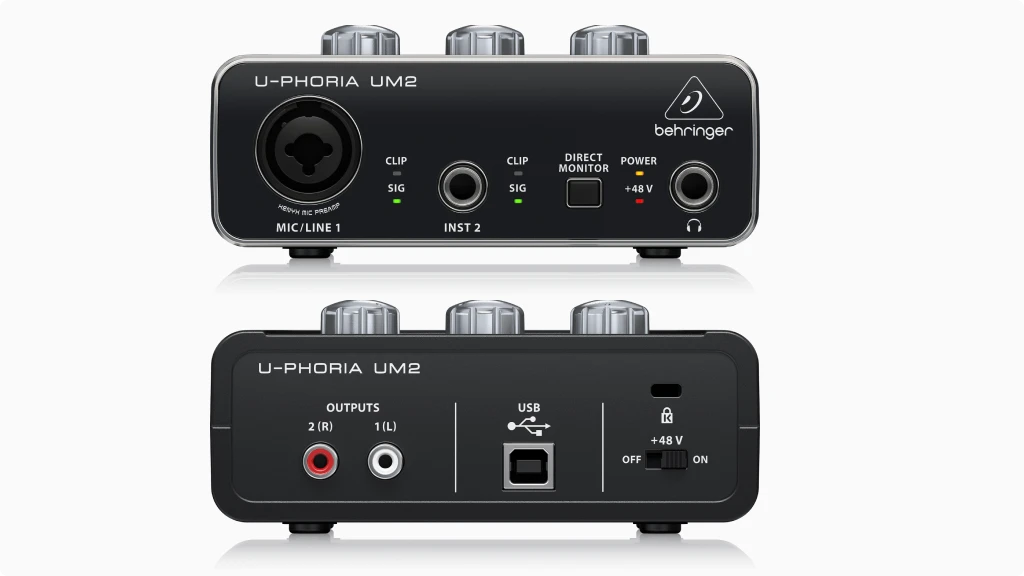
The UM2 keeps things simple, and its design reflects that philosophy. Let me walk through the physical layout and build quality.
Build Quality: The chassis uses impact-resistant plastic rather than metal. At this price, that’s the expected tradeoff. The unit feels lightweight but not fragile. I wouldn’t toss it carelessly in a bag, but it should survive normal use without issues.
The knobs turn smoothly with appropriate resistance. They feel a bit loose compared to more expensive interfaces, but they function as intended. The switches engage with a satisfying click.
Front/Top Panel
- MIC/LINE 1 combo input: An XLR/TRS combo jack that accepts microphones and line-level sources
- INST 2 input: A dedicated 1/4″ jack for guitars and basses
- GAIN 1 and GAIN 2 knobs: Independent level controls for each input
- SIG and CLIP LEDs: Green indicates signal presence, red warns of clipping
- Headphone output: Standard 1/4″ stereo jack
- OUTPUT knob: Controls both headphone and RCA output levels
- DIRECT MONITOR switch: Enables zero-latency monitoring
The layout makes sense. Inputs on the left, outputs on the right, controls in between. The LED indicators help with gain staging, though they’re quite sensitive—the clip light often flashes during normal transients even when levels are safe.
Rear Panel
The back panel contains:
- RCA outputs: Left and right stereo outputs for monitors or speakers
- USB port: Type-B connector for computer connection
- +48V switch: Engages phantom power for condenser microphones
That’s it. The minimal rear panel reinforces this interface’s portable, simple nature.
Setup Experience
Getting started with the UM2 takes about five minutes. Connect the USB cable, wait for your computer to recognize the device, and you’re essentially ready. Mac users can jump straight into their DAW.
Windows users should download the ASIO4ALL driver (or Behringer’s own driver from their website) for best performance. The default Windows audio driver works for playback but introduces too much latency for real-time recording.
In your DAW, select the UM2 as your audio device, set your buffer size, and start recording. The learning curve is minimal, which makes it perfect for beginners.
Getting the Best Sound: Setup Tips for the UM2
The UM2 can deliver surprisingly good results with proper setup. Here are techniques I’ve found helpful for maximizing its potential.
Gain Staging Matters More at 16-bit:With only 16 bits of resolution, you have less headroom for mistakes. Record too quietly, and you’ll hear noise when you turn it up later. Record too hot, and you’ll get harsh digital clipping.
Aim to have the signal LED (green) illuminating consistently during the loudest parts of your performance. The clip LED (red) should flash only occasionally during the absolute loudest peaks. This puts your signal in the sweet spot.
Use Direct Monitoring Wisely: When tracking vocals or guitar, enable direct monitoring to hear yourself without latency. But remember: you’re hearing the raw, unprocessed signal. Any effects in your DAW won’t be audible until playback.
Some musicians find this jarring at first. Singing without reverb feels exposed. Playing guitar without amp simulation sounds thin. The trick is to treat recording and mixing as separate processes. Focus on your performance while tracking, then enjoy the processed sound during playback.
Optimize Your Buffer Settings: Lower buffer sizes reduce latency but increase CPU load. Higher buffer sizes provide stability but introduce delay.
For tracking with direct monitoring, you can use higher buffer sizes (512 or 1024 samples) since you’re not relying on software monitoring. This gives your computer breathing room and prevents audio dropouts.
When recording with software monitoring (using plugins during recording), start with 256 samples and decrease only if your computer can handle it without glitches.
Work Around the RCA Outputs: If you’re connecting studio monitors with TRS inputs, use quality RCA-to-TRS cables. Cheap adapters can introduce noise or degrade the signal.
Alternatively, some affordable powered speakers (like Edifier or Presonus Eris) include RCA inputs that work perfectly with the UM2.
Keep Your Cables Short: Budget interfaces like the UM2 have less robust input stages than professional gear. Long cable runs can pick up interference. Keep your microphone and instrument cables under 15 feet when possible to minimize noise.
Final Thoughts: Who Should Buy the Behringer UM2?
The Behringer U-Phoria UM2 occupies a specific niche. It’s the most affordable way to get a microphone and guitar into your computer with decent quality. That simplicity is its strength.
For first-time home studio builders, the UM2 removes the financial barrier to entry. Instead of saving up for months, you can start recording today. You’ll learn the basics of audio interfaces, DAW software, and recording techniques without a major investment. If you discover that home recording isn’t for you, you’ve lost very little. If you catch the bug, you’ll eventually upgrade knowing exactly what features matter to you.
Singer-songwriters capturing demos will find the UM2 adequate. It records voice and guitar simultaneously, which covers the core workflow. The sound quality won’t match a professional studio, but demos are about capturing ideas, not perfection.
Podcasters on a budget can absolutely start with the UM2. Spoken word is less demanding than music production, and the XENYX preamp handles voice well. As your show grows, you can upgrade—but many successful podcasts have launched with gear this simple.
The UM2 isn’t for everyone, though. If you plan to produce music seriously, the 16-bit limitation will frustrate you eventually. The RCA outputs complicate professional monitoring setups. And Windows users might spend more time troubleshooting drivers than they’d like.
For about twice the price, the Behringer UMC202HD or UMC22 offer 24-bit resolution, which makes a meaningful difference. For roughly three times the price, the Focusrite Scarlett Solo provides better preamps, included software, and more reliable driver support.
But if your budget is truly constrained, or you just want to dip your toes into home recording, the Behringer U-Phoria UM2 does what it promises. It’s a functional, affordable audio interface that helps beginners start their recording journey.
8. FAQ
Does the Behringer UM2 work with GarageBand?
Yes. The UM2 is class-compliant on Mac, meaning it works immediately with GarageBand, Logic Pro, and other macOS DAWs without additional drivers. Simply connect via USB, select the UM2 in GarageBand’s audio preferences, and start recording. If you experience latency issues, enable direct monitoring on the interface and adjust your buffer settings in GarageBand.
Can I use the UM2 with a Shure SM7B microphone?
Technically yes, but with limitations. The SM7B requires significant preamp gain (around 60dB) due to its low output level. The UM2’s XENYX preamp may not provide enough clean gain, resulting in a quiet signal that requires boosting in post—which introduces noise at 16-bit resolution. For SM7B use, consider adding an inline preamp like the Cloudlifter or Fethead, or choose a microphone with higher output sensitivity.
Why is my instrument input not working on Windows?
This common issue relates to ASIO4ALL configuration. By default, ASIO4ALL may not enable all inputs. Open the ASIO4ALL control panel, expand the UM2 device, and ensure both input channels are activated (not greyed out). Some users report better results using older Behringer-specific drivers instead of ASIO4ALL. You can also try switching to WASAPI driver mode in your DAW as an alternative.
| Why Can You Trust Us

| ALSO REVIEWED