M-Audio M-Track Solo Review: Is it Still worth it in 2026?
- Audio Interface, Reviews
- by Bruno Bontempo
Our articles may include affiliate links and we may earn a commission. Here how it works.
OUR VERDICT
The M-Audio M-Track Solo delivers where it counts for beginners: clean recordings, playable latency, and a software bundle that puts pricier competitors to shame. At around $50, it’s the smartest entry point into home recording I’ve tested. The plastic build and 16-bit limitation won’t satisfy pros, but if you’re recording your first demos, starting a podcast, or need a portable backup interface, the M-Track Solo punches well above its price. It’s proof that getting started doesn’t require emptying your wallet.
Release Date
Dec 2020
14.5x11.5x5.5cm
5.71x4.53x2.17 in
300 g
0.66 lb
| Pros
- Impressive software bundle worth more than the interface itself
- Zero-latency direct monitoring eliminates recording delay
- ASIO drivers included for low-latency Windows performance
- Crystal Preamp delivers clean, transparent sound for the price
- Compact and fully USB-powered for true portability
| Cons
- 16-bit/48kHz resolution limits professional applications
- Plastic construction feels lightweight and less durable
- RCA outputs instead of balanced TRS connections
| Key Features
- Inputs: 1x XLR/TRS combo input (mic/line) with Crystal Preamp, 1x 1/4" switchable line/instrument input
- Outputs: 2x RCA stereo outputs, 1x 1/8" (3.5mm) headphone output
- Compatibility: macOS 10.9.5+, Windows 7 SP1+, iOS (with powered USB hub)
- Connectivity: USB 2.0 Type-B (bus-powered)
- Resolution: 16-bit / 48 kHz
- Plus: MPC Beats DAW, Pro Tools First M-Audio Edition, 80 AIR effect plugins, Xpand!2 synthesizer, Eleven Lite amp simulator, ReValver guitar amp plugin, 3 virtual instruments (TubeSynth, Electric, Bassline)
| Best for...
- First-time home studio owners learning to record
- Podcasters on a tight budget who need clean voice capture
- Singer-songwriters recording demos and rough ideas
- Guitarists wanting to practice with amp sims through headphones
- Mobile musicians needing a portable backup interface
| Not ideal for...
- Professional studio work requiring 24-bit resolution
- Multi-instrument recording sessions needing more inputs
- Users who need MIDI connectivity for keyboards or controllers
1. M-Audio M-Track Solo Overview: Entry-Level Done Right
M-Audio has been making audio interfaces since the early 2000s, and they’ve learned a thing or two about what beginners actually need. The M-Track Solo represents their most affordable offering, and it’s designed with one clear purpose: get you recording without complications or a hefty price tag.
This 2-in/2-out USB interface targets solo musicians, podcasters, and content creators who need a simple path from microphone or instrument to computer. It’s not trying to be everything to everyone. Instead, M-Audio stripped away the extras and focused on the essentials: one good preamp, straightforward controls, and enough software to start producing immediately.
The M-Track Solo sits in the ultra-budget category alongside interfaces like the Behringer UM2 and UMC22. However, M-Audio differentiates itself through two main strengths: dedicated ASIO drivers (rather than relying on generic drivers) and one of the most generous software bundles at any price point.
For context, I’ve been recording bass and guitar for over two decades. I’ve used interfaces costing ten times what the M-Track Solo sells for. So when I say this little box surprised me, I mean it. The sound quality and driver performance compete with interfaces twice the price. The limitations are real, but they’re the right compromises for someone just starting out.
In the following sections, I’ll break down exactly what you get, how it performs in real recording situations, and who should consider alternatives.
2. M-Track Solo Features Explained: What Everything Does
Before diving into each feature, here’s what matters: the M-Track Solo keeps things simple on purpose. You won’t find overwhelming options or complicated routing. What you get is a focused set of tools that work reliably. Let me walk you through each one.
Crystal Preamp
M-Audio’s Crystal Preamp is their proprietary microphone preamplifier design. It offers up to 54 dB of gain, which is enough for most dynamic and condenser microphones. The preamp aims for transparency rather than coloration, meaning it captures your source without adding its own character.
- What It Means for You: Think of the preamp as your microphone’s voice coach. A transparent preamp like this one lets your mic’s natural character shine through. You won’t get vintage warmth or tube saturation, but you also won’t get unwanted noise or distortion. For beginners, this neutral starting point is actually ideal because it teaches you what clean recordings sound like before you start adding effects.
Phantom Power (+48V)
Phantom power sends 48 volts of DC current through the XLR cable to power condenser microphones. The M-Track Solo has a dedicated switch on the front panel with an LED indicator that glows orange when engaged.
- What It Means for You: If you own or plan to buy a condenser microphone (like the Audio-Technica AT2020 or Rode NT1), you need phantom power to make it work. Dynamic mics like the Shure SM58 don’t need it, but leaving phantom power on won’t damage them. Just remember to turn it off before unplugging your condenser mic to protect the capsule.
Switchable Line/Instrument Input
The second input on the M-Track Solo accepts either line-level signals or instrument-level signals from guitars and basses. A small switch on the front toggles between these two modes, adjusting the input impedance accordingly.
- What It Means for You: Guitars and basses have weak, high-impedance outputs that need special handling. When you flip to “Instrument” mode, the M-Track Solo adjusts its input to match your guitar’s pickups. Line mode works for keyboards, drum machines, or any device with a standard audio output. Getting this wrong results in either a weak, thin sound (guitar into line) or a harsh, clipped sound (keyboard into instrument).
Zero-Latency Direct Monitoring
The USB/Direct switch on the front panel routes your input signal directly to the headphone and RCA outputs, bypassing the computer entirely. This eliminates the delay that occurs when audio travels through your computer and back.
- What It Means for You: Recording while hearing yourself delayed, even by a few milliseconds, throws off your timing and pitch. Direct monitoring solves this by letting you hear yourself in real time. The tradeoff is you won’t hear any plugins or effects your DAW is applying, but for tracking raw performances, this is exactly what you want.
ASIO Drivers
Unlike many budget interfaces that rely on generic drivers or ASIO4ALL, the M-Track Solo comes with dedicated ASIO drivers for Windows. Mac users get plug-and-play Core Audio compatibility.
- What It Means for You: ASIO drivers communicate directly with your audio interface, bypassing Windows’ audio system. This results in lower latency and more stable performance. In my testing, the M-Track Solo achieved around 9ms round-trip latency at 128 samples, which is impressively playable for this price range.
Headphone Output (1/8" / 3.5mm)
The front-panel headphone jack uses a mini-jack connection shared with the output level control. The output shares level control with the main RCA outputs, so adjusting volume affects both.
- What It Means for You: The smaller jack size means you’ll likely need an adapter for standard studio headphones with 1/4″ plugs. M-Audio recommends headphones with impedance between 16-50 ohms for optimal volume levels. Higher impedance headphones may not get loud enough. While convenient for portability, this is a compromise compared to interfaces with dedicated 1/4″ headphone outputs.
RCA Outputs
The rear panel features unbalanced RCA outputs for connecting powered monitors or consumer audio equipment.
- What It Means for You: RCA connections are common on consumer speakers and home audio equipment. However, professional studio monitors typically use balanced TRS or XLR connections. If you’re using proper studio monitors, you’ll need RCA-to-TRS cables, and you may notice more noise over longer cable runs since RCA is unbalanced. For desktop speakers or short cable distances, this works fine.
Software Bundle
The included software package contains MPC Beats (DAW), Pro Tools First M-Audio Edition (DAW), 80 AIR effect plugins, Xpand!2 (synthesizer), Eleven Lite (guitar amp simulator), ReValver (guitar amp plugin with 2 amps, 3 cabs, 3 mics, 3 effects), and three virtual instruments (TubeSynth, Electric, Bassline).
- What It Means for You: This bundle alone is worth more than the interface costs. MPC Beats is surprisingly capable for beat-making and recording. The amp simulators let guitarists record direct without an amp. The 80 effects plugins cover everything from reverb to compression. You literally have everything needed to record, mix, and produce complete songs right out of the box.
3. M-Track Solo Technical Specifications
Need the exact numbers before you buy? Here’s every specification that matters, along with what each one means for your recordings. Compare these specs with other interfaces to make an informed decision.
| Feature | Specification | Practical Benefit |
|---|---|---|
| Simultaneous I/O | 2-in / 2-out | Record vocals and guitar at the same time, or capture stereo keyboard output |
| Inputs | 1x XLR/TRS combo (mic/line), 1x 1/4" TRS (line/instrument switchable) | Connect any microphone plus guitar, bass, or keyboard simultaneously |
| Outputs | 2x RCA (unbalanced stereo), 1x 1/8" (3.5mm) headphone | Works with consumer speakers and headphones; may need adapters for pro monitors |
| Compatibility | macOS 10.9.5+, Windows 7 SP1+, iOS (with powered USB hub) | Works with virtually any modern computer; iOS requires extra accessories |
| Connectivity | USB 2.0 Type-B (bus-powered) | Single cable for power and audio; no external power supply needed |
| Resolution | 16-bit / 48 kHz | Sufficient for demos, podcasts, and casual recording; below professional 24-bit standard |
| Phantom Power | +48V switchable | Powers condenser microphones directly from the interface |
| Direct Monitor | Zero-latency USB/Direct switch (mono summed) | Hear yourself without delay while recording; both inputs combined to mono |
| Bus Powered | Yes (USB) | Portable and travel-friendly; no wall adapter required |
| Preamp Gain | 0 to +54 dB (mic), -10 to +44 dB (line/instrument) | Enough gain for most microphones; gain-hungry dynamics like SM7B may need a boost |
| Frequency Response | 20 Hz - 20 kHz | Captures the full audible spectrum of human hearing |
| Signal-to-Noise Ratio | 109 dB | Clean recordings at normal gain levels with minimal background noise |
| THD+N | 0.003% (mic preamp), 0.002% (line input), 0.005% (instrument) | Low distortion ensures accurate sound reproduction |
| MIDI | None | Cannot connect MIDI keyboards or controllers directly; use USB MIDI instead |
| Software Bundle | MPC Beats, Pro Tools First, 80 AIR plugins, Xpand!2, Eleven Lite, ReValver (2 amps, 3 cabs, 3 mics, 3 effects), TubeSynth, Electric, Bassline | Complete production setup included; software value exceeds hardware cost |
4. M-Track Solo Performance: How It Sounds and Responds
Performance is where budget interfaces often disappoint, so I approached testing with realistic expectations. What I found was genuinely surprising for a $50 interface.
Preamp Performance: The Crystal Preamp delivers clean gain with minimal self-noise throughout most of its range. Recording vocals with a condenser mic, the results were usable and clear. However, there’s a quirk worth noting: the gain behavior between positions 9 and 10 isn’t linear. Moving from 9 to maximum produces a larger jump in volume than you’d expect. This caught me off guard initially, but once you know about it, you can work around it.
With dynamic microphones that need more gain (like the Shure SM7B), you’ll find yourself pushing closer to maximum. For gain-hungry mics, the M-Track Solo works but doesn’t leave much headroom. If you’re using low-output dynamic mics regularly, consider an interface with more gain on tap or a separate preamp.
For guitar and bass through the instrument input, the sound is honest and direct. The DI tone won’t flatter a poorly set-up guitar, but it captures what’s there accurately. I found the instrument input works particularly well with the included amp simulators, which add the character the clean signal lacks.
Latency Performance: This is where the M-Track Solo earned my respect. The included ASIO drivers perform remarkably well. At 128 samples, round-trip latency sits around 9ms, which is comfortable for real-time playing. Even pushing down to 64 samples, I achieved roughly 6ms round-trip without audio dropouts on a reasonably modern computer.
For context, most people can’t perceive latency below 10ms. So for tracking guitars, vocals, or MIDI instruments through software, the M-Track Solo keeps up. You can actually play virtual instruments and amp sims in real time without the frustrating delay that plagues some budget interfaces.
Audio Quality: Here’s the honest truth about 16-bit/48kHz: it’s enough for demos, podcasts, and casual recording, but it’s below the 24-bit standard used in professional production. You won’t hear a dramatic difference on playback, but you have less headroom during recording and editing.
The signal-to-noise ratio of 109dB is respectable. In practical terms, recordings sound clean at normal gain levels. Push the preamp hard or record very quiet sources, and you’ll start hearing the noise floor. For typical voice recording or instrument tracking at reasonable levels, this isn’t a concern.
The converters do their job without adding obvious coloration. What you put in is essentially what you get out. For learning proper recording technique, this transparency is actually helpful.
Direct Monitoring Performance: The USB/Direct switch offers two modes: USB (hear your DAW output) or Direct (hear your inputs with zero latency). In Direct mode, both inputs are summed to mono through the outputs. This means if you’re recording guitar and vocals simultaneously, you’ll hear them centered rather than panned.
The monitoring works as expected, with no perceivable latency in Direct mode. My only criticism is the lack of a blend control between direct and playback signals. You’re either hearing one or the other, not both mixed together. For overdubbing to existing tracks, you’ll need to use the DAW’s software monitoring instead.
Headphone Performance: The 1/8″ headphone output gets reasonably loud with headphones in the recommended 16-50 ohm range. I tested with 32-ohm headphones and had plenty of volume. Higher impedance studio headphones (like 250-ohm Beyerdynamics) struggled to reach comfortable monitoring levels.
Sound quality through headphones matched the main outputs, which is to say clean and neutral. Don’t expect the headphone amp to drive power-hungry cans, but for typical consumer or prosumer headphones, it performs fine.
5. M-Track Solo Design and Usability: Built for Simplicity
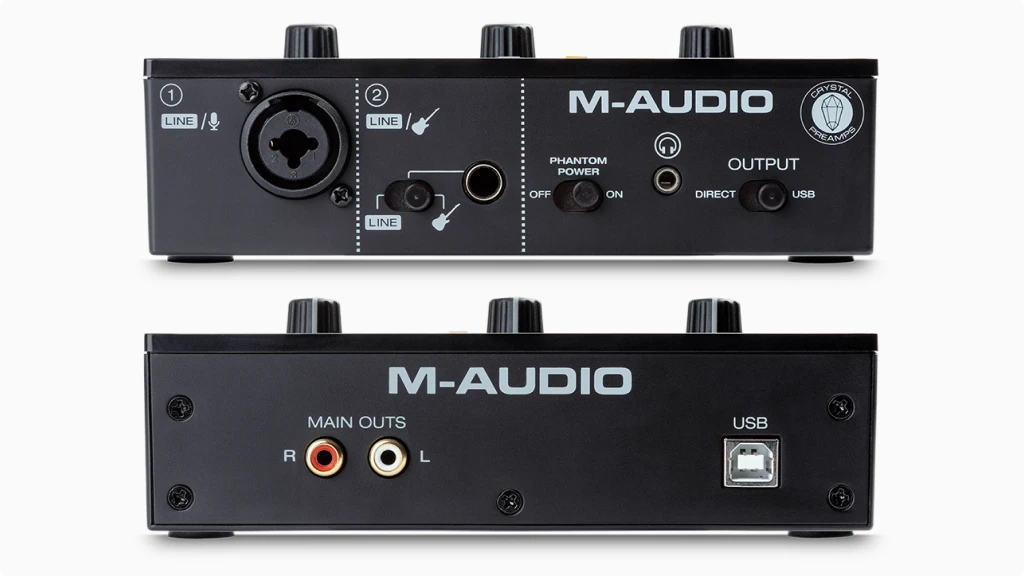
The M-Track Solo prioritizes function over flash. At first glance, it won’t win design awards, but every element serves a purpose. Let me walk through what you’ll actually interact with daily.
Build Quality: Let’s be direct: this is a plastic interface. The enclosure is lightweight composite material with a brushed aluminum-effect finish. It looks decent on a desk, but it won’t survive being dropped or stepped on.
The rubber feet grip surfaces well, preventing the interface from sliding around when you’re plugging in cables or adjusting knobs. Given the light weight, these feet do important work.
For desktop use in a home studio, the build quality is acceptable. For mobile use, treat it carefully. Tossing it loose in a backpack would make me nervous. A padded case or protective sleeve is a worthwhile investment if you’re traveling with it.
Front/Top Panel
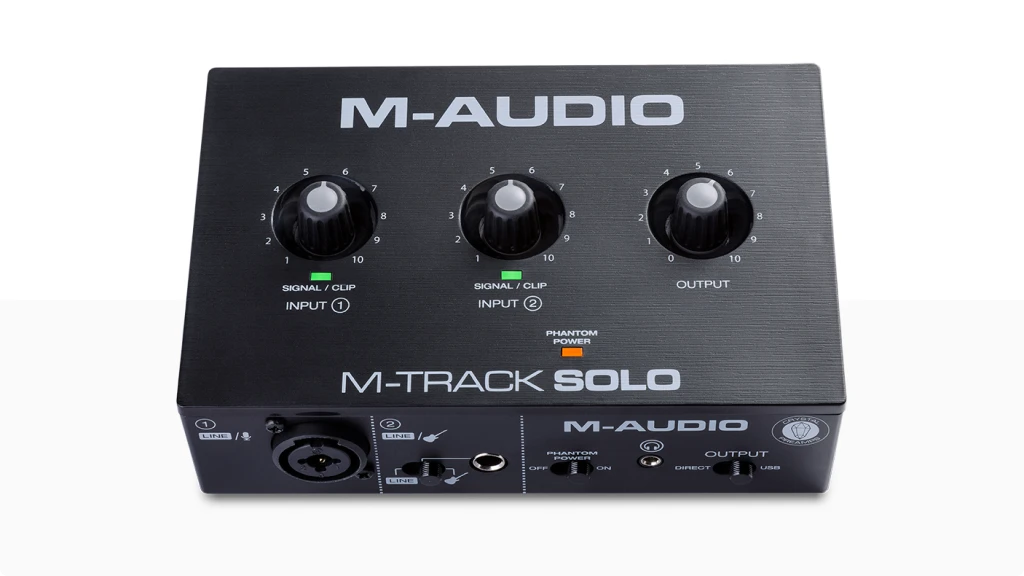
From left to right, you’ll find the XLR/TRS combo input (Input 1), followed by the 1/4″ instrument/line input (Input 2) with its mode switch directly below. Next comes the phantom power switch with its orange LED indicator, then the 1/8″ headphone jack, and finally the USB/Direct monitoring switch.
The layout makes sense for typical workflow: plug your mic into the combo jack, your guitar into the dedicated input, and your headphones in front. Everything you adjust frequently is within reach.
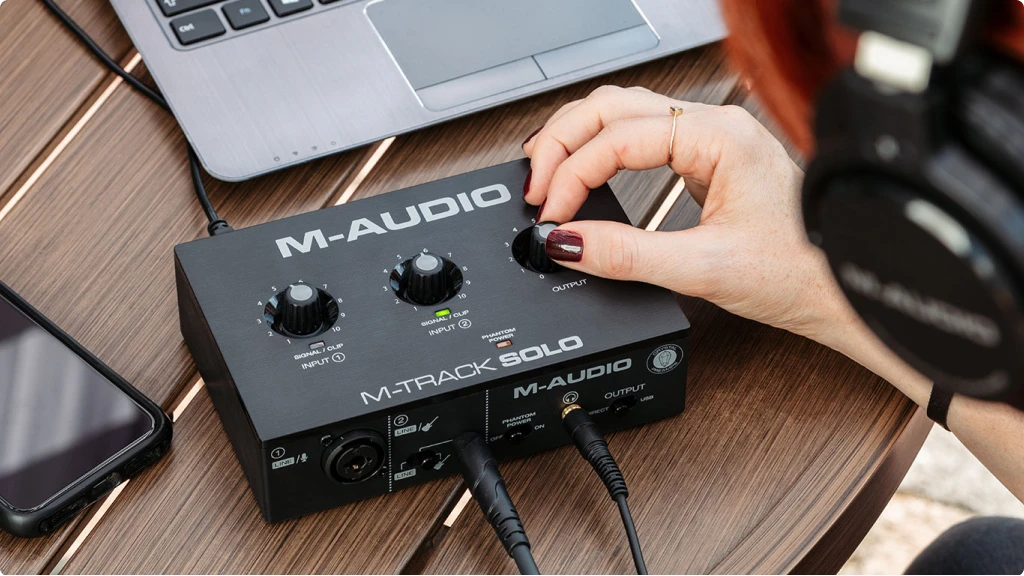
Top Panel: Three knobs control the interface: Gain 1 (for the combo input), Gain 2 (for the instrument input), and Output level (controlling both headphones and main outputs simultaneously). Each gain knob has a corresponding LED that glows green when signal is present and turns red when clipping.
The clip indicators are genuinely useful, especially for beginners learning to set proper gain. Seeing that green light confirm signal presence removes guesswork. When it flashes red, you know to back off immediately.
The knobs themselves have noticeable lateral play, meaning they wobble slightly when touched. They function correctly, but the physical feel doesn’t inspire confidence. This is clearly where cost-cutting happened, and you can tell.
Rear Panel
Around back, you’ll find the dual RCA outputs and the USB-B port. That’s it. Simple and clean, though the RCA placement means cable management requires some thought if you’re using longer runs to monitors.
The USB port is the standard Type-B connector found on printers and many audio interfaces. The included cable is short (about 1 meter), so you may need a longer cable depending on your setup.
Setup Experience
On Mac, setup is genuinely plug-and-play. Connect the USB cable, and macOS recognizes the M-Track Solo immediately through Core Audio. Select it as your input/output device in your DAW or system preferences, and you’re recording.
On Windows, you’ll need to download drivers from M-Audio’s website. The installation process is straightforward, but you’ll also want to install the ASIO driver control panel to adjust buffer size and sample rate. Some users have reported the control panel not functioning correctly on Windows 11, though the interface itself still works.
Software registration requires creating an M-Audio account and entering your serial number. The download process involves multiple installers for each software component. Budget an hour for full installation, especially if your internet connection is slow.
6. Getting the Best Sound from Your M-Track Solo: Practical Tips
One of the biggest challenges for beginners isn’t the gear, it’s knowing how to use it effectively. Here are practical techniques I’ve developed that will help you maximize what the M-Track Solo offers.
Setting Proper Gain Levels: The clip LEDs are your best friends. Here’s how to use them correctly:
Start with the gain knob at minimum. Have your vocalist sing or speak at their loudest expected level, or play your guitar at its loudest passage. Slowly increase gain until the LED flickers green consistently, then back off slightly if you see any red.
Remember that quirk I mentioned about positions 9 to 10? Stay below 9 unless you absolutely need maximum gain. The jump between 9 and 10 is significant enough to catch you off-guard.
For podcasting and voice recording, aim for peaks hitting around -12dB to -6dB in your DAW. This leaves headroom for processing later without risking digital clipping.
Working Around the 16-Bit Limitation: The reduced bit depth means you have less forgiveness for recording too hot or too quiet. Record at conservative levels (peaking around -12dB) to avoid digital clipping, which sounds harsh at 16-bit. You can always add volume later, but you cannot fix clipped audio.
If you’re planning to heavily process recordings with compression and EQ, consider recording slightly quieter than you might with a 24-bit interface. The extra headroom helps when plugins add gain.
Using Direct Monitoring Effectively: When tracking, use Direct mode to hear yourself without latency. Accept that you won’t hear plugins in real time, you’ll add those during mixing. This workflow separates tracking (capturing performances) from production (adding effects), which is actually a good habit to develop.
For overdubbing to existing tracks, you have two choices: use the DAW’s software monitoring with the interface’s low-latency ASIO drivers, or switch between USB and Direct modes as needed. The first approach lets you hear yourself with your existing tracks, while the second eliminates any latency but means switching between hearing your input and your playback.
Dealing with RCA Outputs: If connecting to studio monitors with balanced inputs, use quality RCA-to-TRS cables and keep them short (under 3 meters if possible). The unbalanced connection can pick up interference over longer runs.
For the cleanest signal, position the M-Track Solo away from power supplies, computer monitors, and other electronics that might introduce noise into the unbalanced cables.
Making the Most of the Software Bundle: Don’t overlook the included software, it’s genuinely useful. MPC Beats is excellent for beatmaking and has a surprisingly clean recording engine. Pro Tools First gives you industry-standard workflow experience (useful if you ever work in professional studios).
The Eleven Lite amp simulator combined with ReValver gives guitarists a solid range of tones without needing an amplifier. For practicing late at night or recording direct, these plugins transform the M-Track Solo into a capable guitar recording solution.
Xpand!2 is a powerful multi-timbral synthesizer that covers everything from pianos to pads. Combined with the three additional virtual instruments, you have enough sound sources to produce complete tracks without buying anything else.
7. M-Track Solo Final Thoughts: Who Should Buy It
After spending considerable time with the M-Audio M-Track Solo, my conclusion is clear: it’s the best entry point into audio recording for people on a strict budget.
The interface does exactly what it promises. You get clean recordings, workable latency, and a software package that sets you up for actual music production. The Crystal Preamp captures sources accurately, the ASIO drivers perform better than expected, and the direct monitoring eliminates the frustration of recording with delay.
The compromises are real but reasonable for the price. The 16-bit resolution limits professional applications, the plastic build won’t survive abuse, and the RCA outputs mean adapting to most studio monitors. These are the tradeoffs M-Audio made to hit this price point, and they’re the right ones.
Buy the M-Track Solo if: You’re recording your first demos, starting a basic podcast, learning music production, or need an affordable backup interface for mobile recording. The software bundle alone justifies the purchase if you don’t already own a DAW.
Consider alternatives if: You need 24-bit recording for professional work, you’re connecting multiple microphones simultaneously, or you require MIDI connectivity for keyboards and controllers. The Focusrite Scarlett Solo offers better build quality and resolution at roughly triple the price. The M-Audio M-Track Duo adds a second preamp for just $20 more.
The M-Track Solo won’t be your forever interface. As your skills and needs grow, you’ll eventually want something with higher resolution, more inputs, or better construction. But that’s perfectly fine. This interface exists to get you started without gatekeeping quality behind an expensive price tag.
For around $50, you get everything needed to record professional-sounding demos. That accessibility matters. Not everyone can drop hundreds on gear when they’re just discovering their passion for recording. The M-Track Solo removes that barrier and delivers genuine value in return.
If you’re ready to start recording but working with a limited budget, the M-Track Solo is my top recommendation. It’s not perfect, but it’s honest, capable, and incredibly affordable. That combination is hard to beat.
8. FAQ
Can I Record Two Microphones at the Same Time with the M-Track Solo?
No, you cannot record two microphones simultaneously. The M-Track Solo has only one microphone preamp (the XLR/combo input). The second input is a 1/4″ jack designed for instruments or line-level devices, not microphones. If you connect two line-level sources (like a keyboard’s left and right outputs), you can record them as a stereo pair by assigning inputs 1+2 to a stereo track in your DAW and panning them left and right. However, for recording two people with microphones at once (like a two-person podcast or interview), you will need the M-Track Duo instead, which has two combo inputs with preamps. The Duo costs roughly $20 more and is worth the upgrade if multi-microphone recording is in your plans.
Will the M-Track Solo Work with Rocksmith for Learning Guitar?
Yes, but it requires some setup. The M-Track Solo works with Rocksmith 2014 using the rs_asio mod, which allows the game to recognize third-party audio interfaces instead of requiring the official Real Tone Cable. Users on GitHub have confirmed compatibility, though you need to configure the rs_asio.ini file correctly with the M-Track Solo’s ASIO driver settings. Some players have reported issues with sample rate settings in the M-Audio driver control panel, particularly getting stuck at 44.1kHz instead of the 48kHz the interface supports. If you encounter problems, try using Voicemeeter Banana as an intermediary audio router. The instrument input (Input 2) is where you connect your guitar, and make sure the Line/Instrument switch is set to “Instrument” for proper impedance matching.
How Do I Connect Studio Monitors with TRS/XLR Inputs to the M-Track Solo's RCA Outputs?
The M-Track Solo only has unbalanced RCA outputs, which is uncommon for audio interfaces at any price. Most studio monitors (like the Yamaha HS5 or KRK Rokit) use balanced TRS or XLR inputs. You will need RCA-to-TRS adapter cables or RCA-to-XLR cables to make the connection. Keep these cables as short as possible (under 3 meters) because unbalanced RCA connections can pick up interference and hum over longer distances. Position the interface away from power supplies, computer monitors, and other electronics that might introduce noise. Some users connect the M-Track Solo to consumer speakers or powered multimedia monitors that have RCA inputs, which works without adapters. If you are planning to invest in proper studio monitors, the M-Track Duo might be a better choice since it has balanced 1/4″ TRS outputs.
| Why Can You Trust Us

| ALSO REVIEWED