Fender Quantum HD 8 Review: Full-Band Recording Made Simple
- Audio Interface, Reviews
- by Bruno Bontempo
Our articles may include affiliate links and we may earn a commission. Here how it works.
OUR VERDICT
The Fender Quantum HD 8 delivers what serious project studios need: transparent MAX-HD preamps with 75dB of gain, Fender-engineered instrument inputs that actually sound like your guitar, and dedicated re-amp outputs for creative tone sculpting.
Add ultra-low latency USB-C performance, 16 ADAT channels for expansion, and a perpetual Fender Studio Pro license. It competes directly with interfaces costing hundreds more. If you record full bands, run a project studio, or simply demand professional-quality conversion without the professional price tag, this interface belongs on your shortlist.
Release Date
Jan 2026
48.3x22x4.4 cm
10x8.6X1.73 in
2.9 kg
6.30 lb
| Pros
- Transparent MAX-HD preamps with industry-leading 75dB gain range
- Fender-designed instrument inputs capture guitar and bass naturally
- Dedicated re-amp outputs for creative tone experimentation
- Ultra-low latency performance (around 3.5ms round-trip)
- Comprehensive bundled software including Fender Studio Pro
| Cons
- All mic inputs located on rear panel only
- Re-amp outputs cannot mirror inputs in real-time
- Limited monitor controller features (no talkback or mono fold-down)
| Key Features
- Inputs: 8 XLR/TRS combo mic/line inputs (rear), 2 Hi-Z instrument inputs (front), 16 ADAT optical channels, S/PDIF stereo
- Outputs: 2 XLR main outputs, 8 TRS line outputs, 2 re-amp outputs, 2 headphone outputs, 16 ADAT optical channels, S/PDIF stereo
- Compatibility: macOS, Windows, iOS, iPadOS, Android
- Connectivity: USB-C (USB 2.0 protocol)
- Resolution: 32-bit / 192 kHz
- Plus: ender Studio Pro perpetual license, 12-month Fender Studio Pro+ subscription, Universal Control app, DSP monitor mixer, loopback routing, Auto Gain function, speaker switching, ADAT standalone mode, MIDI I/O, Word Clock I/O
| Best for...
- Full-band recording sessions requiring 8+ simultaneous mic inputs
- Guitarists and bassists who want transparent DI recording with re-amp flexibility
- Project studios looking to expand via ADAT
- Content creators needing loopback and DSP mixing capabilities
- Studios seeking an interface that grows with their needs
| Not ideal for...
- Solo artists who only need 2-4 inputs
- Musicians on a tight budget under $500
- Those who prefer front-panel mic access for quick sessions
1. Fender Quantum HD 8 Overview: Where Guitar Legacy Meets Studio Innovation
The Fender name carries serious weight. For decades, it’s been synonymous with guitars, basses, and amplifiers that shaped modern music. So when Fender (through their acquisition of PreSonus) released the Quantum HD 8, I had to see if their guitar expertise translated into a recording interface worth considering.
The short answer: it does.
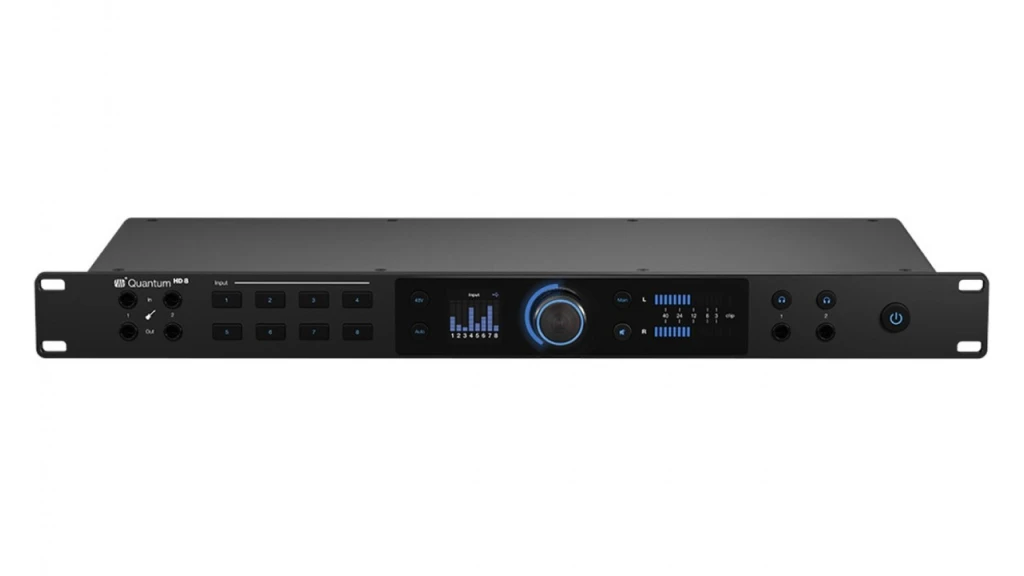
The Quantum HD 8 sits at the top of Fender’s new interface lineup, offering a 26-in/30-out configuration packed into a 1U rackmount chassis. This is the interface for project studios, full-band recordings, and anyone who’s outgrown their 2-input desktop unit but isn’t ready to drop several thousand on flagship converters.
What makes it interesting isn’t just the spec sheet—though the 32-bit/192kHz conversion and 124dB dynamic range are nothing to ignore. The real story is how Fender’s instrument design expertise shaped the front-panel inputs and re-amp outputs. As someone who’s spent 20+ years recording guitar and bass, this collaboration between studio engineering and guitar manufacturing caught my attention.
Let me break down what matters when you’re actually using this thing in a session.
2. Fender Quantum HD 8 Features Explained: What Actually Matters
Before diving into every spec, I want to highlight the features that genuinely impact your recordings. Some of these are standard fare; others set the Quantum HD 8 apart from similarly-priced interfaces.
MAX-HD Mic Preamps with 75dB Gain
The Quantum HD 8 uses eight newly designed MAX-HD preamps. These are digitally-controlled analog preamps with an impressive 75dB gain range—plus a switchable -20dB pad that extends total gain adjustment to 95dB.
- What It Means for You: You can plug in virtually any microphone and get usable signal. Dynamic mics like the Shure SM7B, notorious for needing lots of gain, work without an external preamp. Ribbon mics? Same story. I found these preamps stay clean even when pushed, which matters when you’re tracking quiet sources like acoustic guitar fingerpicking or soft vocals.
Fender-Designed Instrument Inputs
The two front-facing Hi-Z inputs were co-developed with Fender’s guitar engineers—the same people designing Stratocasters and Precision Basses.
- What It Means for You: Your guitar or bass sounds like itself, not a compromised version of itself. Many interfaces treat instrument inputs as an afterthought, resulting in a slightly dull or colored signal. The Quantum HD 8’s inputs feel responsive and transparent. When I plugged in my Jazz Bass and rolled off the tone knob, I heard exactly what I expected—not some weirdly filtered version. This matters because it gives you honest tracks to work with, whether you’re keeping the DI sound or re-amping later.
Dedicated Re-Amp Outputs
Two dedicated re-amp outputs on the front panel let you send signals from your DAW back through guitar amps, pedals, and other outboard gear.
- What It Means for You: Think of it like a time machine for your tones. Record a clean DI track today, then experiment with different amp settings, pedal combinations, and mic placements next week—without asking the guitarist to come back. The output impedance is correctly matched for plugging directly into amp inputs. I ran several re-amp sessions, adjusting amp settings between takes, and the workflow felt natural.
Auto Gain Function
Press the Auto Gain button, select your channels, and make noise for about eight seconds. The interface sets optimal gain levels automatically.
- What It Means for You: This speeds up session prep considerably. I found it particularly useful when setting up multiple mics on a drum kit—instead of adjusting eight preamps individually, I had reasonable starting points within seconds. You’ll still want to fine-tune, but Auto Gain gets you 80% of the way there immediately.
32-bit/192kHz Conversion with 124dB Dynamic Range
The converters capture audio at up to 32-bit/192kHz resolution with 124dB of dynamic range.
- What It Means for You: More headroom and detail than most project studios will ever need. At 24-bit/48kHz (which is where most people actually work), you’re getting professional-quality conversion that holds up against interfaces costing significantly more. The practical benefit is recordings that feel “open” and detailed, with transients that stay intact.
DSP Monitor Mixer and Loopback
Built-in DSP mixing lets you create cue mixes with essentially zero latency. Loopback routing sends audio from any application back into your DAW.
- What It Means for You: Performers can monitor themselves without delay while you keep plugins running in your session. Streamers and podcasters can route system audio into their recordings for things like Zoom calls or background music. The mixer is controlled through Universal Control software, which works on desktop, tablet, and mobile devices.
ADAT Expansion (16 Channels at 48kHz)
Two optical ADAT ports provide 16 additional input/output channels at 48kHz sample rates (8 at 96kHz using S/MUX).
- What It Means for You: Your interface can grow with your needs. Add an external preamp with ADAT output, and suddenly you have 24 analog inputs. The Quantum HD 8 can even function as a standalone ADAT preamp, sending its eight channels to another interface. This expandability protects your investment.
Universal Control App and Fender Studio Pro
The Quantum HD 8 includes Universal Control software for managing all interface settings, plus a perpetual license for Fender Studio Pro (formerly Studio One Pro) and a 12-month Studio Pro+ subscription.
- What It Means for You: You’re getting a full professional DAW included—not a “lite” version with track limits. Fender Studio Pro handles everything from basic recording to complex mixing. The Universal Control app lets you adjust preamp gain, phantom power, and routing from your phone, which is genuinely useful when you’re at the drum kit instead of the control room.
3. Fender Quantum HD 8 Specs Table: Complete Technical Specifications
Here’s everything you need to verify compatibility with your studio setup. I’ve added practical context to help you understand what these numbers mean in real use.
| Feature | Specification | Practical Benefit |
|---|---|---|
| Simultaneous I/O | 26 inputs / 30 outputs | Record a full band with room mics plus external gear via ADAT |
| Analog Inputs | 8 XLR/TRS combo (rear), 2 Hi-Z ¼" (front) | Mic an entire drum kit or run multiple instruments simultaneously |
| Analog Outputs | 2 XLR main, 8 TRS line, 2 re-amp, 2 headphone | Feed monitors, outboard gear, and two independent headphone mixes |
| Digital I/O | ADAT optical (2x8ch at 48kHz), S/PDIF, Word Clock, MIDI | Expand to 24 analog inputs with external preamps |
| Compatibility | macOS 10.12+, Windows 10+, iOS, iPadOS, Android | Works with laptops, desktops, tablets, and phones |
| Connectivity | USB-C (USB 2.0 protocol) | Universal connection, no Thunderbolt licensing costs |
| Resolution | 32-bit / 192 kHz | Future-proof conversion quality |
| Dynamic Range | 124 dB | Captures quiet details and loud transients without distortion |
| Preamp Gain | 75 dB (+95 dB with pad) | Works with low-output ribbon and dynamic mics without cloudlifters |
| Frequency Response | 20 Hz – 20 kHz (±0.1 dB) | Flat, accurate response across the audible spectrum |
| Round-Trip Latency | ~3.5 ms (32 samples at 44.1kHz) | Near-real-time monitoring through DAW with plugins |
| Form Factor | 1U rackmount | Fits standard studio racks; solid metal construction |
| Dimensions | 19" x 8.3" x 1.75" (48.3 x 21.1 x 4.4 cm) | Standard rack width with reasonable depth |
| Weight | 6.3 lbs (2.9 kg) | Light enough for mobile recording setups |
| Included Software | Fender Studio Pro (perpetual), 12-month Studio Pro+ | Full-featured DAW ready for professional production |
4. Fender Quantum HD 8 Performance: Real-World Recording Results
Numbers on a spec sheet don’t tell the whole story. Here’s what I found when actually recording through the Quantum HD 8.
Latency Performance That Surprised Me: I expected decent latency from a USB-C interface. I didn’t expect to get round-trip figures around 3.5ms at 44.1kHz with a 32-sample buffer. For context, this approaches what Thunderbolt interfaces deliver and significantly outperforms most USB competitors.
What does this mean practically? I could monitor through my DAW with reverb and delay plugins active, playing guitar in real-time, without that disorienting lag that makes you feel like you’re playing underwater. Musicians who track themselves can stay in their creative flow instead of fighting against their monitoring setup.
I ran a test session recording bass through amp simulation plugins. At a 64-sample buffer, the latency felt imperceptible—essentially identical to playing through a hardware amp. Bumping up to 128 samples (still under 6ms round-trip) remained comfortable for most tracking situations.
Preamp Quality in Action: The MAX-HD preamps lived up to their transparent reputation. Recording acoustic guitar with a small-diaphragm condenser, the high frequencies stayed detailed without that harsh brittleness some budget preamps introduce. Vocals sounded natural across several different microphones, from a dynamic SM7B to a large-diaphragm condenser.
Where I noticed the preamps most was with quiet sources. Recording a nylon-string guitar at moderate distance, I needed about 55dB of gain. Many interfaces would introduce audible noise at this level; the Quantum HD 8 stayed clean. The extra gain headroom also means you won’t need an external cloudlifter or preamp for demanding microphones.
Guitar and Bass Recording: This is where the Fender collaboration shows its value. The Hi-Z inputs on the front panel genuinely sound better than generic instrument inputs I’ve used on other interfaces. There’s a clarity and responsiveness that preserves pick attack and lets the natural character of your instrument come through.
Recording bass, I noticed the low end stayed tight and defined rather than getting muddy or compressed. Guitar pickups responded dynamically to playing intensity. These aren’t dramatic differences—you won’t think you’ve suddenly upgraded your guitar—but they contribute to recordings that just feel right and need less corrective EQ later.
Re-Amping Workflow: The dedicated re-amp outputs work exactly as intended. I recorded a DI guitar track, then spent an afternoon running it through different amp and pedal combinations. The output impedance is correctly matched, so I didn’t experience the tone-sucking that happens when you jury-rig a re-amp setup through regular line outputs.
One limitation worth noting: you cannot mirror the instrument inputs to the re-amp outputs in real-time through the internal mixer. They’re only addressable from your DAW. This means you can’t plug in, dial in your amp sound while monitoring through the re-amp path, and record simultaneously without routing through software first. It’s a minor workflow inconvenience rather than a dealbreaker, but it’s there.
Multi-Channel Recording: I tested the interface recording a drum kit with eight microphones simultaneously. The preamps handled the extreme dynamic range—from soft hi-hat work to full snare cracks—without any channels clipping or losing detail in the quieter moments. The Auto Gain function got all eight channels to reasonable starting levels in about 15 seconds, which saved significant setup time.
Expanding via ADAT with an external preamp brought the total channel count to 16 analog inputs with no stability issues. The word clock keeps everything tightly synchronized, and I measured no drift or timing anomalies across extended recording sessions.
5. Design and Usability: Built for the Long Haul
Front Panel
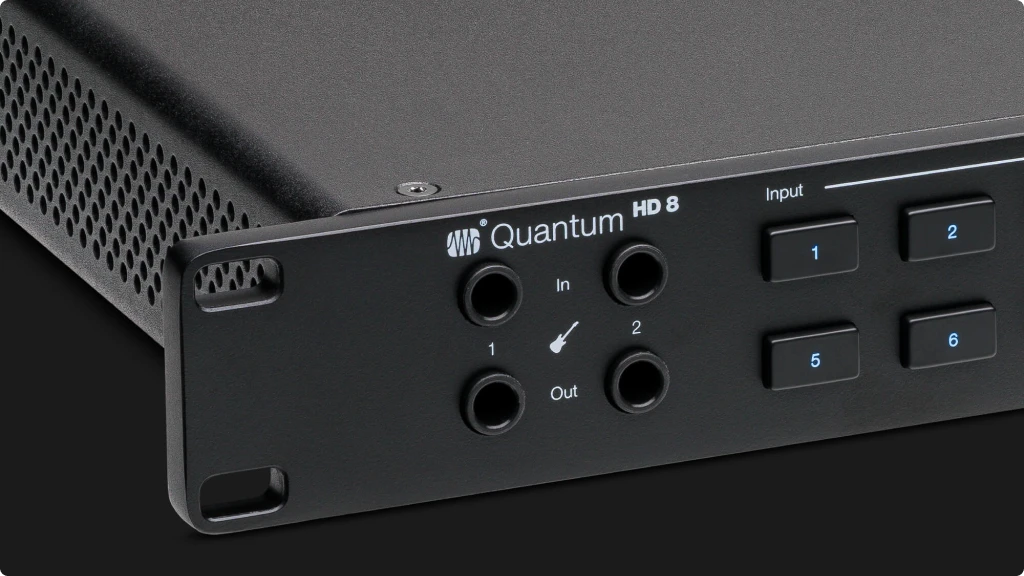
The front panel prioritizes the controls you need most during recording. Two instrument inputs with dedicated Hi-Z impedance sit below two re-amp outputs—keeping all guitar-related connections in one accessible location. Two headphone outputs with independent volume control allow for different cue mixes.
The main encoder handles gain adjustment, output levels, and menu navigation. An illuminated ring provides visual feedback for selected parameters, while a small but sharp color display shows metering, settings, and status information. LED meters for outputs give you quick visual reference without staring at a computer screen.
The button layout feels intuitive after a few sessions. You can adjust phantom power, engage Auto Gain, and switch between inputs without diving into menus. However, accessing some features like the -20dB pad and low-cut filter requires the main encoder and screen navigation rather than dedicated buttons.
Back Panel
The rear panel handles serious connectivity. Eight XLR/TRS combo jacks accept mic or line-level signals. Ten balanced TRS outputs cover main monitors, additional speaker pairs, and external effect sends. Two pairs of ADAT optical connectors provide digital expansion, accompanied by S/PDIF, word clock, and a DB9 connector for MIDI I/O via included breakout cable.
The IEC power inlet means standard power cables work worldwide—no proprietary adapters to lose. Build quality feels solid throughout, with the kind of chunky metal construction that survives being thrown in a road case.
Setup Experience
Initial setup took about 15 minutes, most of which was downloading Universal Control and registering for Fender Studio Pro. macOS recognized the interface immediately via class-compliant drivers, though PreSonus’s custom drivers unlock the full low-latency performance.
Universal Control software presents a clean, logical interface. The mixer view—which isn’t the default but should be—gives you everything needed for cue mixing and signal routing. Creating headphone mixes, enabling loopback, and adjusting DSP settings all happen within a single window that doesn’t overwhelm with options.
One quality-of-life feature worth mentioning: the entire interface state, including all preamp settings and routing configurations, can be saved and recalled as scenes. Useful for project studios that switch between different setups regularly.
6. Getting the Most From Your Fender Quantum HD 8: A Guitarist's Workflow Guide
The Quantum HD 8’s combination of Fender-designed inputs and re-amp capabilities creates some interesting workflow possibilities. Here’s how to leverage them effectively.
The DI + Re-Amp Recording Strategy: Rather than committing to an amp tone during tracking, consider recording a clean DI signal alongside your amped sound. Connect your guitar to the front-panel Hi-Z input, set up your amp in the usual way, and mic it. In your DAW, create two tracks: one receiving the direct signal from the interface input, another receiving the miked amp.
Now you have options. Keep the original amp sound if it works. Or later, send the DI track back through the re-amp outputs to experiment with different amps, pedal combinations, and mic positions—without re-tracking anything. This approach saved me during a session where the guitarist’s original amp tone sounded great in isolation but disappeared in the mix. Re-amping through a different setup took 30 minutes instead of scheduling another session.
Optimizing Buffer Settings: For tracking with amp simulations or monitoring through plugins, start at 64 samples. At 44.1kHz, this delivers round-trip latency under 5ms—imperceptible for most players. If your system struggles (dropouts or glitches), move to 128 samples. You’re still under 6ms, which remains comfortable.
For mixing when you’re not recording, bump the buffer to 256 or 512 samples. This reduces CPU overhead and lets you run more plugins without worrying about real-time performance.
Expanding Your Setup via ADAT: If you frequently record drums or large ensembles, consider pairing the Quantum HD 8 with an ADAT-equipped preamp like the Focusrite Clarett+ OctoPre or Audient ASP880. Connect via optical cable, sync word clock if available, and you’ve effectively doubled your mic input count.
The Quantum HD 8’s ADAT standalone mode also works in reverse: it can function as an 8-channel preamp feeding another interface. This provides flexibility if your setup evolves or you need to integrate into a larger studio system.
7. Final Thoughts: Who Should Buy the Fender Quantum HD 8?
After several weeks of sessions—tracking guitars, recording drums, mixing projects, and testing every feature I could find—the Quantum HD 8 earns its spot in the competitive $1,000 interface market.
The Strengths That Matter: The preamps genuinely deliver. 75dB of clean gain handles demanding microphones without external help. The Fender-designed instrument inputs preserve what makes your guitar or bass sound like itself. Ultra-low latency lets you track through plugins without thinking about it.
The re-amp outputs add creative flexibility that most interfaces in this range don’t offer. Expandability via ADAT means you’re not locked into a fixed channel count. And the included Fender Studio Pro software provides a legitimate professional DAW, not a crippled trial version.
Where It Falls Short: All microphone inputs are on the rear panel, which can be inconvenient for quick podcast-style setups or solo recording sessions where you’re constantly connecting and disconnecting. The re-amp outputs not being accessible through the internal mixer creates a minor workflow friction. And the monitor control section, while functional, lacks advanced features like talkback and mono fold-down that dedicated monitor controllers provide.
The Fender Quantum HD 8 makes sense for:
- Project studio owners who record full bands and need reliable 8+ channel tracking
- Guitarists and bassists who want transparent DI recording with serious re-amping capability
- Studios planning to grow who need ADAT expansion for future mic additions
- Content creators who need loopback, DSP mixing, and multi-platform compatibility
If you only need two inputs for solo recording, look at the Quantum HD 2 or similar compact interfaces. If you need more than 8 simultaneous mic inputs without ADAT, you’re into higher-budget territory.
The Quantum HD 8 competes directly with established options like the RME Babyface Pro FS and MOTU UltraLite-mk5. It holds its own on specifications while offering guitar-specific features those alternatives lack. For musicians who take both recording and their instruments seriously, that combination is hard to beat.
8. FAQ
Is the Fender Quantum HD 8 the same as the PreSonus Quantum HD 8?
Yes, essentially. Fender acquired PreSonus in 2021, and the Quantum HD 8 was developed during this period as a collaboration between both companies. The most recent units carry Fender branding and include Fender Studio Pro software (the rebranded version of Studio One Pro). The hardware and core functionality remain identical—the Fender-designed instrument inputs were part of the original PreSonus release, developed in partnership with Fender engineers. If you see PreSonus Quantum HD 8 listings, they’re the same interface with different bundled software and branding.
Can I use the Fender Quantum HD 8 with Pro Tools, Logic Pro, or Ableton Live?
Yes. The Quantum HD 8 works as a standard audio interface with any DAW that supports Core Audio (macOS) or ASIO/WDM (Windows). I tested it with Logic Pro, Ableton Live, and Reaper without any compatibility issues. While it comes bundled with Fender Studio Pro, you’re not locked into using that DAW. The Universal Control software manages interface settings independently of your recording software.
Does the Quantum HD 8 require Thunderbolt, or does USB-C work on any port?
The Quantum HD 8 uses USB-C connectivity with USB 2.0 protocol—not Thunderbolt. This means it works with standard USB-C and USB-A ports (with an adapter) on virtually any computer. You don’t need a Thunderbolt-equipped machine. However, for optimal low-latency performance, use a direct USB connection rather than going through a hub, and ensure your computer meets the minimum requirements (macOS 10.12+ or Windows 10+).
| Why Can You Trust Us

| ALSO REVIEWED