Focusrite Scarlett 2i2 4th Gen Review 2026: Honest Test Results
- Audio Interface, Reviews
- by Bruno Bontempo
Our articles may include affiliate links and we may earn a commission. Here how it works.
OUR VERDICT
The Focusrite Scarlett 2i2 4th Gen represents Focusrite’s most significant update to their best-selling interface. With 69dB of clean gain, Auto Gain level-setting, and Clip Safe protection, it solves the two biggest frustrations in home recording: setting proper levels and avoiding ruined takes. The enhanced preamps now handle demanding microphones like the SM7B without needing a Cloudlifter. If you’re building your first home studio or upgrading from an older interface, this is where your search ends.
Release Date
Aug 2023
18 × 4,5 × 9,9 cm
7.09 × 1.79 × 3.90 in
600 g
1.32 lb
| Pros
- 69dB gain range handles demanding mics without external boosters
- Auto Gain and Clip Safe eliminate level-setting guesswork
- 120dB dynamic range matches professional studio converters
- Dual Air modes add musical character during recording
- Industry-leading software bundle included at no extra cost
| Cons
- Phantom power applies to both channels simultaneously (no per-channel control)
- No dedicated mix knob for direct monitoring blend
- -
| Key Features
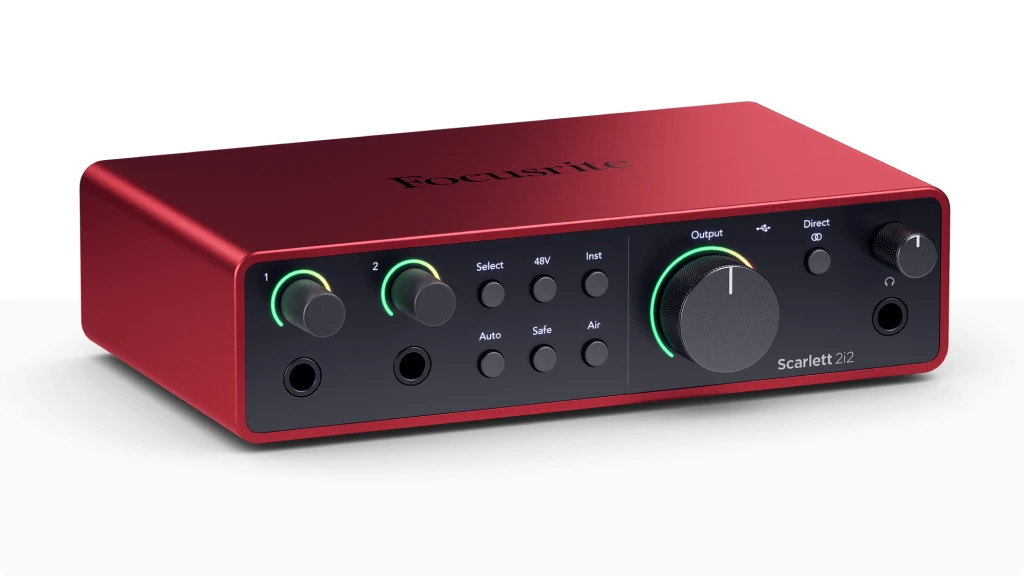
- Inputs: 2x XLR, 2x 1/4" TRS combo inputs switchable between Hi-Z instrument and line level. Note: Only 2 inputs usable simultaneously (XLR or TRS per channel, not both)
- Outputs: 2x 1/4" TRS balanced line outputs, 1x 1/4" TRS stereo headphone output with independent volume control
- Compatibility: macOS 11+, Windows 10+, ChromeOS, iOS (iPad with USB-C, iPhone with adapter). Class-compliant (works without drivers on Mac/iPad)
- Connectivity: USB-C, bus-powered
- Resolution: 24-bit/192 kHz
-
Plus:
Auto Gain automatic level setting, Clip Safe clipping prevention, Dual Air modes, Loopback and Standalone mode, MIDI I/O. Pro Tools Intro+ (perpetual license) Ableton Live Lite and more
| Best for...
- Singer-songwriters recording vocals and acoustic or electric guitar
- Podcasters wanting professional sound quality with easy setup
- Home studio musicians building their first serious recording setup
- Streamers needing loopback functionality and reliable audio
- Guitar players using amp simulation software
| Not ideal for...
- Those needing independent phantom power control per channel
- Producers requiring more than 2 simultaneous inputs
1. The Scarlett Legacy: Why the 2i2 4th Gen Matters
The Focusrite Scarlett 2i2 has earned its reputation as the world’s best-selling audio interface. Since its launch in 2012, this red box has become synonymous with home recording. Walk into any bedroom studio or podcaster’s setup, and chances are you’ll spot one.
Focusrite’s history runs deep in professional audio. Founded by Rupert Neve in 1985, the company built its reputation making consoles for legendary producers like George Martin. That heritage shows in the Scarlett line, which brings professional-quality preamps to an accessible price point.
The 4th generation, released in August 2023, represents the biggest leap forward in the series. Focusrite didn’t just refine what worked—they addressed the real frustrations that recording musicians face every day. The result is an interface that helps you capture better takes more consistently.
This review comes from my perspective as someone who’s spent over two decades recording bass, guitar, and producing music. I’ve watched the Scarlett series evolve from a solid budget option into the industry standard. The 4th Gen gave me enough reasons to pay attention, so I put it through real recording sessions to see if it lives up to the promise.
2. Breaking Down the Features: What Each One Actually Does
Understanding audio interface specs can feel overwhelming. Let me walk you through each feature and explain what it means for your actual recordings.
69dB Preamp Gain Range
The preamps amplify your microphone’s signal to a usable level. The 4th Gen increased this from 56dB (3rd Gen) to 69dB—a significant jump.
- What It Means for You: Think of gain like zoom on a camera. More gain means you can “zoom in” on quieter sounds without adding noise. I tested this with a Shure SM7B, a notoriously quiet dynamic microphone that previously required an external booster like a Cloudlifter. The 4th Gen powered it cleanly with room to spare. If you own or plan to buy a dynamic mic, this upgrade matters.
Auto Gain
Press the Auto button, perform for 10 seconds, and the interface sets your input level automatically.
- What It Means for You: Setting proper levels trips up beginners constantly. Too low and your recordings sound noisy. Too high and they distort. Auto Gain analyzes your performance and finds the sweet spot. During testing, it consistently set levels around -18dB—exactly where audio engineers recommend recording. It’s like having an experienced engineer setting your levels for you.
Clip Safe
This feature monitors your signal 96,000 times per second and automatically reduces gain if you’re about to clip.
- What It Means for You: Ever had a vocalist hit an unexpectedly loud note and ruin an otherwise perfect take? Clip Safe acts as a safety net. It catches those moments before they become problems. One important note: once it lowers the gain, it stays lowered for the rest of the recording. Think of it as an emergency brake rather than automatic compression.
Dual Air Modes
The original Air mode gets split into two options: Presence and Harmonic Drive.
- What It Means for You: Presence mode boosts high frequencies, making vocals and acoustic guitars sound more forward and detailed. It’s like moving your recording “closer” in the mix. Harmonic Drive adds mid-range warmth and subtle saturation—useful for guitars and vocals that need more body. I found Presence mode particularly effective on male vocals and acoustic guitar, while Harmonic Drive added punch to electric bass recordings.
Hi-Z Instrument Inputs
The front-panel 1/4″ inputs switch between line level and Hi-Z (high impedance) mode via a button.
- What It Means for You: Hi-Z mode is designed specifically for electric guitars and basses. It preserves the character of your pickups without signal loss. During my tests with both single-coil and humbucker pickups, the input captured natural tones without impedance mismatch issues. Active pickups (like EMGs) also worked well without clipping—a problem that plagued earlier Scarlett generations.
120dB Dynamic Range
The converters come from Focusrite’s flagship RedNet interfaces, used in professional studios worldwide.
- What It Means for You: Dynamic range is the distance between the quietest sound you can record (the noise floor) and the loudest sound before distortion. More range means you can capture both whispered vocals and aggressive strumming without compromise. The 120dB figure matches what you’d find in interfaces costing significantly more.
Loopback
Routes audio from any software application back into your recording.
- What It Means for You: Podcasters can record interview audio from Zoom or Skype directly. Streamers can mix game audio with their voice. Musicians can capture sound from YouTube tutorials or virtual instruments. It’s a feature that saves hours of complex routing setup.
Standalone Mode
The interface passes audio from inputs to outputs without needing a computer connection.
- What It Means for You: Use it as a preamp for live performances. Monitor instruments through your headphones during practice without booting up your computer. It’s a small feature that adds genuine flexibility.
Focusrite Scarlett 2i2 Specs
Ready to see if the Scarlett 2i2 4th Gen fits your recording needs? This specifications table breaks down every detail that matters, so you can make an informed decision and start recording with confidence.
| Feature | Specification | Practical Benefit |
|---|---|---|
| Simultaneous I/O | 4 x 2 (including Loopback) | Record two sources while using loopback for system audio capture |
| Mic Inputs | 2x XLR (rear panel) | Leave microphones permanently connected for quick setup |
| Instrument/Line Inputs | 2x 1/4" TRS combo (front panel, switchable Hi-Z/Line) | Plug in guitars or keyboards without reaching around the unit |
| Monitor Outputs | 2x 1/4" TRS balanced (rear panel) | Connect studio monitors with balanced cables for clean signal |
| Headphone Output | 1x 1/4" TRS stereo (front panel, independent volume) | Adjust headphone level without affecting monitor output |
| Compatibility | macOS 11+, Windows 10+, ChromeOS, iOS/iPadOS | Works with virtually any modern computer, tablet, or phone |
| Connectivity | USB-C (USB 2.0 protocol) | Single cable connection that also powers the interface |
| Resolution | 24-bit / 192 kHz | Capture studio-quality audio with headroom for processing |
| Dynamic Range (Line Out) | 120 dB | Matches professional studio converters for detailed recordings |
| Dynamic Range (Mic In) | 116 dB | Captures quiet details without noise floor issues |
| Preamp Gain Range | 69 dB | Powers demanding mics like SM7B without external boosters |
| Phantom Power | +48V (both channels simultaneously) | Powers condenser microphones directly from the interface |
| Direct Monitoring | Yes (front panel button) | Monitor input signal with zero latency while recording |
| Bus Powered | Yes (900mA via USB-C) | No external power supply needed with most computers |
| External Power Option | USB-C 5V DC input (rear panel) | Powers the interface when using iPhone or standalone mode |
| Round-Trip Latency | ~2.74ms at 96 kHz | Monitor through plugins in real-time without noticeable delay |
| Auto Gain | Yes (10-second analysis) | Sets optimal recording levels automatically |
| Clip Safe | Yes (96,000 checks/second) | Prevents clipped takes by automatically reducing gain |
| Air Modes | Presence + Harmonic Drive | Add high-end clarity or mid-range warmth during recording |
| Loopback | Yes (stereo virtual inputs) | Route system audio into your DAW for streaming or podcasting |
| Standalone Mode | Yes (with external power) | Use as a preamp for live performance without a computer |
| MIDI I/O | Yes | For keyboard controllers |
| Headphone Impedance | Drives up to 250 ohms (200 ohms recommended) | Works with most studio headphones; high-impedance models may need higher volume |
| Software Bundle | Pro Tools Intro+, Ableton Live Lite, FL Studio (6 mo.), Hitmaker Expansion | Complete production toolkit included at no extra cost |
| Warranty | 3 years | Peace of mind with extended manufacturer coverage |
4. Real-World Performance: What Testing Revealed
The specifications tell one story. Actual recording sessions tell another. Here’s what I found putting the Scarlett 2i2 4th Gen through practical use.
Preamp Performance: The preamps deliver on their promise. Recording a Shure SM7B—a microphone known for needing substantial gain—I had clean, noise-free signal with the gain knob at about 75%. That’s headroom to spare.
Condenser microphones performed beautifully. An Audio-Technica AT2020 captured vocals with clarity and detail. The noise floor stayed inaudible even in quiet passages.
The real-world test that impressed me most was recording acoustic guitar with air conditioning running in the background. The preamps were clean enough that noise reduction plugins barely needed to work.
Auto Gain Accuracy: I tested Auto Gain across multiple sources: vocals at varying dynamics, acoustic guitar from gentle fingerpicking to aggressive strumming, and direct electric bass.
In each case, it set levels conservatively—around -18dB peaks—leaving plenty of headroom. This is smart design. You can always push levels up in your DAW, but you can’t fix clipping.
The 10-second analysis period requires you to perform at your actual recording intensity. If you hold back during setup and then belt during the take, you might still clip. Use it as intended—perform like you mean it during the analysis—and it works reliably.
Clip Safe in Action: I intentionally tried to break this feature. Playing bass with aggressive dynamics, I couldn’t get it to clip. When the signal approached danger levels, Clip Safe kicked in smoothly.
One limitation worth noting: it doesn’t gradually return to the original gain setting. Once it reduces gain, that becomes your new level. For most recording situations, this is fine. For sustained loud passages, you might need to reset manually.
Air Mode Quality: Presence mode adds a gentle high-frequency lift starting around 50Hz and peaking around 7kHz with about 4dB of boost. On vocals and acoustic guitar, it added clarity without harshness.
Harmonic Drive mode uses DSP rather than analog circuitry. It adds mid-range harmonics that help sources cut through a mix. I found it particularly effective on electric bass and vocals that needed more presence.
Both modes are subtle enough to commit to during recording. Unlike heavy EQ that limits your options later, these add musical character without painting you into a corner.
Latency Performance: Round-trip latency measured around 2.74ms at 96kHz—fast enough for real-time monitoring with software effects. At 48kHz with a 256-sample buffer, I got about 7.4ms, which remained comfortable for playing guitar through amp simulations.
Direct monitoring eliminates latency entirely for situations where you need zero delay. The tradeoff is you won’t hear your software effects while recording, but for tracking basic parts, it works perfectly.
Guitar Recording: The Hi-Z inputs handle guitars naturally. Testing with a Stratocaster (single-coil pickups), a Les Paul (humbuckers), and a bass with active EMG pickups, each maintained its character through the signal chain.
The included Softube Marshall Silver Jubilee 2555 amp simulation responded well to the clean signal. There’s enough headroom that hot pickups don’t cause input distortion—an issue that affected earlier Scarlett generations.
5. Build Quality and Daily Use: Design That Works
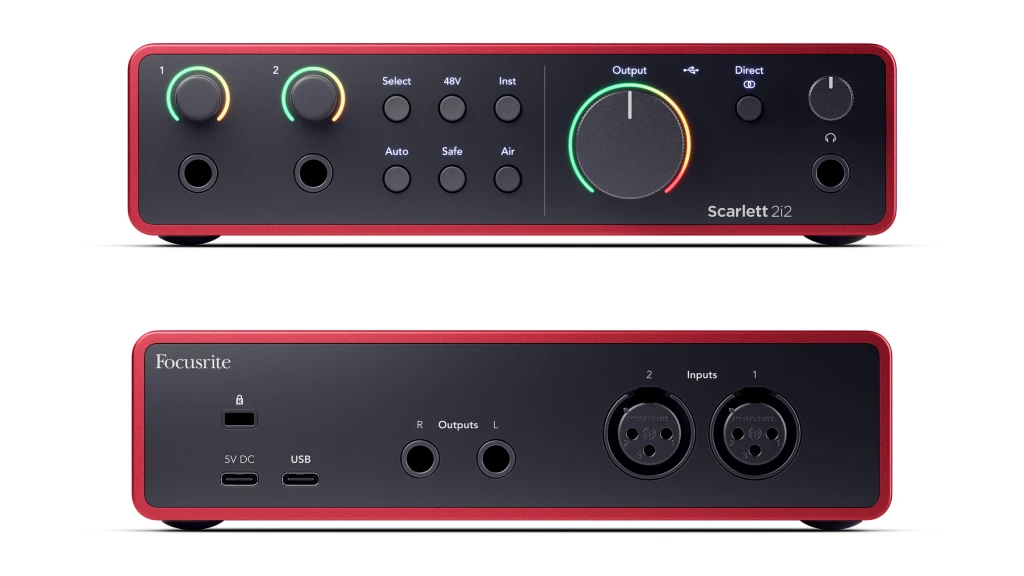
The Scarlett 2i2’s design has become iconic, and the 4th Gen refines it thoughtfully.
Build Quality: The brushed aluminum chassis wraps the top, bottom, and sides. It feels substantial without being heavy—portable enough for mobile recording while sturdy enough for desktop permanence.
The front and back panels are now matte black plastic instead of the gloss finish on the 3rd Gen. This change eliminates fingerprint magnets and looks more professional. The knobs have zero wobble and turn smoothly with appropriate resistance. Cable connections seat firmly without wiggle.
Rubber feet grip surfaces well and hide screws for accessing the internals. Not that you’d need to—this unit is built to last.
Front Panel
From left to right: two 1/4″ instrument/line inputs with their own gain knobs featuring the Dynamic Gain Halos, control buttons (Select, 48V, Inst, Air, Auto, Safe), a large monitor volume knob with its own halo, direct monitor button, and headphone output with volume control.
The Gain Halos deserve special mention. These LED rings around the gain knobs show input level in real-time. Green means you’re in a good range. Yellow indicates you’re getting hot. Red warns you’re clipping. It’s immediately readable—no squinting at tiny meters.
The dedicated headphone volume is a welcome addition over the 3rd Gen’s shared output control. Adjusting your headphone level no longer affects your monitor output.
Back Panel
Two XLR microphone inputs, two 1/4″ TRS balanced line outputs, USB-C port, optional USB-C power input, and Kensington lock slot.
Moving the XLR inputs to the rear was controversial among users, but it makes practical sense. You can leave microphones permanently connected while plugging instruments into the front as needed. Cable management improves significantly.
The tradeoff: if you frequently swap microphones, you’ll be reaching around the unit. For most home studio setups where mics stay in place, the rear location works well.
Setup Experience
Focusrite’s Easy Start tool guides beginners through initial configuration. Connect the interface, visit the registration page, and it walks you through driver installation, software authorization, and basic recording tips.
On Mac and iPad, the interface is class-compliant—meaning it works immediately without driver installation. Windows requires the Focusrite Control 2 software, which installs cleanly and runs without issues.
The mobile Focusrite Control 2 app (iOS/Android) pairs with your desktop to provide remote control. Useful if you’re recording across the room from your computer and need to adjust settings.
6. Getting the Most From Your 2i2: Practical Recording Tips
The Scarlett 2i2 4th Gen is capable hardware, but technique matters. Here’s how to maximize your recordings.
Gain Staging Done Right: Even with Auto Gain, understanding proper levels helps you make informed decisions. Aim for peaks around -12dB to -18dB when recording at 24-bit. This leaves headroom for unexpected dynamics while keeping your signal well above the noise floor.
The 24-bit depth means you don’t need to “record hot” like the old 16-bit days. Use that headroom. Better to have a quiet recording you can boost than a clipped one you can’t fix.
Getting Clean Vocal Takes: Position your microphone 6-8 inches from your mouth. Use a pop filter to control plosives (hard P and B sounds). The Air Presence mode can help vocals sit forward in a mix, but apply it during recording only if you’re confident about the sound you want.
For dynamic microphones like the SM7B, use the full 69dB gain range confidently. The 4th Gen’s preamps stay clean even at high gain settings.
Recording Electric Guitar: The Hi-Z inputs are your direct line to amp simulation software. Keep the Inst button engaged (lit up) when connecting guitars directly. For acoustic-electric guitars with preamps, you might get better results using line mode instead—experiment to see which sounds best with your particular instrument.
The Harmonic Drive Air mode can add body to thin-sounding direct recordings. It’s subtle enough to commit to without regret.
Using Loopback for Podcasts and Streams: Enable Loopback in Focusrite Control 2 to capture system audio alongside your microphone. This creates a virtual input that your recording software can access.
For podcasters: you can record Zoom guests directly into your DAW without additional software. For streamers: mix game audio with your voice through OBS or similar software.
Optimizing Buffer Settings: Lower buffer sizes reduce latency but increase CPU load. For tracking with software monitoring, try 128 or 256 samples. For mixing when latency doesn’t matter, increase to 512 or 1024 samples for more stability.
If you’re monitoring through the Direct button (bypassing software), buffer size becomes irrelevant for your monitoring experience—though it still affects recording.
7. The Verdict: Who Should Buy the Scarlett 2i2 4th Gen
The Focusrite Scarlett 2i2 4th Gen does more than iterate—it addresses real frustrations in home recording. The Auto Gain and Clip Safe features remove technical barriers that trip up beginners. The enhanced 69dB preamps eliminate the need for external boosters with demanding microphones. The dual Air modes provide musical options without requiring external processing.
You’ll Love This Interface If: You’re setting up your first serious home studio and want something you won’t outgrow quickly. The audio quality matches interfaces costing significantly more, and the software bundle provides genuine value.
You’re a singer-songwriter recording vocals and guitar. Two inputs is perfect for simultaneous voice and instrument tracking. The Hi-Z inputs handle guitars naturally, and the preamps flatter vocals.
You’re podcasting or streaming and want reliable, professional sound without complexity. Loopback simplifies workflows that would otherwise require additional software.
You want an interface that makes recording easier rather than adding complexity. Auto Gain and Clip Safe genuinely reduce the technical knowledge required to get good results.
Consider Alternatives If: You need more than two simultaneous inputs. Recording a full drum kit or multiple performers requires the Scarlett 4i4, 8i6, or larger.
You want built-in DSP effects beyond Air mode. Interfaces like the Universal Audio Volt series offer onboard compression. The 2i2 keeps things simple—which is a feature, not a limitation, depending on your needs.
Coming From the 3rd Gen?: If your 3rd Gen works well for your needs, the upgrade isn’t essential. The improvements are real but incremental rather than transformative. However, if you’ve struggled with gain-hungry microphones or level-setting frustrations, the 4th Gen’s new features directly solve those problems.
Final Thoughts: The Focusrite Scarlett 2i2 4th Gen earned its place as the default recommendation for home recording interfaces. It balances professional-quality audio with genuine ease of use. The enhanced preamps, thoughtful automation features, and excellent software bundle deliver value that’s hard to match at this price point.
For most home studio needs—vocals, guitar, bass, podcasting, streaming—you could spend more money without getting better results. That’s the mark of gear that truly works.
8. FAQ
Can I Use the Focusrite Scarlett 2i2 4th Gen With My iPhone or iPad?
Yes, the Scarlett 2i2 4th Gen works with iOS devices, though setup varies depending on your device. USB-C iPads connect directly with a USB-C cable, and the iPad provides enough power to run the interface without additional equipment.
For iPhones and older Lightning-based iPads, you need two things: an Apple Lightning to USB adapter, and external power for the Scarlett. The 4th Gen solved this common frustration by adding a secondary USB-C port on the back specifically for external power. Connect a standard USB power adapter or power bank to this port, and your iPhone can power the data connection without struggling.
This external power option also enables standalone mode, letting you use the interface as a preamp for live performances or practice sessions without any computer connected.
Will the Scarlett 2i2 4th Gen Drive My 250 Ohm Headphones?
The 4th Gen’s improved headphone amplifier handles high-impedance headphones better than previous generations, with a dynamic range now reaching 115dB. For popular 250-ohm headphones like the Beyerdynamic DT 770 Pro or DT 990 Pro, most users report adequate volume for mixing and monitoring.
That said, Focusrite officially recommends headphones with a maximum impedance of 200 ohms for optimal performance. With 250-ohm headphones, you may find yourself running the headphone volume at 70-100% during quiet monitoring situations. This works fine for music playback and editing, but some users prefer more headroom when monitoring vocals during recording.
If you already own 250-ohm headphones, try them before buying new ones. If you find the volume insufficient for your workflow, consider either lower-impedance headphones (32-80 ohms) or adding a dedicated headphone amplifier between the Scarlett and your headphones.
Why Does My Guitar Sound Thin or Weak Through the Scarlett 2i2 4th Gen?
This common issue usually comes down to one setting: the Inst button. When connecting an electric guitar or bass directly to the front-panel 1/4″ inputs, the Inst button must be engaged (lit up) for that channel. This switches the input to Hi-Z (high impedance) mode, which properly matches your guitar’s pickup output.
Without Hi-Z mode engaged, the interface expects a stronger line-level signal, which makes your guitar sound weak, thin, and lacking in low-end. Press the Select button to choose the channel your guitar is connected to, then press Inst until it lights up.
If you’re still hearing thin tone with Hi-Z engaged, check that you’re using a standard instrument cable (TS, with one ring) rather than a balanced cable (TRS, with two rings). Also, try the Air Harmonic Drive mode to add some mid-range body to your direct signal. For amp simulation software, keep in mind that most amp plugins expect a clean DI signal, so experiment with the Air modes off versus on to see which sounds better with your particular plugin.
| Why Can You Trust Us

| ALSO REVIEWED