MOTU UltraLite-mk5 Review: My Hands-On Test Results (2026)
- Audio Interface, Reviews
- by Bruno Bontempo
Our articles may include affiliate links and we may earn a commission. Here how it works.
OUR VERDICT
After putting the MOTU UltraLite through its paces in my home studio, I can confidently say it’s a solid piece of gear for creators who need versatility and reliable performance.
This MOTU UltraLite review reveals that the sound is clean, the build feels durable, and it packs a surprising number of connections into a compact unit that handles everything from vocal recording to mixing with ease.
If you’re looking to upgrade your setup with an interface that can grow with your needs, the UltraLite deserves your attention. Consider checking it out through the links below to see if it’s the right fit for your studio.
Release Date
April 2021
22x17.5x4.5 cm
8.6x6.9x1.75 in
1.3 kg
2.9 lb
| Pros
- Massive I/O (18x20) options
- Built-in DSP for zero-latency
- Works without a computer
- High-headroom preamps
- ADAT, MIDI, & 10 line outputs
| Cons
- Overkill for beginners
- No Thunderbolt
- -
| Key Features
- Inputs: 2 combo XLR + 8 line inputs, plus 2-channel ADAT optical input expanding to 18 inputs
- Outputs: 2 main monitor, 10 line outputs, 1 independent headphone outputs, and 2-channel ADAT optical output
- Compatibility: Windows, macOS, iOS (with adapter)
- Connectivity: 24-bit/192kHz
- Resolution: USB-C
- Plus: Built-in DSP for effects and mixing with zero latency, and standalone operation without a computer
| Best for...
- Musicians recording full bands or multiple instruments at once
- Producers who want to integrate outboard gear with multiple out
- Musicians connecting several synths and drum machines
- Users who want to expand their system using ADAT
- Producers who need professional monitoring accuracy
| Not ideal for...
- Creators who only need one or two inputs
- Anyone who requires Thunderbolt connectivity
- -
1. MOTU UltraLite-mk5 Overview
The MOTU UltraLite-mk5 model, sits in a sweet spot for home studio owners. As I discovered, it’s not just a bridge to your computer; it’s a compact mixing console and a standalone hardware unit. MOTU has a long history in professional audio, and that experience shows clearly in the UltraLite-mk5 design.
2. MOTU UltraLite Features Explained
What sets the this interface apart from entry-level interfaces isn’t just the number of features—it’s how those features work together to solve real studio challenges.
During my testing, I found that understanding what each capability actually does for your workflow is more important than just reading spec sheets.
In this section, I’ll break down the key features in plain language, explaining not just what they are, but why they matter for your recordings. Whether you’re considering the UltraLite as your first professional interface or upgrading from a simpler model, these explanations will help you determine which features you’ll actually use versus which are just nice to have.
Simultaneous Input/Output (I/O)
- What It Means for You: You can record a drum kit with several mics, connect a few synths, and still have room for a vocalist—all at the same time. The MOTU UltraLite operates like having a large multi-lane highway instead of a single road, preventing audio traffic jams during your most complex sessions.
Built-in DSP and Effects
- What It Means for You: You can add reverb to your vocals while recording without hearing a delayed, echoey version. The processing happens inside the UltraLite interface, so it doesn’t tax your computer’s CPU and adds no latency. It’s like having a built-in effects pedal board for your recordings that comes standard.
ADAT Optical Connectivity
- What It Means for You: If you ever need more than the built-in inputs, you can easily expand. Think of it as adding an extra wing to your studio without having to replace the entire foundation—a key advantage.
Standalone Operation
- What It Means for You: You can use the UltraLite as a mixer for a live stream or a small live performance by itself. Your settings and mixes are saved, making it a very flexible centerpiece for your audio setup.
Hi-Z Instrument Inputs
- What It Means for You: You get a clean, full-sounding recording from your guitar with the MOTU UltraLite without it sounding thin or weak. It’s the correct “adapter” for your guitar’s signal to be understood perfectly by the interface.
3. Specs Table
| Feature | Specification | Practical Benefit |
|---|---|---|
| Simultaneous I/O | 18 In / 20 Out (with ADAT) | Record a full band or multiple instruments simultaneously without limitations using the MOTU UltraLite |
| XLR Mic Inputs | 2 combo jacks (XLR/TRS) with preamps | Connect professional microphones with phantom power for condenser mics |
| TRS Line Inputs | 8 dedicated TRS inputs | Connect synthesizers, drum machines, or outboard gear from line-level devices to the MOTU UltraLite-mk5 |
| Hi-Z Inst. Inputs | 2 on the front panel | Perfect for directly plugging in your electric guitar or bass without a DI box |
| MIDI I/O | 1-in/1-out | Connect MIDI keyboards, drum pads, or other hardware to control virtual instruments |
| Line/Monitor Outputs | 12 analog outputs | Route audio to multiple sets of studio monitors or to external processing gear |
| Headphone Outputs | 1 independent outputs | Connects headphones for monitoring |
| Compatibility | Windows, macOS, iOS | Works with most modern computers and popular DAW software |
| Preamps | High-quality, ultra-low-noise | Your recordings start with a clean, clear signal with plenty of gain |
| Resolution | 24-bit/192kHz | Professional audio quality that captures every detail of your sound |
| Phantom Power | +48V for condenser mics | Essential for powering studio condenser microphones on the UltraLite |
| Direct Monitor | Hardware-based, zero-latency | Hear yourself in real-time without any distracting delay while recording |
| Connectivity | USB-C | Fast, modern connection for stable audio streaming to and from your computer |
| Bus Powered | Yes | Can be powered directly from your computer's USB port, reducing cable clutter |
| Plus | Standalone operation, DSP mixing, Loopback | Use the MOTU UltraLite as a mixer without a computer and apply effects with no CPU hit |
| Bundle Software | MOTU Performer® Lite and Ableton Live® Lite, 100+ instruments, 6 GB of free loops and sample packs. | Comes with software to control the interface and a lightweight DAW to get started |
4. UltraLite Performance
In use, the MOTU UltraLite-mk5 delivers exactly what you’d hope for in a professional audio interface: clean and reliable audio. The preamps are quiet, providing a strong, clear signal for microphones without adding noticeable noise.
This is crucial for capturing delicate sources like vocals or acoustic guitar. The difference between these preamps and those on a budget interface is the clarity and headroom you get; you can push the gain without the sound becoming muddy or harsh.
For tracking with effects, the MOTU UltraLite’s DSP mixer is a game-changer. I could send a singer a reverb-heavy mix in their headphone while recording a completely dry signal into FL Studio.
I had a clean slate for mixing later—all with no hit on my computer’s performance. The driver stability was also solid on my system; I experienced no crashes or unexpected dropouts during long sessions with the MOTU UltraLite, which is just as important as sound quality.
5. Design and Daily Use
The MOTU UltraLite-mk5 feels robust and well-constructed. The metal chassis and knobs have a solid, quality feel that inspires confidence for both studio use and transport.
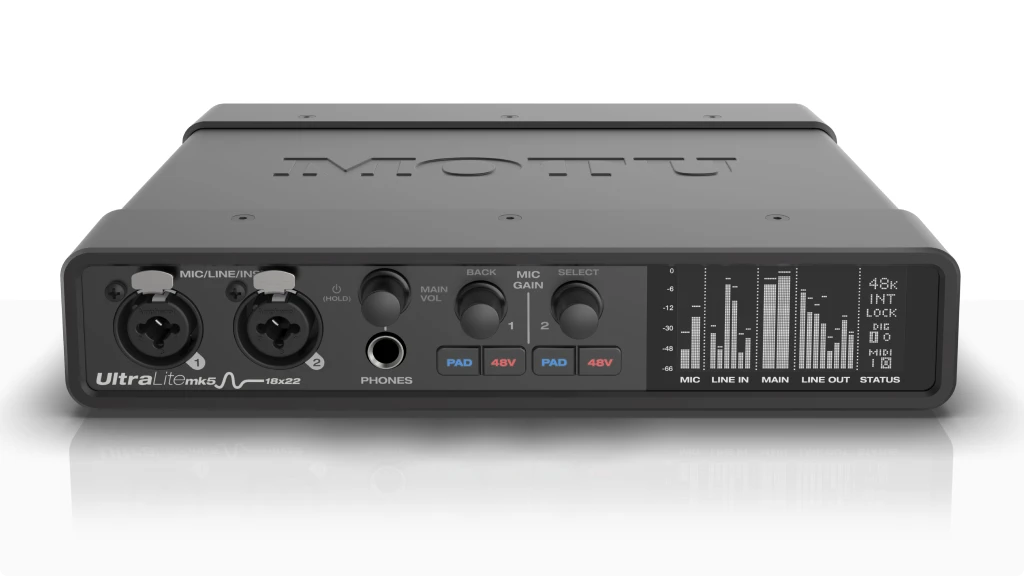
The bright, color LCD screen is a significant advantage over interfaces that rely solely on blinking LEDs. It visually shows your levels, mixer routing, and settings, which makes setup and troubleshooting much more intuitive.
The front-panel layout is logical and user-friendly. The two combo inputs with their own gain knobs and phantom power are easily accessible, which is perfect for quickly plugging in a microphone or guitar.
It’s a design that clearly considers how musicians and producers actually work.
6. Choosing an Audio Interface
Before you buy any interface, it’s helpful to zoom out and consider what really matters for your workflow. The MOTU UltraLite-mk5 is a powerful tool, but here’s how to judge if it’s the right tool for you.
I/O Count: This is the most crucial decision for any audio interface purchase. List every sound source you need to record at the same time. Don’t forget future plans. The MOTU UltraLite excels here with its extensive I/O options, while the MOTU M2 is a fantastic 2-input alternative for solo creators, and the Apogee Duet 3 is a premium 2-in/4-out option for macOS users.
Sound Quality: Look beyond marketing terms when evaluating any audio interface. “24-bit/192kHz” is standard for professional interfaces. The real-world difference in the MOTU UltraLite-mk5 comes from the quality of the preamps (for clean gain) and converters (for accurate sound capture and playback). This is where brands like MOTU build their reputations.
Connection Type: USB-C is versatile and fast for most studio applications. Thunderbolt offers lower latency on supported computers but is often found on higher-priced models. For most home studios, the MOTU UltraLite-mk5’s modern USB connection is perfectly sufficient.
Special Features: Built-in DSP or standalone operation can be huge workflow enhancers. Decide if these are “nice-to-haves” or essential tools for how you create music or content before investing.
7. Final Verdict: MOTU UltraLite
This MOTU UltraLite review concludes that it isn’t for everyone, and that’s its strength. It’s a specialized tool for those who have outgrown the beginner stage and need a robust, flexible hub for their studio. It delivers professional-grade sound and a staggering number of IOs in a well-built, smartly designed package.
If you are a solo artist who only ever records one track at a time, you’d be better served by a simpler and more affordable interface. However, if you see a future of recording drums, bands, or multiple hardware synths, or if you simply value the ability to create custom headphone mixes and use zero-latency effects, the MOTU UltraLite-mk5 is an investment that will pay off for years to come. It’s a workhorse that empowers you to create without technical limitations getting in your way.
8. FAQ
Is the MOTU UltraLite good for beginners?
The MOTU UltraLite is likely overkill for a true beginner. It’s extensive I/O and features can be overwhelming if you just need to plug in one microphone and a guitar. A simpler 2-input interface like the MOTU M2 or Focusrite Scarlett 2i2 would be a more straightforward and cost-effective starting point.
Can I use the MOTU UltraLite for live streaming?
Yes, the multiple inputs are perfect for connecting several microphones for podcast streams or round-table discussions. The MOTU UltraLite-mk5’s onboard DSP allows you to create a polished mix with compression and EQ for your stream without overloading your computer, and the two headphone outputs let you have a co-host with their own mix. Compare the Best Audio Interfaces for Streaming
Does the MOTU UltraLite work without a computer?
Yes, this is one of the it’s standout features. You can run the MOTU UltraLite in standalone mode as a digital mixer. Once you configure your mixes and settings on a computer and save them to the device, you can unplug the and use it for live sound or streaming.
| Why Can You Trust Us

| ALSO REVIEWED