
Presonus Audiobox USB 96 Review: Still worth it in 2026?

Presonus Audiobox USB 96 review with hands-on insights. Learn if this budget 2×2 interface delivers for home recording, podcasting, and music production.
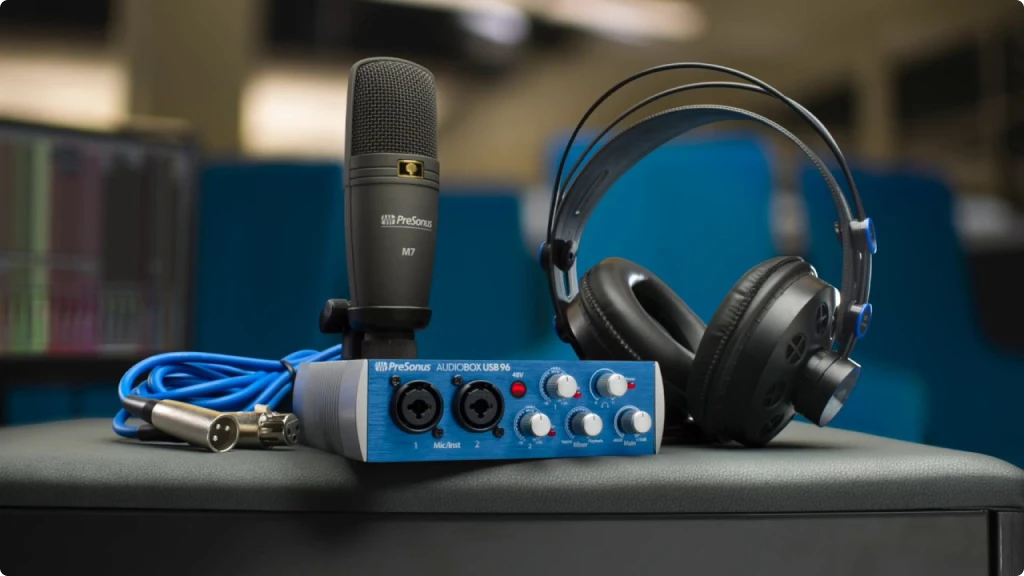
Presonus Audiobox USB 96 Review - Pressonus audio interface sitting on a desk with a presonus microphone and headphones

Our articles may include affiliate links and we may earn a commission. Here how it works.

Jump to...

OUR VERDICT

4.5

The Presonus Audiobox USB 96 is one of those interfaces that does exactly what it promises without unnecessary complications. It gives you two clean preamps, solid 24-bit/96kHz conversion, and a build quality that can survive being tossed in a backpack. The software bundle alone justifies serious consideration, and the zero-latency monitoring keeps your workflow smooth. If you need a straightforward tool to capture ideas, record demos, or produce content without a steep learning curve, this interface delivers. It lacks advanced routing options and higher sample rates found in pricier units, so professionals with complex needs should look elsewhere. However, for home studios and mobile recording, the Audiobox USB 96 remains a reliable workhorse.

Release Date

2020

14x14x4.4 cm

5.5x5.5x1.75 in

910 g

2.091 lb

| Pros

| Cons

Presonus Audiobox USB 96 Audio Interface

Best Deals

Presonus Audiobox USB 96

| Key Features

| Best for...

| Not ideal for...

Presonus Audiobox USB 96 Audio Interface

Best Deals

Presonus Audiobox USB 96

1. A Louisiana-Made Interface Built for Real Musicians

PreSonus has been making audio gear since 1995, when founders Jim Odom and Brian Smith started the company in a garage in Baton Rouge, Louisiana. What began as a small operation solving technical problems for local musicians has grown into one of the most recognized names in affordable pro audio. The company was acquired by Fender in 2021, which speaks to the reputation they built over nearly three decades.

The Audiobox USB 96 represents their approach perfectly: give musicians professional-quality tools without the professional-level price tag. This is their best-selling interface of all time, and there are good reasons for that. It strips away features you probably do not need while keeping everything essential for capturing solid recordings.

So who actually benefits from this interface? If you write songs and want to record vocals over guitar, this handles that workflow effortlessly. If you host a podcast with a guest, you get two independent preamps with their own gain controls. If you play guitar or bass and want to record direct into your DAW using amp simulations, the instrument inputs have the right impedance for that purpose.

The Presonus Audiobox USB 96 sits in a competitive space alongside interfaces like the Focusrite Scarlett Solo and Behringer UMC202HD. What sets it apart is the combination of build quality, MIDI connectivity, and an unusually generous software package. Throughout this review, I will break down what matters for your decision and share practical insights from actually using this interface.

2. Presonus Audiobox USB 96 Features: What Each One Actually Does

Understanding audio interface specs can feel overwhelming when manufacturers throw numbers around without context. Here is what each feature on the Audiobox USB 96 means for your actual recording experience.

24-bit/96kHz Resolution

The numbers 24-bit and 96kHz describe how accurately the interface converts your analog signal into digital information. Think of bit depth as the ruler measuring volume dynamics. A 24-bit system captures subtle differences between whispers and loud passages without introducing noise. The sample rate of 96kHz determines how many snapshots per second the converter takes, which affects how accurately it reproduces high frequencies.

  • What It Means for You: Recording at 24-bit gives you headroom to record at lower levels without worrying about background hiss. You can safely leave some space on your meters and normalize later. Most people record at 44.1kHz or 48kHz anyway, but having 96kHz available means the interface will not limit you as your projects grow.

Class-A Mic Preamps

Preamps amplify the weak signal from your microphone to a usable level. Class-A refers to a circuit design that keeps transistors running continuously, which typically results in lower distortion and more consistent performance. The Audiobox preamps offer 35dB of gain, which handles most dynamic and condenser microphones comfortably.

  • What It Means for You: Condenser mics work well here because the preamps have enough gain without adding audible noise. Dynamic mics like the SM58 also perform fine for podcasting and vocals. If you use ribbon microphones or very quiet sources, you might want an interface with more gain on tap.
Presonus Audiobox USB 96 Audio Interface

Best Deals

Presonus Audiobox USB 96

48V Phantom Power

Condenser microphones need external power to operate, and phantom power delivers 48 volts through the XLR cable. The switch on the Audiobox USB 96 activates phantom power globally, meaning both inputs receive power simultaneously.

  • What It Means for You: When you plug in a condenser mic, flip this switch and you are ready to record. Just remember that phantom power affects both channels at once. If you use a ribbon mic on channel one and a condenser on channel two, you cannot power them independently. For most home studios, this limitation rarely causes problems.

Combo XLR/Instrument Inputs

Each front input accepts both XLR cables from microphones and 1/4-inch cables from guitars, basses, or keyboards. The instrument inputs have high impedance, which preserves the tone of passive pickups properly.

  • What It Means for You: You can connect microphones and instruments without adapters or separate boxes. Recording acoustic guitar with a mic while simultaneously capturing your electric bass direct works seamlessly. The flexibility means fewer purchases down the road.

Zero-Latency Hardware Monitoring

The Mixer knob on the front panel blends your input signal with playback from your computer. When turned fully toward “Input,” you hear yourself directly through the interface without any processing delay.

  • What It Means for You: Recording vocals while hearing yourself delayed creates a disconnected experience that affects performance. This knob solves that problem at the hardware level. You can blend in the backing track at whatever ratio feels comfortable, so you stay in the pocket while tracking.

MIDI Input and Output

The rear panel includes standard 5-pin DIN MIDI connectors. These allow you to connect keyboards, synthesizers, drum machines, and other MIDI controllers to your computer through the interface.

  • What It Means for You: If you own a keyboard or hardware synth without USB connectivity, these MIDI ports save you from buying a separate MIDI interface. You can trigger virtual instruments, record MIDI data, and sync external gear all through one box.

Balanced TRS Outputs

The main outputs use balanced 1/4-inch TRS connections, which reject interference over cable runs. Balanced connections carry the signal on two conductors, allowing the receiving device to cancel out any noise picked up along the cable.

  • What It Means for You: Connecting studio monitors becomes cleaner and quieter. If your monitors are across the room and cables run near power strips or computer equipment, balanced connections prevent hum and buzz from entering your monitoring chain.

USB Bus Power

The Audiobox USB 96 draws all its power from the USB connection. No wall adapter required.

  • What It Means for You: Traveling becomes simpler because you have one less thing to pack and one less outlet to find. At home, your desk stays cleaner without another power brick. The trade-off is that USB ports must provide adequate power, which occasionally causes issues with older laptops or unpowered USB hubs.

3. Audiobox 96 Specs Table

Ready to see exactly what the Presonus Audiobox USB 96 brings to your setup? Here is a complete breakdown of every specification with practical context for your recording needs.

FeatureSpecificationPractical Benefit
Simultaneous I/O2-in / 2-outRecord two sources at once, like vocals and guitar, to separate tracks
Inputs2 combo XLR/1/4-inch with Class-A preampsConnect microphones or instruments without adapters
Outputs2 balanced 1/4-inch TRS, 1 stereo 1/4-inch headphoneFeed studio monitors and headphones simultaneously
CompatibilitymacOS 10.13+, Windows 10/11 (64-bit), iOS/iPadOSWorks across all major platforms including iPad recording
ConnectivityUSB 2.0 Type-B (bus-powered)Single cable provides power and data transfer
Resolution24-bit / 96kHz maximumCaptures full detail for professional-quality recordings
Phantom Power+48V (global switch)Powers condenser microphones directly from the interface
Direct MonitoringHardware mixer knob (zero-latency)Hear yourself instantly while recording without delay
Bus PoweredYes, via USBNo external power supply needed for portable recording
MIDI5-pin DIN In/OutConnect keyboards, synths, and controllers without extra hardware
Dynamic Range105 dB (ADC/DAC)Captures quiet details and loud peaks without distortion
Mic Preamp Gain0 to 35 dBHandles most condenser and dynamic microphones adequately
Instrument Input Impedance500 kΩPreserves tone from passive guitar and bass pickups
Frequency Response20 Hz to 20 kHz (±3 dB)Captures full audible spectrum from bass to treble
THD+NLess than 0.008%Clean signal path with minimal distortion
Headphone Output60 mW per channel @ 60ΩDrives most headphones loud enough for critical monitoring
Dimensions5.5 x 5.5 x 1.75 inches (140 x 140 x 44 mm)Fits easily on crowded desks or in laptop bags
Weight1.3 lbs (0.59 kg)Light enough for mobile recording setups
Included SoftwareStudio One Artist, Studio Magic Suite, Ableton Live LiteComplete DAW and plugin bundle worth over $1000

4. Sound Quality and Real-World Performance of the Audiobox USB 96

The specs tell one story, but how does the Presonus Audiobox USB 96 actually perform when you plug in a microphone and hit record? Here is what I found during practical use.

Preamp Performance: The preamps deliver clean gain with minimal coloration. When recording vocals through a condenser microphone, the signal comes through transparent and uncolored. This neutrality actually works in your favor because it lets the character of your microphone and source material come through without interference. Some users prefer preamps with more character, but for an entry-level interface, transparency is the safer choice.

The 35dB of gain handles most situations adequately. I had no issues with condenser mics, dynamic mics for podcasting, and direct instrument recording. However, if you use gain-hungry dynamic mics like the Shure SM7B, you will need an inline preamp booster. The Audiobox does not have enough gain on its own for that specific microphone.

Converter Quality: The 24-bit converters with 105dB dynamic range perform well for the price point. Recordings sound detailed without obvious artifacts or harshness. The frequency response runs flat from 20Hz to 20kHz within 3dB, which means bass notes and high-frequency transients both capture accurately.

Recording at 96kHz shows marginal improvement over 44.1kHz for most material. Unless you are doing specialized work that benefits from higher sample rates, recording at 48kHz offers the best balance between file size and quality.

Direct Monitoring Experience: The hardware monitoring through the Mixer knob works exactly as advertised. There is genuinely zero perceptible latency when monitoring your input signal. This makes overdubbing vocals or guitar parts feel natural and connected.

The blend control offers plenty of range to find your sweet spot. Some performers like hearing mostly themselves with just a touch of the backing track. Others prefer more playback and less direct signal. The knob gives you that flexibility without diving into software settings.

Headphone Output: PreSonus describes the headphone output as “screaming loud,” and that characterization is accurate. Even with demanding headphones, there is plenty of volume available. The output handles everything from earbuds to professional closed-back monitors without strain.

Sound quality through headphones reflects what the converters deliver. Detail reproduction is solid, stereo imaging is accurate, and there is no audible distortion at reasonable listening levels.

Latency Through the DAW: When using software monitoring with effects, latency depends on your buffer settings and computer performance. At 128 samples on a modern computer, round-trip latency stays under 10ms, which is acceptable for most tracking situations. Lower buffer settings reduce latency further but demand more from your CPU.

The interface integrates smoothly with Studio One, the included DAW, and also works well with third-party software like Reaper, Ableton, Logic, and Pro Tools. Driver stability on Mac is excellent since it uses class-compliant drivers. Windows performance varies depending on system configuration, though most users report solid results with the ASIO drivers.

Presonus Audiobox USB 96 Audio Interface

Best Deals

Presonus Audiobox USB 96

5. Audiobox USB 96 Design: Built Tough, Keeps It Simple

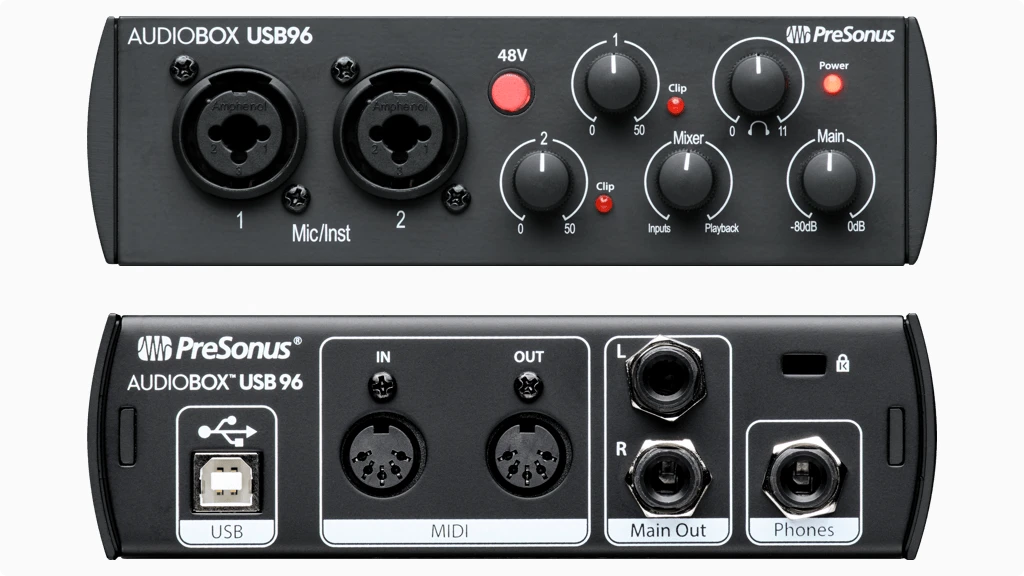
Presonus Audiobox USB 96 Audio Interface font and back view

The physical design of an interface matters more than some people realize. You interact with these controls during every session, and durability determines whether your investment lasts.

Build Quality and Materials: The Audiobox USB 96 uses a heavy-duty steel chassis that feels substantially more robust than plastic alternatives at similar prices. PreSonus famously demonstrated the durability by driving a truck over one of these units in a promotional video. While I do not recommend testing that claim yourself, the point stands: this thing is built to survive real-world abuse.

The compact dimensions measure 5.5 inches wide by 5.5 inches deep by 1.75 inches tall. That footprint fits easily on crowded desks or in laptop bags. Weight comes in around 1.3 pounds, which feels solid without being cumbersome for mobile use.

Knobs have a satisfying resistance and do not wobble or feel loose. Some user reviews mention the gain knobs sitting close together, which can make precise adjustment slightly awkward for people with larger hands. This is a valid observation, though it rarely causes problems in practice once you get accustomed to the layout.

Front Panel Layout

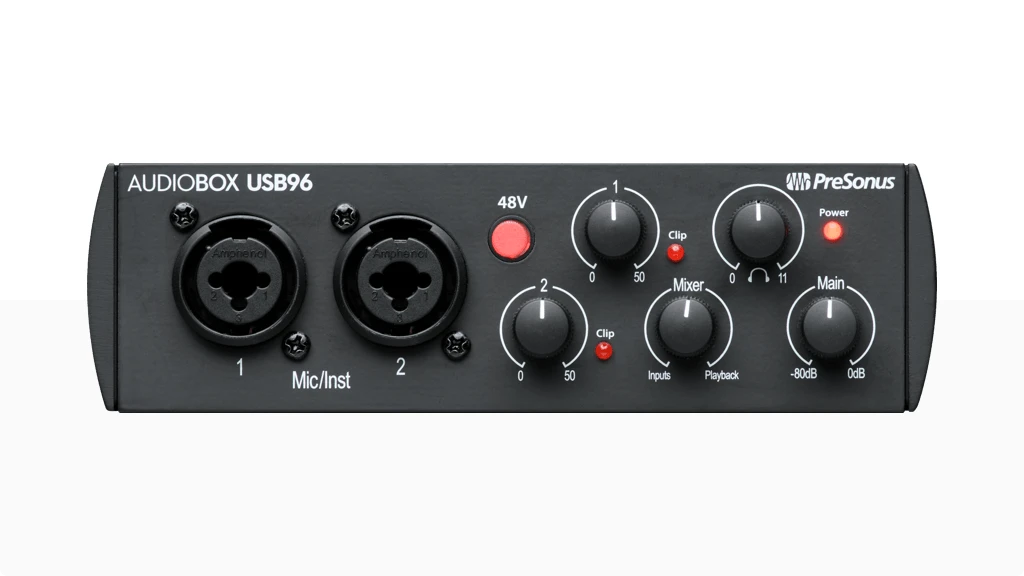
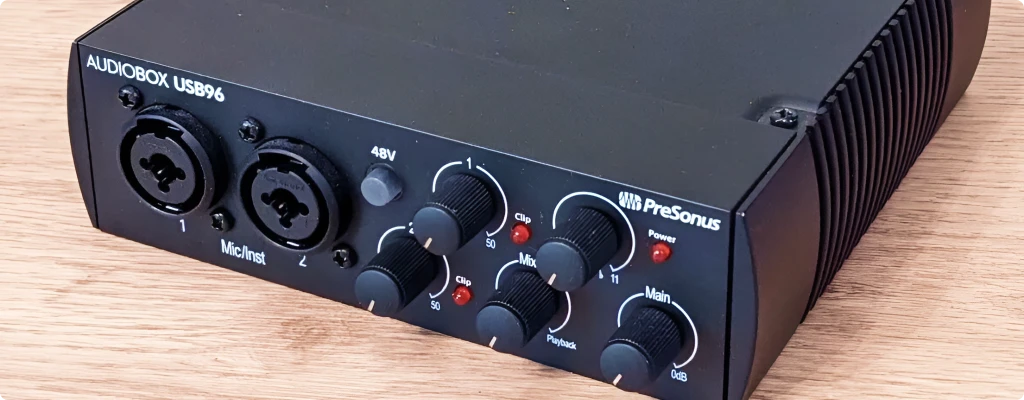
The front panel hosts both combo inputs with their individual gain knobs, phantom power switch, LED clip indicators for each channel, the Mixer blend knob, and the main volume control. Everything you need during recording sits within easy reach.

The clip indicators glow red when your input signal approaches distortion. These visual cues help you set appropriate gain levels quickly. The single LED per channel is simpler than metering found on more expensive interfaces, but it communicates the essential information effectively.

Back Panel Connections

The rear panel contains the balanced main outputs, headphone jack with volume control, USB-B port, and MIDI input/output connections. Placing the headphone output on the back rather than the front panel is the most common criticism of this design. It works fine once your headphones are plugged in, but adjusting the cable or swapping headphones during a session requires reaching behind the unit.

The MIDI connections on the back make sense for permanent studio setups where cables stay connected. If you frequently connect and disconnect MIDI devices, the rear placement adds minor inconvenience.

Presonus Audiobox USB 96 Audio Interface

Best Deals

Presonus Audiobox USB 96

Setup Experience

Getting the Audiobox USB 96 running takes minimal effort. On Mac, you simply connect the USB cable and the system recognizes the interface immediately. No drivers required for basic operation, though installing the Universal Control software gives you access to additional features and the software bundle.

On Windows, installing the ASIO drivers first provides the best experience. The PreSonus website hosts current drivers, and installation follows standard procedures. Some users have reported occasional driver conflicts with Windows 10 updates, though these issues typically resolve with driver reinstalls or troubleshooting USB power settings.

Registration through your my.presonus.com account unlocks the software bundle. The process involves creating an account, entering your hardware serial number, and downloading the included applications. Plan for 30 to 60 minutes to download and install everything, depending on your internet speed.

6. Getting the Best Guitar Tone from Your Audiobox USB 96

Many people buying the Audiobox USB 96 want to record guitar direct, using amp simulations instead of microphones on physical amplifiers. This workflow has become increasingly popular for home studios where volume is a concern, and the Audiobox handles it well with some understanding of the signal chain.

Understanding Instrument Input Impedance: The instrument inputs on the Audiobox USB 96 present a 500 kilohm impedance, which is appropriate for passive guitar and bass pickups. This impedance preserves the high-frequency detail and dynamic response of your instrument without loading down the pickups. If your guitar sounds dull or lifeless through other interfaces, inadequate input impedance might be the culprit.

Active pickups and buffered pedals already output a low-impedance signal, so they work equally well. The point is that the Audiobox does not impose unwanted tonal changes on your instrument signal before it reaches your amp simulation.

Setting Up for Amp Simulation: To get good results recording guitar direct, start with a clean, undistorted signal from the interface. Turn off the Mixer knob’s input blend or set it toward playback, because you want to hear the processed sound from your amp plugin rather than the dry signal. Then adjust your gain so peaks stay well below clipping.

The included Studio One Artist DAW comes with Ampire, a capable amp simulation plugin. Ampire offers several amp models ranging from clean to high-gain, along with cabinet impulse responses and effects. For many users, this covers everything needed without purchasing additional plugins.

Third-party amp simulations like Neural DSP, Positive Grid, and Line 6 all work through the Audiobox as well. The interface simply provides a clean path for your instrument signal. Quality differences in your tone will come from the plugin software, not the interface itself.

Reducing Latency for Comfortable Playing: Playing guitar through amp simulations requires low latency to feel responsive. Audible delay between picking a note and hearing the result throws off your timing and feel. The Audiobox handles this well at low buffer settings.

Set your DAW buffer to 128 samples or lower for tracking. On most modern computers, this results in round-trip latency under 10 milliseconds, which feels immediate to most players. If you experience audio dropouts at low buffer settings, your computer may need optimization for audio work.

Another approach uses the direct monitoring feature. Run your dry signal through the Mixer knob at low volume while monitoring the amp simulation at higher volume. This gives you immediate response from the dry signal while still hearing the processed tone. Some players find this hybrid monitoring approach more comfortable than pure software monitoring.

Recording Practices for Better Results: When tracking guitar, record the dry DI signal even if you are monitoring through an amp simulation. Studio One makes this easy through its input routing options. Recording dry means you can change your amp tone, tweak settings, or switch plugins entirely during mixing without re-recording.

The Audiobox captures enough detail that your dry tracks remain usable through any processing. This flexibility is valuable when you are learning what tones work for different musical contexts. You might discover during mixing that the heavy distortion you tracked works better as a cleaner tone, and having the dry recording lets you make that change.

7. Final Verdict: Who Should Buy the Presonus Audiobox USB 96

After spending considerable time with the Audiobox USB 96, my conclusion is straightforward: this interface does its job reliably without demanding much attention. It captures clean recordings, integrates with any major DAW, survives being thrown in bags, and comes with software that genuinely adds value.

The ideal buyer is someone starting their recording journey or someone who needs a simple, portable solution alongside a more elaborate studio setup. Singer-songwriters get exactly what they need: two inputs for voice and instrument, direct monitoring for comfortable tracking, and MIDI for connecting keyboards. Podcasters get the same benefits with room for a co-host or guest. Guitarists get a clean DI path and Ampire for amp simulation out of the box.

The included software bundle deserves emphasis because it changes the value equation significantly. Studio One Artist is a complete DAW with unlimited tracks, professional editing tools, and a workflow that many users prefer over higher-priced alternatives. The Studio Magic plugins add instruments and effects worth exploring. When you factor in what you would spend buying similar software separately, the hardware itself becomes almost a bonus.

The limitations are real but predictable for this price range. Two inputs means you cannot record a drum kit or a full band simultaneously. The USB-B connection feels outdated when USB-C is becoming standard. The rear headphone jack is inconvenient for some setups. Sample rates cap at 96kHz, which limits specialized applications.

Compared to the Focusrite Scarlett 2i2, the Audiobox trades the Air Mode feature for MIDI connectivity and a more robust chassis. Both deliver similar audio quality. Your choice depends on whether you value MIDI I/O or Focusrite’s signature preamp character more.

For musicians, podcasters, and content creators who want to stop researching and start recording, the Presonus Audiobox USB 96 delivers. It gets out of your way and lets you focus on the creative work. And after the countless recordings it has enabled since its introduction, that reliable, no-nonsense approach has proven itself many times over.

Presonus Audiobox USB 96 Audio Interface

Best Deals

Presonus Audiobox USB 96

8. FAQ

Can I use the Audiobox USB 96 with my iPhone or iPad?

Yes, the Audiobox USB 96 works with iOS and iPadOS devices, but you need the right adapter. For iPhones and iPads with Lightning ports, use the Apple Lightning to USB 3 Camera Adapter with a powered USB hub or the adapter connected to a power source. The interface draws too much power for most iOS devices to supply directly. For iPads with USB-C ports, you can use Apple’s USB-C to USB adapter, though PreSonus recommends using a powered connection for reliable operation. Once connected, the interface works class-compliant without installing any apps or drivers. Recording apps like GarageBand, Cubasis, and n-Track recognize the Audiobox automatically. If you plan to record in remote locations, pairing the interface with a mobile battery pack rated at 2600mAh or higher provides portable power without needing wall outlets.

No, the Audiobox USB 96 does not include a built-in loopback feature. Loopback allows you to route your computer audio back through the interface, which streamers use to mix microphone input with system sounds, music, or game audio into a single output for platforms like Twitch or OBS. If you need loopback functionality, you have two options. First, you can use free software like VoiceMeeter (Windows) or Loopback by Rogue Amoeba (Mac) to create a virtual audio routing setup that achieves the same result. Second, if hardware loopback matters for your workflow, consider interfaces designed for streaming, such as the PreSonus Revelator io24 or the Zoom AMS-24, which include dedicated loopback switches. For basic video conferencing on Zoom, Google Meet, or Microsoft Teams, the Audiobox USB 96 works without loopback since these applications handle audio routing internally.

The blue and black versions of the Audiobox USB 96 are functionally identical. PreSonus released the 25th Anniversary Edition in 2020 with a matte black finish to celebrate the company’s milestone, but the internal hardware, preamps, converters, and specifications remain the same as the original blue model. The only visible difference beyond color is a minor change to the front panel labeling around the gain knobs. The original blue version had separate numerical scales for mic and instrument inputs, while the Anniversary Edition uses a single unified scale from 0 to 50. Both versions ship with the same software bundle, though the specific version of Studio One included depends on when you purchase, as PreSonus updates the bundled software over time. If you already own the blue version, there is no sonic or functional reason to upgrade. Choose whichever color matches your studio aesthetic.

| Why Can You Trust Us

Bruno Bontempo playing a Ibanez BTB605 cerulean blue at Laurus Nobilis Metal festival in Portugal 2025.
Bruno Bontempo
I've been recording, producing, and playing bass for over 20 years—from touring with my first band at 15 to playing progressive metal across Europe today. Through multiple albums, projects (Madness of Light, Rising Course, Roots of Ascendant, Human|Archive), and production work, I've tested audio interfaces in every scenario imaginable. At Best Audio Hub, I combine my historian background with years of hands-on music and audio experience. No marketing fluff—just honest insights from someone who's been in the trenches.

| ALSO REVIEWED

Presonus Audiobox USB 96 Review: Still worth it in 2026?

The definitive Presonus AudioBox USB 96 Review covers preamps, latency, and build quality. Perfect for new podcasters and singer-songwriters? Find out.
Presonus Audiobox USB 96- Powerful, Affordable & Reliable

Our articles may include affiliate links and we may earn a commission. Here how it works.

Table of Contents

OUR VERDICT

4.4

The Presonus Audiobox USB 96 strikes a perfect balance between affordability and functionality, making it an ideal choice for musicians, streamers, and podcasters seeking to enhance their audio quality.

With its simple setup and durable build, it caters to both beginners and seasoned creators looking for a compact solution. The 48V phantom power supports professional-grade condenser microphones, while its MIDI I/O expands creative possibilities for those integrating digital instruments or controllers. 

Whether you’re recording a podcast, live streaming, or tracking instruments, this interface delivers reliable performance and versatility in a budget-friendly package.
Presonus Audiobox USB 96 Audio Interface

Best Deal

Presonus Audiobox USB 96

| Key Features
| Pros
| Cons
| Best Deals

1. Overview: Presonus Audiobox USB 96

The Presonus Audiobox USB 96 is a compact, affordable audio interface designed to bring pro-grade sound to musicians, podcasters, and streamers without straining their budget.


Its straightforward design and robust features make it an excellent choice for home studios, live streaming, and podcast recording.


Built with simplicity and versatility at its core, the Audiobox USB 96 is perfect for beginners who need an easy-to-use interface and for experienced creators seeking a reliable tool to enhance their workflow.


Despite its entry-level price, this interface does not compromise on performance. It offers 24-bit/96 kHz resolution, ensuring clear and detailed audio capture that rivals higher-priced models.


The inclusion of MIDI I/O extends its capabilities, allowing integration with instruments and controllers for more creative options. Whether you’re recording vocals, instruments, or live podcasts, the Audiobox USB 96 proves to be a trustworthy companion for a wide range of audio projects.


Let’s dive into the features and performance of this reliable device.

2. Features Explained

The Presonus Audiobox USB 96 is packed with features that make it an excellent choice for a variety of users, especially those who need an easy-to-use interface for home recording, live streaming, or podcasting.

2 XLR/TRS/Hi-Z Input

  • What It Means for You: You can connect microphone,  guitar or keyboard guitar directly into the interface. The Hi-Z option ensures your electric guitar or bass retains its full tone and richness without distortion.

2 balanced 1/4" + 1 headphone output

  • What It Means for You: The headphone output means you can listen your sound in real-time with independent volume control. Balanced outputs minimize hum and noise, ensuring a clean signal to your studio monitors.

Professional-quality mic preamps

  • What It Means for You: The built-in preamp delivers detailed and natural sound. It includes phantom power for condenser microphones.
Presonus Audiobox USB 96 Audio Interface

Best Deals

Presonus Audiobox USB 96

Direct Monitoring

  • What It Means for You: Allows you to hear your input in real-time without any delay.

MIDI I/O

  • What It Means for You: It is like a digital translator that lets keyboards, drum machines, and other MIDI devices communicate with your recording software.

24-bit/96 kHz Resolution

  • What It Means for You: The higher bit depth (24-bit) and sample rate (96 kHz) ensure every detail of your sound is captured. CDs are recorded at 44 kHz.

Software Bundle

  • What It Means for You: 6-months of Studio One Pro+ and the Studio Magic Suite software bundle.

3. Specs Table

Feature Specification Practical Benefit
Simultaneous I/O
2 in/2 out
For recording and monitoring

XLR Mic Input

2 combo input
For mic or instrument like keyboards, synthesizers
<Hi-Z Inputs
2 combo input
For guitars and basses
Line/Monitor Outputs
2 balanced outputs
Connection to studio monitors.
Headphone Output
1/4″ Jack
Independent volume control for monitoring.
Compatibility
macOS, Windows, iOS and iPadOS
Connect anywhere
Preamps
Professional High-Resolution
Pro-grade quality

Resolution

24-bit/96kHz
Studio quality sound.
Phantom Power
Yes (48V)
Supports condenser microphones
Direct Monitor
Yes
Hear yourself with no delay

Connectivity

USB 2.0
Basic connectivity
Bundle Software
6-months of Studio One Pro+ and the Studio Magic Suite software bundle
Basic tools for music and podcast production.

4. Audiobox Performance

The Audiobox USB 96 provides excellent sound quality for its price range. The preamps are clear and provide a solid dynamic range, which is essential for capturing the nuances of vocals and instruments.

In addition, the 24-bit/96 kHz resolution is perfect for capturing high-fidelity sound for music production or podcasts. The direct monitoring ensures you hear your recordings in real-time, which is crucial for streamers who rely on accurate feedback during their broadcasts.

Its compact design makes it portable, and since it is USB bus-powered, it’s perfect for musicians who are on the go and need an interface that won’t weigh them down. However, it’s important to note that with only two inputs, it might not be the best choice for more complex setups.

| Pros

| Cons

5. Design and Usability

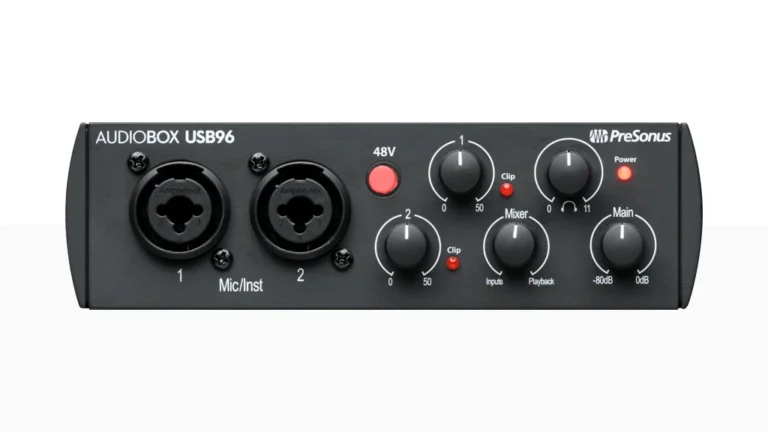
The Presonus Audiobox USB 96 is compact and lightweight, making it easy to carry around and set up in various locations. The build quality is solid but it could look better. The inputs and outputs are clearly marked, and the layout is simple, allowing for a hassle-free setup.

In terms of usability, Audiobox 96 is its simple, but user-friendly, the knobs are labeled and light indicators work as they should.

The included software bundle makes it easy to get started, and the interface works seamlessly with most digital audio workstations (DAWs).

Other audio interfaces may be more user-friendly and even more elegant, like the Universal Audio Volt 2, also the Focusrite Scarlett 2i2 4th Gen and Apollo Solo.

Presonus Audiobox USB 96 Audio Interface

Best Deals

Presonus Audiobox USB 96

6. Presonus Audiobox USB 96 Review

The  is an excellent choice for musicians, streamers, and podcasters who need a reliable, budget-friendly audio interface.


With its high-resolution recording, 48V phantom power, and MIDI I/O, it offers the essential features you need to achieve professional-quality sound at home. While it may not be suitable for larger setups due to its limited input options, it’s a great choice for solo creators who prioritize quality without breaking the bank.


Another great option for entry level and simple setup would be the Behringer U-Phoria UM2.

7. FAQ

Is the Presonus Audiobox USB 96 good for streaming?

Yes, the Presonus Audiobox USB 96 is an excellent choice for streamers. Its low-latency direct monitoring, high-quality preamps, and USB bus-powered design make it ideal for live streaming setups.

We also recommend Focusrite Vocaster One: Best Audio Interface for Podcasters

Can I use the Presonus Audiobox USB 96 for recording vocals?

Absolutely! The Presonus Audiobox USB 96 comes with 48V phantom power, which is perfect for condenser microphones used in vocal recordings. Its clear preamps and high-resolution recording make it a great option for capturing vocals with high fidelity.

Does the Presonus Audiobox USB 96 work with Mac?

Yes, the Presonus Audiobox USB 96 is compatible with macOS 10.8 or later, and it works seamlessly with most major DAWs, including Studio One, Cubase, Ableton and others.
Best Audio Hub 20 years of experience badge
I've been recording, producing, and playing bass for over 20 years—from touring with my first band at 15 to playing progressive metal across Europe today. Through multiple albums, projects (Madness of Light, Rising Course, Roots of Ascendant, Human|Archive), and production work, I've tested audio interfaces in every scenario imaginable. At Best Audio Hub, I combine my historian background with years of hands-on music and audio experience. No marketing fluff—just honest insights from someone who's been in the trenches.
Scroll to Top