M-Audio AIR 192|6 Review (2026): Is It Worth Your Money?
- Audio Interface, Reviews
- by Bruno Bontempo

Our articles may include affiliate links and we may earn a commission. Here how it works.
OUR VERDICT
The M-Audio AIR 192|6 delivers solid value for home studio creators who need versatile connectivity without overspending. Its Crystal preamps capture clean audio, and the dedicated Hi-Z instrument inputs handle guitar and bass signals with accuracy. The 5-pin MIDI I/O adds flexibility for synth users. However, this interface has limited preamp gain for low-output dynamic mics like the SM7B. If you need a reliable 2-channel interface with MIDI connectivity and a generous software bundle, the AIR 192|6 is a smart choice for your home setup.
Release Date
Oct 2019
20.5x15x7 cm
8.0x6.0x2.76 in
950 g
2.1 lb
| Pros
- Dedicated Hi-Z inputs optimized for guitar and bass recording
- Full 5-pin MIDI I/O for synths and external gear
- Class-leading 2.59ms round-trip latency
- Solid metal chassis with desktop-friendly angled design
- Generous software bundle includes two DAWs and 40+ plugins
| Cons
- Limited preamp gain struggles with low-output dynamic mics
- Volume knob has abrupt jumps near maximum settings
- Windows drivers may require troubleshooting on newer systems
| Key Features
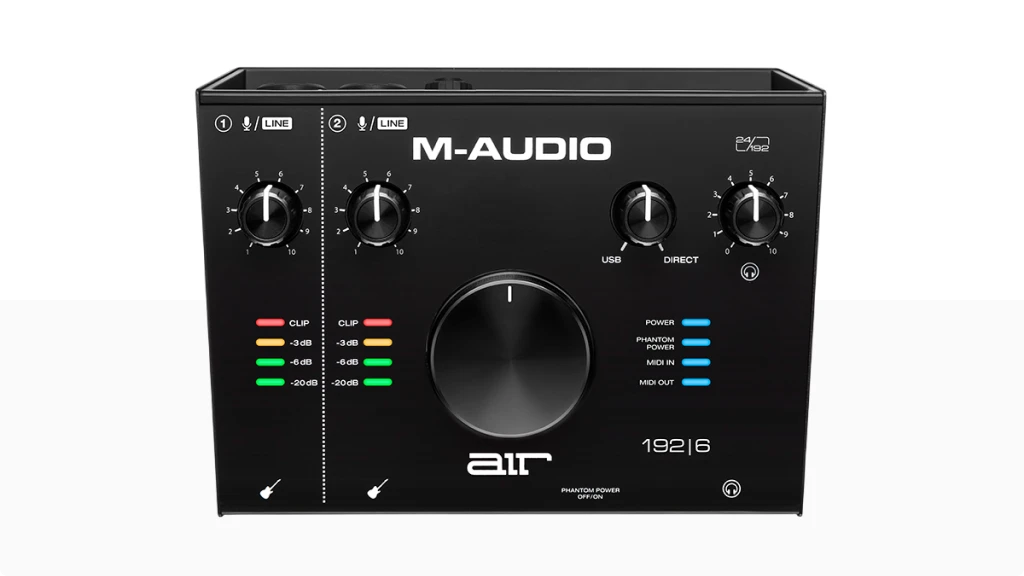
- Inputs: 2x XLR+1/4" TRS combo, 2x 1/4" Hi-Z instrument + 5-pin MIDI In
- Outputs: 2x 1/4" TRS balanced monitor, 1x 1/4" headphone output with independent level control + 5-pin MIDI Out
- Compatibility: macOS (class-compliant), Windows (requires driver download), iOS compatible
- Connectivity: USB-C (USB-C to USB-A cable included, bus-powered)
- Resolution: 24-bit/192kHz
- Plus: Crystal Preamps with +48V phantom power, Direct monitoring with USB/Direct blend knob, LED VU meters for both channels. Software bundle: Ableton Live Lite, MPC Beats, Pro Tools | First M-Audio Edition, Eleven Lite (amp sim), AIR Creative FX Collection (20 plugins), Xpand!2, Mini Grand, DB-33, Touch Loops (2GB), Revalver
| Best for...
- Solo musicians recording guitar, bass, and vocals at home
- Podcasters who need two microphone inputs for interviews
- Bedroom producers working with MIDI keyboards and synths
- Streamers seeking clean audio with direct monitoring
- Beginners who want a complete recording package with bundled software
| Not ideal for...
- Users with low-output dynamic mics (SM7B, RE20) who lack an inline preamp
- Multi-track recording sessions requiring more than 2 simultaneous inputs
- Professional studios needing advanced routing and DSP processing
1. M-Audio AIR 192|6 Overview: A Versatile Budget Interface
M-Audio has been building audio gear since 1988. The company started making MIDI interfaces and eventually became a go-to brand for home studio equipment. Their AIR 192 series represents their current lineup of affordable USB interfaces, and the AIR 192|6 sits in the middle of that range.
So what makes this M-Audio AIR 192|6 review worth your attention? This interface targets a specific user: the home creator who needs more than basic connectivity but doesn’t require a full rack of inputs. In other words, it’s built for musicians, podcasters, and producers working in small spaces with focused needs.
The AIR 192|6 offers two combo XLR/TRS inputs on the back, two dedicated instrument inputs on the front, and something many budget interfaces skip: full 5-pin MIDI I/O. This combination makes it particularly attractive if you’re working with synthesizers, drum machines, or other MIDI hardware alongside your recordings.
I’ve used this interface for recording guitar, bass, and vocals in my home setup. The Crystal preamps deliver clean, transparent audio that doesn’t color your source. However, the preamps have a notable limitation: they struggle with low-output dynamic microphones. If you’re planning to use an SM7B or similar mic, you’ll likely need an inline preamp like a Cloudlifter or FetHead.
The included software bundle is substantial. You get Ableton Live Lite, MPC Beats, and Pro Tools | First M-Audio Edition. Additionally, there’s Eleven Lite for guitar amp simulation, the AIR Creative FX Collection with 20 effects, and several virtual instruments. For someone just starting out, this package eliminates the need to buy a DAW right away.
At its current price point (typically under $200), the M-Audio AIR 192|6 competes directly with the Focusrite Scarlett 2i2 and the PreSonus AudioBox USB 96. Each has trade-offs, but the AIR 192|6 wins on MIDI connectivity and instrument input flexibility.
In the following sections, I’ll break down the features, performance, and design details that matter for your purchasing decision.
2. M-Audio AIR 192|6 Features: What Every Spec Actually Means
Understanding audio interface specifications can feel overwhelming. Therefore, I’ll explain each feature in plain language and tell you exactly how it affects your recording experience.
Crystal Preamps with +48V Phantom Power
M-Audio’s Crystal Preamps are the amplification circuits that boost your microphone signal. They’re designed to be transparent, meaning they don’t add noticeable coloration to your audio. The +48V phantom power switch enables condenser microphones that require external power to operate.
- What It Means for You: Your microphone’s natural sound goes into your computer without unwanted tonal changes. Think of preamps like a magnifying glass—good ones enlarge without distortion. The phantom power means you can use studio condensers, not just dynamic mics.
24-bit/192kHz Resolution
This specification describes the quality ceiling of your recordings. The 24-bit depth captures a wider dynamic range (the difference between the quietest and loudest sounds), while 192kHz refers to the sample rate—how many audio snapshots are taken per second.
- What It Means for You: You get professional-grade recording quality. In practice, most people work at 44.1kHz or 48kHz, but having 192kHz headroom means your interface won’t be the bottleneck if you pursue higher-fidelity projects later.
Hi-Z Instrument Inputs
The two front-panel 1/4″ inputs are high-impedance (Hi-Z) connections specifically designed for guitars, basses, and other instruments with passive pickups. These inputs have optimized gain staging and impedance matching for direct instrument signals.
- What It Means for You: Plug your guitar or bass directly in and get an accurate representation of your instrument’s tone. No DI box required. The dedicated gain and impedance stage preserves your pickup’s character, so your Stratocaster sounds like a Stratocaster.
5-Pin MIDI I/O
Unlike many budget interfaces that omit MIDI entirely, the AIR 192|6 includes standard 5-pin DIN MIDI input and output connections. These allow two-way communication with synthesizers, drum machines, controllers, and other MIDI hardware.
- What It Means for You: Connect your hardware synth or drum machine directly without buying a separate USB-MIDI interface. Record MIDI data into your DAW while simultaneously playing back sequences to external gear. This is a significant advantage if you work with hardware instruments.
USB-C Connectivity with 2.59ms Latency
The interface connects via USB-C (with a USB-A adapter included) and achieves a round-trip latency of 2.59ms under optimal conditions. Round-trip latency is the time between playing a note and hearing it back through your monitors.
- What It Means for You: Near-instantaneous response when recording. At 2.59ms, the delay is imperceptible to most people. This matters when tracking vocals or instruments while listening to playback—you won’t feel “out of sync” with your performance.
Direct Monitoring with USB/Direct Blend
The USB/Direct knob lets you mix your live input signal with the audio coming back from your computer. At the “Direct” position, you hear only your input with zero latency. At the “USB” position, you hear only your DAW’s output.
- What It Means for You: Monitor yourself in real-time without any delay, regardless of your computer’s buffer settings. This is crucial for vocalists and instrumentalists who need to hear themselves naturally while recording. Find a comfortable blend between your live signal and your backing tracks.
LED VU Meters
Each input channel has visible LED meters on the top panel. These show your input signal level in real-time, helping you set appropriate gain levels before recording.
- What It Means for You: Visual feedback prevents clipping (distorted audio from levels that are too high). Watch the meters while adjusting gain—aim for levels that peak in the yellow range without hitting red. This simple feature saves recordings from being ruined by distortion.
Headphone Output with Independent Level Control
A dedicated 1/4″ headphone jack on the front panel has its own volume knob, separate from the main monitor output. The headphone amp receives the same USB/Direct mix as your main outputs.
- What It Means for You: Record in the same room as your monitors without feedback issues. Adjust headphone volume without affecting what comes out of your speakers. Additionally, this lets you set comfortable monitoring levels for late-night sessions when you can’t use monitors.
3. M-Audio AIR 192|6 Specifications: Complete Technical Breakdown
Before you commit to any audio interface, you need to know exactly what you’re getting. The table below breaks down every specification of the M-Audio AIR 192|6 and explains how each feature benefits your recording workflow. Use this as your quick reference when comparing options.
| Feature | Specification | Practical Benefit |
|---|---|---|
| Simultaneous I/O | 2-in / 2-out | Record two sources at once (e.g., vocal + guitar) while monitoring in stereo |
| Inputs | 2x XLR/TRS combo (rear), 2x 1/4" Hi-Z (front), 5-pin MIDI In | Connect mics, line sources, guitars, bass, and MIDI gear without adapters |
| Outputs | 2x 1/4" TRS balanced, 1x 1/4" headphone, 5-pin MIDI Out | Drive studio monitors and headphones independently with MIDI sync to external gear |
| Compatibility | macOS (class-compliant), Windows (driver required), iOS (via CCK) | Works on Mac without drivers; Windows needs installation; iPad compatible with adapter |
| Connectivity | USB-C (USB 2.0 Hi-Speed), bus-powered | Single cable for power and data; no external power supply needed |
| Resolution | 24-bit / 192kHz | Professional-grade audio quality with wide dynamic range for detailed recordings |
| Phantom Power | +48V switchable | Powers condenser microphones that require external voltage to operate |
| Direct Monitoring | USB/Direct blend knob | Monitor your input with zero latency while blending DAW playback |
| Bus Powered | Yes (USB) | No wall adapter required; plug in and start recording anywhere |
| Round-Trip Latency | 2.59ms (optimal settings) | Near-instantaneous response; delay is imperceptible during tracking |
| Preamp Gain | +55dB (approx.) | Adequate for condensers and high-output dynamics; may need boost for SM7B-type mics |
| Dynamic Range | 104dB (A-weighted) | Captures quiet details without noise floor issues in typical home environments |
| MIDI I/O | 5-pin DIN In and Out | Connect hardware synths, drum machines, and controllers without extra interfaces |
| Metering | LED VU meters (2 channels) | Visual feedback prevents clipping; dial in proper gain levels before recording |
| Software Bundle | Ableton Live Lite, MPC Beats, Pro Tools First, Eleven Lite, AIR Creative FX (20 plugins), Xpand!2, Mini Grand, DB-33, Touch Loops (2GB), Revalver | Complete production toolkit included; no immediate need to buy additional software |
| Dimensions | 204mm x 152mm x 70mm (8" x 6" x 2.75") | Compact desktop footprint fits small workspaces |
| Weight | 950g (2.1 lbs) | Solid enough to stay put; light enough for mobile recording |
| Build | Metal chassis with angled desktop design | Durable construction; tilted panel improves visibility and access to controls |
4. M-Audio AIR 192|6 Performance: Real-World Test Results
Performance is where specifications meet reality. Here’s how the AIR 192|6 handled various recording scenarios in my studio.
Preamp Performance and Gain Structure: The Crystal preamps delivered clean recordings with vocals and instruments. Using an Audio-Technica AT2020 condenser, I captured detailed vocal takes with no perceptible noise floor issues. The sound was neutral and uncolored, which is exactly what you want from a budget interface.
However, the preamps showed their limitation with my Shure SM58. I had to push the gain knob past the 3 o’clock position to get adequate levels. With lower-output dynamic mics like the SM7B, this becomes problematic. Several users report needing inline preamps like the Triton FetHead to achieve usable levels with gain-hungry microphones.
The gain knobs also exhibit some abrupt volume jumps near their maximum settings. Consequently, fine-tuning levels in that range requires patience. This isn’t ideal, but it’s manageable once you’re aware of it.
Instrument Input Quality: The Hi-Z inputs performed well with both my Fender Stratocaster and Precision Bass. The interface captured the natural character of each instrument without thinning out the low end or adding harshness to the highs. Recording through the included Eleven Lite amp simulator, I achieved usable guitar tones for demo work.
One note for acoustic players: piezo pickups from acoustic guitars may need an external preamp for optimal results. The interface handles magnetic pickups better than piezo transducers.
Latency and Direct Monitoring: The advertised 2.59ms round-trip latency held up in practice. At a 64-sample buffer setting, I experienced no perceptible delay while tracking. The direct monitoring feature worked flawlessly, providing zero-latency input monitoring when needed.
For context, most people can’t perceive delays under 10ms. At 2.59ms, the AIR 192|6 performs better than many interfaces in its price range. This makes it suitable for real-time monitoring during tracking sessions.
MIDI Functionality: The 5-pin MIDI connections worked without issues. I tested with a Korg Minilogue and successfully recorded MIDI sequences while sending clock data back to the synth. There’s no noticeable MIDI latency or timing drift during extended sessions.
Driver Stability: On macOS, the interface is class-compliant and requires no driver installation. It worked immediately upon connection. Windows users need to download drivers from M-Audio’s website. Several users report occasional driver issues with Windows 10 and 11, including sample rate mismatches that cause audio dropouts. These issues are typically resolved by ensuring the Windows Sound settings match the M-Audio Control Panel settings.
Overall Sonic Character: The AIR 192|6 sounds clean and transparent. It doesn’t add warmth or character—it simply captures what you put into it. For home recording, this is advantageous because it gives you flexibility during mixing. You can add color with plugins rather than being stuck with whatever the preamps impart.
Compared to the MOTU M2, the AIR 192|6 offers slightly less headroom and about 5dB less gain. The MOTU also has superior latency performance on Windows. However, the AIR 192|6 includes MIDI I/O and costs less, so the trade-off may be worthwhile depending on your priorities.
5. M-Audio AIR 192|6 Design: Build Quality and User Experience
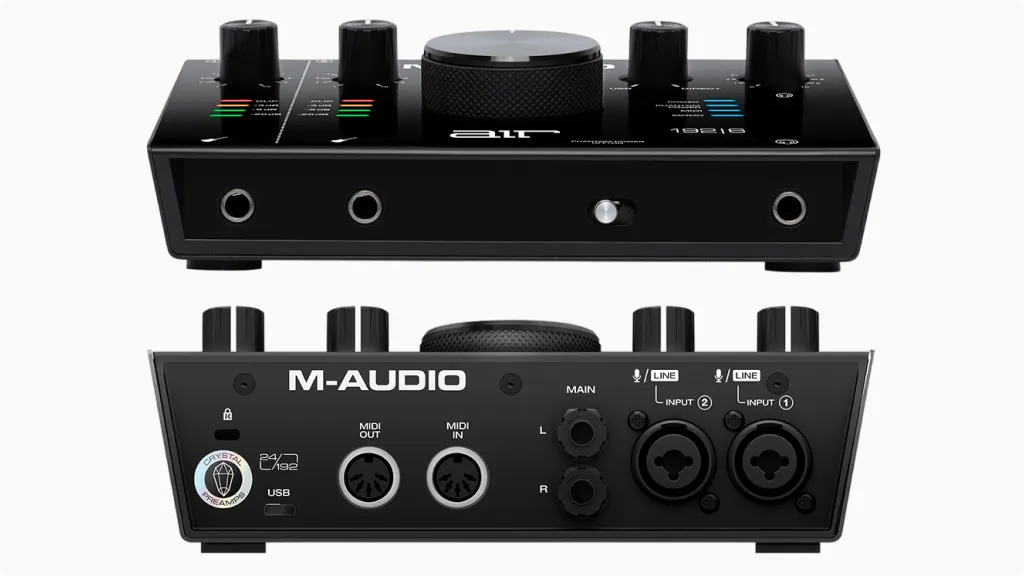
The physical design of an audio interface affects your daily workflow. Here’s my assessment of the AIR 192|6’s build quality and usability.
Build Quality and Materials: The AIR 192|6 features a metal chassis that feels solid and professional. At 950 grams (about 2.1 lbs), it has enough weight to stay put on your desk without sliding around. The enclosure inspires confidence—it doesn’t feel like it would break if knocked off a table.
The angled desktop design tilts the control surface toward you, improving visibility and access to knobs. This thoughtful touch makes a real difference during sessions when you’re adjusting levels frequently.
Top/Front Panel
The top panel houses all primary controls and visual feedback. Two gain knobs sit at the left, each with corresponding LED VU meters. The large central knob controls main output volume—it’s the most prominent feature and easy to grab quickly.
To the right, you’ll find the USB/Direct blend knob and headphone volume control. A +48V phantom power button, power LED, and MIDI activity indicators complete the layout.
The gain knobs have adequate resistance but lack detents or markings for recall. Additionally, the monitor knob is smooth and responsive, though some users report volume jumps at higher settings.
Front Panel: The front panel keeps things simple: two 1/4″ Hi-Z instrument inputs and one 1/4″ headphone jack. This placement makes sense—you’ll plug and unplug guitars and headphones regularly, so having them accessible matters.
The instrument inputs automatically override the corresponding rear combo inputs when plugged in. This is worth knowing if you’re troubleshooting why your microphone suddenly went silent.
Back Panel
The rear panel contains connections you typically set up once: two XLR/TRS combo inputs, two 1/4″ TRS monitor outputs, MIDI In and Out (5-pin DIN), and the USB-C port.
Having the mic inputs on the back is a design choice that works well for desktop setups. Cables route neatly behind the interface rather than cluttering your workspace. However, if you frequently swap microphones, reaching around back becomes tedious.
Setup Experience
Initial setup is straightforward. Mac users can connect the interface and start working immediately—no driver required. Windows users should install the driver before connecting the hardware to avoid potential issues.
The software registration process requires creating an M-Audio account. After registering your interface, you receive download links for the bundled software. This process works but involves multiple downloads and authorizations. Set aside 30-45 minutes to get everything installed.
One common setup issue: Windows users must match the sample rate in Windows Sound settings with the M-Audio Control Panel. Mismatches cause audio dropouts and playback issues. If you’re experiencing problems, check this setting first.
6. Getting the Most from Low-Gain Preamps: Practical Solutions
The M-Audio AIR 192|6’s preamps work well with most microphones, but they can struggle with gain-hungry dynamic mics. This section addresses that limitation with practical solutions.
Understanding the Gain Problem: Dynamic microphones with low output levels (like the Shure SM7B, Electro-Voice RE20, or even the SM58 in some applications) require significant preamp gain. The AIR 192|6’s Crystal preamps provide adequate gain for condenser mics and high-output dynamics, but they run out of headroom with quiet sources.
When you push the gain knob toward maximum, two problems emerge. First, you may still not have enough level for proper recording. Second, the noise floor becomes more noticeable as you crank the gain higher.
Solution 1: Inline Mic Preamps (Cloudlifter, FetHead)
The most common solution is an inline preamp or “mic activator.” These devices sit between your microphone and the interface’s XLR input, providing 20-25dB of clean gain. Popular options include:
- Cloudlifter CL-1: Provides +25dB of clean gain
- Triton FetHead: Offers +27dB and lower self-noise
- sE Electronics DM1: Budget-friendly at around $99
These devices use phantom power from your interface to operate, so no additional power supply is needed. After installing one, you’ll use significantly less preamp gain, resulting in cleaner recordings.
Solution 2: Choose the Right Microphone: If you haven’t purchased a microphone yet, consider your interface’s gain structure when deciding. Condenser microphones typically have higher output and work well with the AIR 192|6. The Audio-Technica AT2020, Rode NT1, and AKG P220 all pair nicely without gain issues.
Some dynamic microphones also have higher output levels. The Shure SM58 and Sennheiser e835 require less gain than broadcast-style dynamics and generally perform well with budget interfaces.
Solution 3: Recording Technique Adjustments: When possible, get closer to your microphone. Reducing the distance between your source and the mic capsule increases signal level, requiring less preamp gain. For vocals, working 4-6 inches from the microphone usually provides adequate signal.
Additionally, proper gain staging throughout your signal chain helps. Record at healthy levels (peaking around -12dB to -6dB in your DAW) rather than trying to maximize the signal at the preamp stage.
When to Consider a Different Interface: If you’re committed to using low-output dynamic microphones and don’t want to buy additional gear, the AIR 192|6 may not be the best choice. The MOTU M2 offers about 5dB more preamp gain, and the Focusrite Scarlett series handles gain-hungry mics reasonably well.
However, if you value the MIDI connectivity and instrument inputs, purchasing an inline preamp alongside the AIR 192|6 is often more cost-effective than choosing a more expensive interface.
7. Final Verdict: Is the M-Audio AIR 192|6 Right for You?
The M-Audio AIR 192|6 occupies a practical middle ground in the budget interface market. It offers features that competitors at the same price point often omit, particularly the 5-pin MIDI I/O and dedicated instrument inputs.
Who Should Buy This Interface: This interface makes the most sense for solo musicians recording guitars, bass, and vocals at home. The Hi-Z inputs handle direct instrument recording effectively, and the included Eleven Lite plugin provides serviceable amp tones for demos and scratch tracks.
Podcasters recording solo or two-person episodes will appreciate the dual XLR inputs and direct monitoring capability. The clean preamps capture spoken word clearly, and the software bundle includes everything needed to edit and produce episodes.
Bedroom producers working with MIDI keyboards, synths, and drum machines gain significant value from the integrated MIDI I/O. No need to buy a separate USB-MIDI interface—the AIR 192|6 handles that connectivity natively.
Streamers seeking improved audio quality will find this interface accessible and effective. The USB-C connection, bus-powered operation, and direct monitoring simplify setup while delivering noticeably better sound than built-in computer audio.
Who Should Look Elsewhere: If you plan to use low-output dynamic microphones without an inline preamp, the limited gain will frustrate you. The MOTU M2 or Focusrite Scarlett 2i2 handle these microphones more gracefully.
Recording projects requiring more than two simultaneous inputs need a larger interface. Consider the M-Audio AIR 192|8 or 192|14, or look at the Focusrite Scarlett 4i4 or MOTU M4.
Professional applications demanding advanced routing, DSP processing, or ultra-low latency on Windows would be better served by interfaces from RME, Universal Audio, or MOTU’s higher-end offerings.
The Bottom Line: The M-Audio AIR 192|6 delivers genuine value for home creators. Its combination of clean preamps, comprehensive connectivity, solid build quality, and extensive software bundle creates a compelling package under $200.
It’s not perfect—the limited preamp gain and occasional Windows driver quirks are real drawbacks. But for the intended user (home musicians, podcasters, and producers with modest input needs), these limitations are either manageable or irrelevant.
If MIDI connectivity matters to you and you’re working with condenser mics or high-output dynamics, the AIR 192|6 earns a strong recommendation. It does its job without fuss and leaves money in your budget for microphones, headphones, or monitors.
8. FAQ
Can I Use the M-Audio AIR 192|6 with an iPad or iPhone?
Yes, the AIR 192|6 works with iOS devices, though M-Audio doesn’t officially advertise this compatibility. You’ll need Apple’s Camera Connection Kit (Lightning to USB or USB-C depending on your device) and potentially a powered USB hub for reliable operation. Users in forums confirm it functions with GarageBand and other iOS DAWs. The interface draws power from the iPad, so a powered hub helps prevent disconnection issues during longer sessions.
Why Is There No Sound Coming from My M-Audio AIR 192|6 on Windows?
This is one of the most common issues users report in forums. The problem usually stems from a sample rate mismatch between Windows Sound settings and the M-Audio Control Panel. To fix it: go to Windows Sound Settings, select the AIR 192|6 as your output device, click “Device properties,” then “Additional device properties,” and under the Advanced tab, set the sample rate to match your M-Audio Control Panel (typically 44.1kHz or 48kHz). Additionally, try different USB ports—some users find that USB 2.0 ports work more reliably than USB 3.0 ports for this interface.
Does the M-Audio AIR 192|6 Have Enough Gain for an SM7B or RE20?
Not without help. The AIR 192|6’s preamps provide approximately 55dB of gain, which falls short for low-output dynamic microphones like the Shure SM7B or Electro-Voice RE20. Users consistently report needing to push the gain knob to maximum, which introduces noise and still may not provide adequate levels. The solution is adding an inline preamp such as the Cloudlifter CL-1 (+25dB), Triton FetHead (+27dB), or sE Electronics DM1 Dynamite. These devices use phantom power from the interface and provide the extra gain needed for quiet dynamic mics. If you already own an SM7B or plan to buy one, factor in an additional $100-150 for a gain booster, or consider an interface with more preamp headroom like the MOTU M2.
| Why Can You Trust Us

| ALSO REVIEWED